

Introduction/ Preface
Real-time streaming in the Spark ecosystem (RTM) is a great leap in Spark structured streaming, as it guarantees an end-to-end processing as low as 5 ms
This directly serves use cases where ultra-low latency is crucial for operations, such as financial transactions and infrastructure monitoring, to name a few, which can directly translate to revenue loss or business image if not addressed in timely manners with Databricks’ RTM streaming
In this blog, we will introduce a simple demo notebook(s) focusing on:
Creating a simulated streaming dataset in a message bus system (Kafka) with control over
Programmatically introducing duplicated records in the upstream
Queue partitions (As it impacts downstream processing/ patallelism)
Rows/Sec for writing into the message bus (Kafka is for demo purposes here but this can be any of the currently supported sources by RTM
Reading real-time messages from the message bus in Spark real-time streaming mode and writing down to Databricks’ Lakebase serverless instance, including:
A simple, direct write (no transformation) using RTM
A simple stateful transformation (deduplication)
Explicit tuning parameters for both scenarios/use cases in order to quickly evaluate your use case for RTM
How to use this blog/code:
Real-time mode sizing framework
You can change the upstream spec or
Downstream specs through the widgets that expose several tuning parameters
Learning the ropes of a full pipeline, using foreach in a real-time streaming fashion to write down to a JDBC sink (Lakebase Postgres in our demo)
Clone the code from the GitHub repo to start your journey!
Compute resources used:
Any supported upstream system by Spark Realtime Mode
In this case, we are using a Kafka topic that we can recreate with n partitions (default 8)
Databricks classic cluster (no autoscaling)
Driver: rd-fleet.xlarge (32 GB memory, 4 cores)
Workers: 8 rd-fleet.xlarge instances
DBR 17.3 LTS+
Lakebase postgres instance with 2CU’s (Capacity Units)
The flow Illustration:
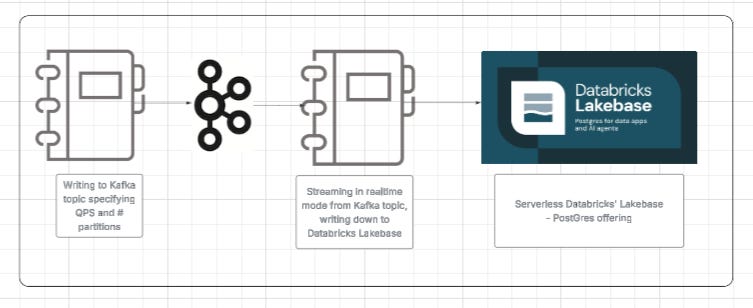
Important parameters:
In this framework, we included different parameters to control
Records generation (Upstream):
Duplication of the same record (including the key) across different timestamps, to simulate a duplication happening upstream
Percentage of duplicate records generated
Partitions to be created (this will control the slots needed downstream when Spark reads from Kafka upstream in real-time fashion)

Records persistence (Downstream):
Dedup flag in order to decide a stateful or stateless transformation
A batching mechanism to increase throughput

Key Code Snippets to use/reuse:
I think the major part that I’d like to expand on is two things, actually:
defining a Python JDBC-backed code to implement a Foreachwriter
The structure of this implementation requires at least open, process, and close implementations. Additionally, I added a buffer implementation that is time or row counts based in order to control the throughput
An implementation skeleton in Python would be as follows (full code available on GitHub)class PgForeachWriter: def open(self, partition_id, epoch_id): try: self.conn = psycopg2.connect(**conn_kwargs) self.conn.autocommit = False self.cursor = self.conn.cursor() # ... # Buffering state (only used in buffered mode) if use_buffered_mode: self.buffer = [] self.last_flush_ts = time.time() return True except Exception as e: # ... return False def _flush_if_needed(self, force=False): ... def process(self, row): ... def close(self, error): ... def make_pg_buffered_writer( jdbc_url, jdbc_user, jdbc_password, jdbc_driver, jdbc_jar_path, table_name, max_batch_size=100, # flush when >= this many rows (0 = simple mode) flush_secs=2.0, # flush if last flush older than this (0 = simple mode) ):After defining the writer class, all you need is to use it in your writeStream with real-time mode, as shown below
jdbc_writer = make_pg_buffered_writer(
    jdbc_url=JDBC_URL,
    jdbc_user=JDBC_USER,
    jdbc_password=JDBC_PASSWORD,
    jdbc_driver=JDBC_DRIVER,
    table_name=TABLE_NAME,
    max_batch_size=max_batch_size_param,
    flush_secs=flush_secs_param
)

query = (
    df_for_write
    .writeStream
    .foreach(jdbc_writer)
    .outputMode("update")
    .queryName("jdbc_sink_writer")
    .trigger(realTime="5 minutes")
    .option("checkpointLocation", checkpoint_path)
    .start()
)
Performance measures:
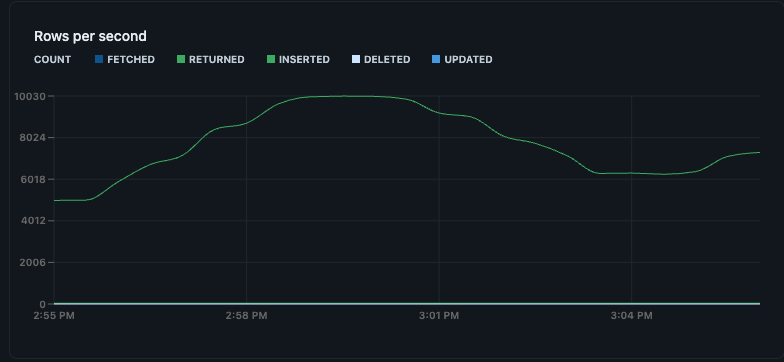
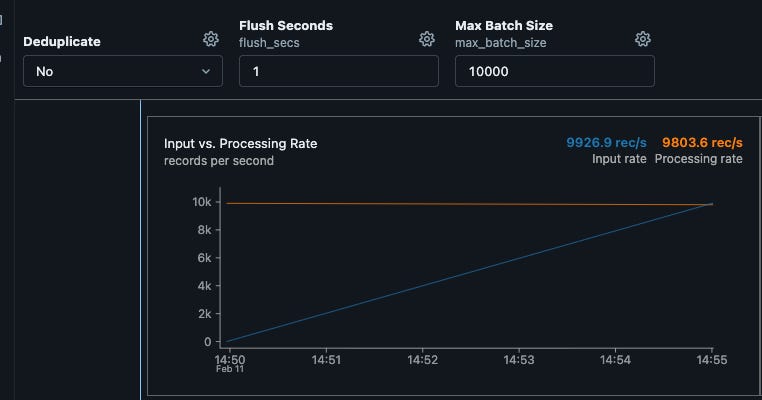
I ran many scenarios in simulation and consistently sustained around 10k writes/sec over several minutes, with minimal to no delays and no backlog, as shown below. This aligns with a production rate of around 10K upstream writes, which are read in real time by Spark's streaming and written to Lakebase. I was also able to achieve a similar throughput for stateful (deduplication) transformation with no drops
Key considerations:
RTM mode will handle any recs/sec rate when sized right
Lakebase will handle writes/sec in the 10’s K range per CU out of the box
That said, there are tuning parameters and things to consider:
To enhance the write throughput, and depending on the use case you can:
Consider Lakebase Autoscaling
Consider batching the writes to downstream (this is generally best practice) to benefit from Postgres batch DML API’s
Batching can be time or number-of-rows-based (example provided in the repo)
To enhance the RTM read in general:
You can tune your windowing range for stateful transformation
Tune the realTime value (default 5 minutes); this parameter is used for checkpoint commit
Increase the number of upstream partitions
The sweet spot:
For the ideal optimum solution:
Consider right-sizing of:
upstream source and its partitions, as it will control parallelism downstream
Spark cluster size makes sure there are enough slots to schedule all stages at once
Downstream sizing (in our case, it is Lakebase) and consider autoscaling, more CU’s = More throughput
Conclusion:
While the purpose of this exercise is to demonstrate a full pipeline using Lakebase PostgreSQL as the downstream, and is not benchmarking specifically
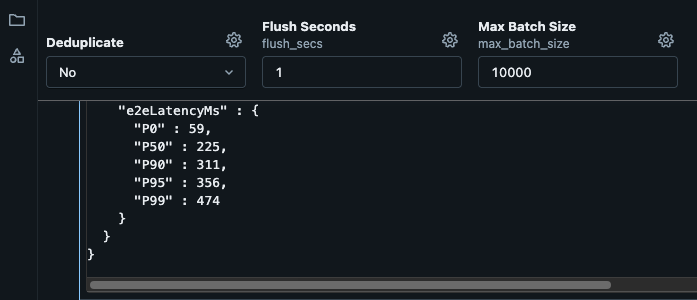
The E2E latency in test is P95 356 MS with a P50 of 225 MS
These figures are out of the box with no tuning of any sorts, it can be improved further.
Also, with 8 Kafka topic partitions and an adequate Databricks cluster configuration, there is ~0 lag in real-time streaming read from Kafka and downstream write to Lakebase
That said, please note that your mileage will vary! In essence, that:
A clear understanding of records production upstream is key
A correct sizing of the Spark cluster and the Downstream OLTP (Lakebase Postgres in our setup) is crucial for throughput
There is a trade-off between write capacity and the downstream cluster capacity units
Time or number of rows is a good tuning parameter in such a case Or
Autoscaling downstream to scale to more throughput requirements should be considered
🙋 Frequently Asked Questions
What is the main goal of this demo?
It demonstrates how to build a low-latency streaming pipeline from Kafka through Spark Real-Time Mode into Lakebase, while exposing the main tuning knobs that affect throughput and lag.
What variables can I change in the simulation?
You can adjust ingest rate, Kafka partition count, duplicate-record percentage, deduplication behavior, and downstream batching settings.
Why does Kafka partition count matter?
Partition count affects how much parallelism Spark can use when reading the stream. Too few partitions can limit throughput even if the cluster has spare capacity.
When should I use buffered writes instead of direct writes?
Buffered writes are usually better when downstream write throughput is the bottleneck. They reduce per-row overhead and improve efficiency for OLTP-style sinks.
Can stateful deduplication still perform well in Real-Time Mode?
Yes — based on our test results, the pipeline achieved similar throughput with deduplication enabled, provided the job was sized appropriately.
What should I tune first in production?
Start with upstream partitions, Spark cluster sizing, downstream write capacity, and batching thresholds. Then refine checkpoint cadence and stateful window settings.


