

The Hidden Storage Problem
A common pattern emerges in Delta Lake deployments: storage costs creep up month after month despite stable data ingestion volumes. Teams investigate and discover that their actual in-use data represents only a fraction of their total storage footprint. In one documented case shared on public forums, a team found their active data was just 18% of total storage—the rest was historical data files that had never been cleaned up.
This isn’t a bug—it’s a consequence of how Delta Lake’s time travel feature works. And it’s why the VACUUM command evolved from a basic cleanup tool into a sophisticated optimization toolkit with three distinct modes, each designed for different scenarios.
Understanding the Root Cause: Why Files Accumulate
Delta Lake’s transaction log is the key to understanding storage bloat. Every write operation—INSERT, UPDATE, DELETE, MERGE—generates new Parquet files and records them in the transaction log. But here’s the critical detail: old files aren’t automatically deleted. They’re marked as “removed” in the log, but they remain on disk.
This design enables Delta Lake’s powerful time travel queries:
SELECT * FROM events VERSION AS OF 100
SELECT * FROM events TIMESTAMP AS OF ‘2024-11-01’
The transaction log itself is self-cleaning—log entries older than 30 days (configurable via delta.logRetentionDuration) are automatically pruned. However, the actual Parquet data files are never automatically deleted. Without intervention, they accumulate indefinitely.
For tables with frequent MERGE or UPDATE operations, this can mean months of historical files building up despite a 7-day retention policy.
VACUUM FULL: The Comprehensive Cleanup
The original VACUUM command, now referred to as VACUUM FULL (though FULL is the default and doesn’t need to be specified), was designed as a thorough cleanup mechanism:
VACUUM events RETAIN 168 HOURSHow VACUUM FULL Works
The operation proceeds in three distinct phases:
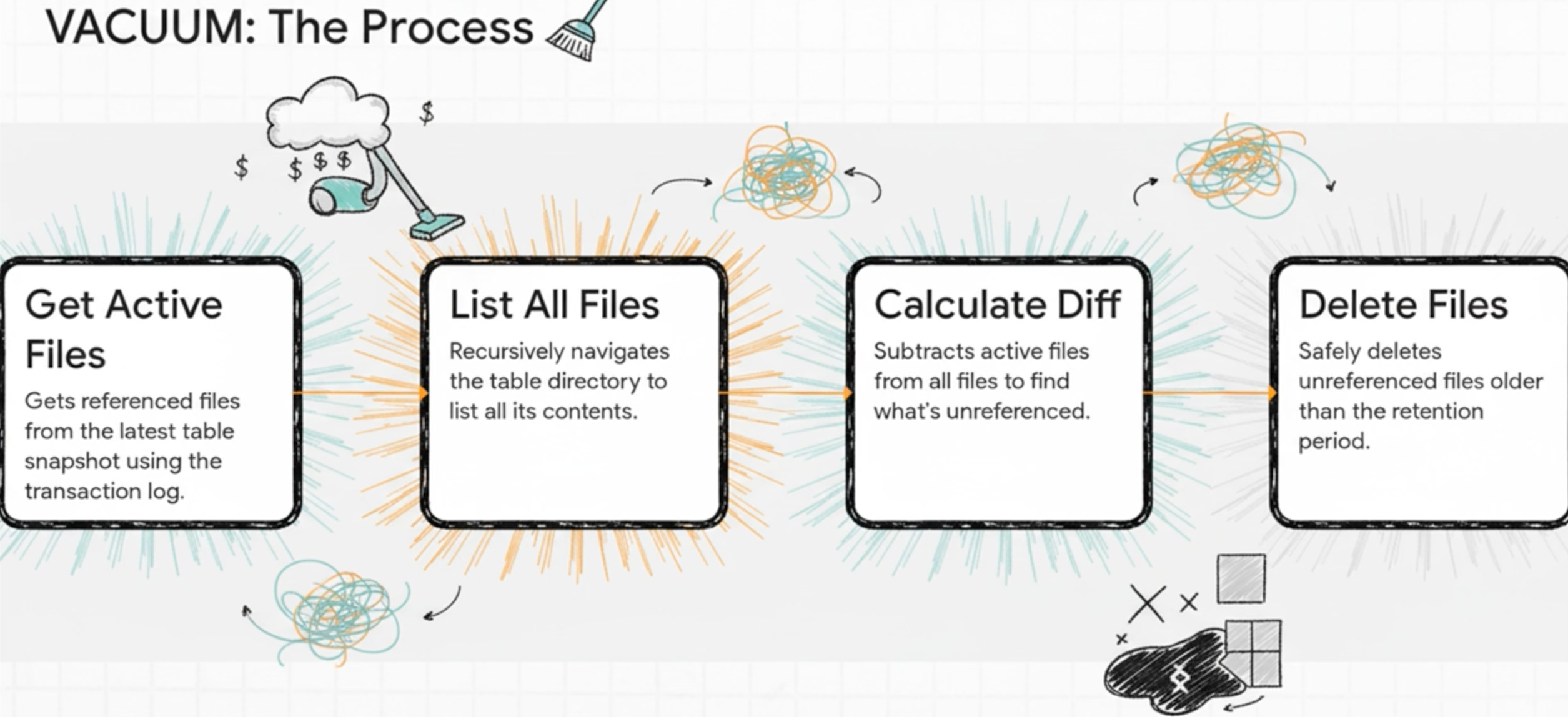
Phase 1: Recursive File Listing
VACUUM starts by recursively listing every file in the table’s storage directory. On cloud storage, this means API calls:
AWS S3:
ListObjectsV2requestsAzure Blob:
List BlobsoperationsGCP Storage: List operations
For large tables with millions of files across thousands of partitions, this phase can be time-consuming and generates significant API costs. The listing happens in parallel across Spark worker nodes, with parallelism determined by the number of unique directory paths.
Phase 2: Delta Log Comparison
VACUUM reads the Delta transaction log to identify which files are currently referenced. Files are marked for deletion if they:
Are not referenced in the current table state, AND
Are older than the retention threshold (7 days by default)
Critically, VACUUM FULL doesn’t just consult the Delta log—it also identifies straggler files: files that exist in the table directory but were never successfully committed to the Delta log (typically from aborted writes or failed jobs).
Phase 3: Deletion
File deletion is a driver-only operation. The driver issues deletion commands to the cloud storage provider:
AWS: Uses
DeleteObjectsbulk API (single-threaded)Azure/GCP: Can delete in parallel if
spark.databricks.delta.vacuum.parallelDelete.enabledis set to true
The Performance Challenge
For large tables, VACUUM FULL can take a significant amount of time—reports from the community mention runs lasting 30-60 minutes or more for petabyte-scale tables. The recursive listing phase is often the bottleneck, both in runtime and API call costs.
Teams typically run VACUUM FULL weekly or monthly due to these performance constraints.
VACUUM USING INVENTORY: The Extreme Scale Solution (Delta Lake 3.2.0)
I’ll briefly address it, but I don’t recommend this approach. In my experience—across 400+ companies and thousands of use cases from terabyte to petabyte scale—I haven’t seen a single team use it. I’m including it only for completeness, not as a path worth your time
Released in May 2024 with Delta Lake 3.2.0, VACUUM USING INVENTORY introduced a novel approach to eliminate the expensive file listing phase.
The Core Innovation
Instead of making live API calls to list files, this mode leverages pre-generated inventory reports from cloud providers:
AWS S3 Inventory
Azure Storage Blob Inventory
GCP Storage Insights
These services generate daily or weekly manifest files containing complete lists of all objects in a bucket. VACUUM USING INVENTORY:
Reads the pre-generated inventory manifest
Compares it against the Delta transaction log
Identifies and deletes files
The Reality: When NOT to Use It
Despite impressive performance numbers, VACUUM USING INVENTORY comes with significant operational overhead that makes it unsuitable for most organizations:
Setup Complexity:
Configure cloud inventory service
Establish inventory scheduling (daily/weekly)
Create and maintain manifest tables in Delta Lake
Configure VACUUM to read from inventory locations
Monitor inventory freshness and handle schema evolution
The Compliance Risk:
For compliance-critical use cases—GDPR right-to-deletion, CCPA data retention, financial record-keeping—the stakes are high. If inventory manifests are stale or misconfigured, files that should have been deleted might be missed. The potential penalties from compliance violations can far exceed any computational savings.
Recommendation:
VACUUM USING INVENTORY is best reserved for organizations that:
Operate dozens of petabyte-scale tables
Have dedicated platform engineering teams
Have low compliance risk or robust inventory monitoring
For most teams, the operational complexity and risk aren’t justified by the savings. Standard VACUUM modes are simpler, more reliable, and sufficient.
VACUUM LITE: The Practical Evolution (Delta Lake 3.3.0)
On January 6, 2025, Delta Lake 3.3.0 introduced VACUUM LITE, which fundamentally changed the maintenance equation by addressing VACUUM FULL’s core bottleneck in a simpler way.
The Key Insight
Rather than scanning storage directories or managing complex inventory systems, VACUUM LITE takes a direct approach:
Read the Delta transaction log (which already lists all committed files)
Identify files marked as “removed” and older than the retention threshold
Delete them
That’s it. No directory traversal. No ListObjects API calls. No inventory management.
VACUUM events LITE RETAIN 168 HOURS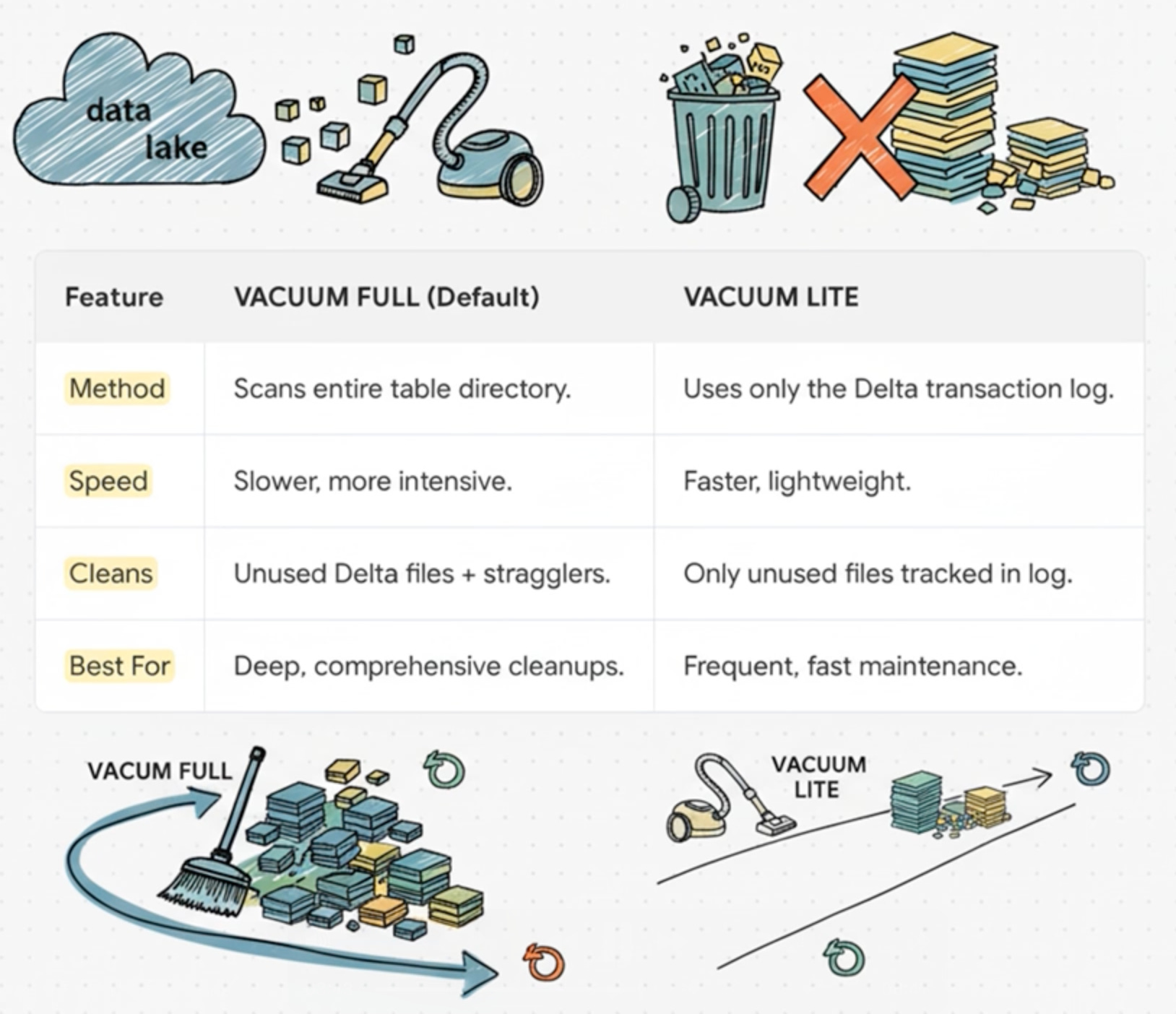
Performance Characteristics
Community reports show dramatic speedups:
Operations that took 30-60 minutes with VACUUM FULL now complete in under 5 minutes
Minimal API call costs since directory listing is eliminated
Suitable for frequent execution (daily or multiple times per day)
The Trade-Off: Speed vs. Thoroughness
VACUUM LITE’s speed comes from being more selective. It only deletes files tracked in the Delta transaction log. It will not catch:
Straggler files from aborted writes
Orphaned files from failed jobs
Any files not committed to the transaction log
The Baseline Requirement
There’s a critical safety mechanism: VACUUM LITE requires at least one successful VACUUM FULL run within the transaction log retention window (30 days by default).
This baseline ensures VACUUM LITE has a complete picture. Without it, the command fails with:
DELTA_CANNOT_VACUUM_LITE: VACUUM <tableName> LITE cannot delete all eligible files
as some files are not referenced by the Delta log. Please run VACUUM FULL.
This safety check prevents accidental data loss. If you encounter this error, run VACUUM FULL once to establish the baseline.
Recommended Strategy: The Hybrid Approach
The most effective strategy combines both VACUUM modes:
Weekly Maintenance: VACUUM LITE
Use LITE for routine cleanup of files from normal operations (MERGE, UPDATE, DELETE):
-- Scheduled daily
VACUUM high_churn_table LITE RETAIN 168 HOURS
When to use:
Tables with frequent data modifications
Well-managed ingestion pipelines
Daily or multi-daily maintenance windows
Weekly/Monthly Deep Clean: VACUUM FULL
Use FULL for comprehensive cleanup:
-- Scheduled weekly (e.g., Sunday morning)
VACUUM high_churn_table RETAIN 168 HOURS
When to use:
Establishing the baseline for LITE mode
After irregular ingestion issues
Cleaning up straggler files
Compliance-critical scenarios requiring thoroughness
Periodic deep maintenance
This two-tier approach provides:
Fast, frequent cleanup via LITE (minutes daily)
Comprehensive straggler removal via FULL (weekly/bi-weekly)
Predictable maintenance windows
Lower overall compute costs
The Secret to a Cheaper VACUUM (Hardware Configuration) $$$
The standard Databricks recommendation for VACUUM is:
Auto-scaling cluster (1-4 workers)
Compute-optimized instances (AWS C5, Azure F-series, GCP C2)
8 cores per worker
8-32 core driver
This is a safe, balanced configuration. However, there’s an alternative approach if you can afford some occasional failures but want to save every penny.
The Single-Node Strategy
For VACUUM LITE and certain VACUUM FULL scenarios, running on a single powerful driver node (0 workers) can be more cost-effective:
Configuration:
Driver: Large compute-optimized instance (32-64 cores)
Workers: 0
Mode: Single-node cluster
Why this works:
File listing: For many tables, the listing phase is bottlenecked by cloud storage API rate limits, not CPU. Additional workers may not significantly improve listing time.
File deletion: This is driver-only regardless of worker count. Workers sit idle during this phase.
Cost: A single large driver for 30 minutes often costs less than a multi-node cluster for the same duration..
Decision Framework: Choosing Your VACUUM Strategy
Here’s a practical guide for determining which VACUUM mode to use:
Use VACUUM FULL When:
✅ Running your first VACUUM on a table (establishes LITE baseline)
✅ After messy or failed data ingestion jobs
✅ Periodic deep cleaning (weekly/bi-weekly/monthly)
✅ Compliance-critical scenarios (thoroughness matters)
✅ Tables with known straggler file issues
✅ Resolving DELTA_CANNOT_VACUUM_LITE errors
Typical frequency: Weekly to monthly, depending on table characteristics
Use VACUUM LITE When:
✅ Daily or frequent maintenance operations
✅ Well-managed tables with regular modifications
✅ Routine cleanup of committed files
✅ Tables with an established FULL baseline
✅ Speed and cost optimization are priorities
Typical frequency: Daily to weekly
Understanding the Timeline: When Features Became Available
For teams planning their VACUUM strategy, here’s when each feature was introduced:
VACUUM (FULL mode): Original Delta Lake feature, available since early versions
VACUUM USING INVENTORY: Delta Lake 3.2.0 (May 9, 2024)
Requires Databricks Runtime 15.4 LTS or later
VACUUM LITE: Delta Lake 3.3.0 (January 6, 2025)
Requires Databricks Runtime 16.1 or later
Check your Databricks Runtime version to determine which features are available in your environment.
Key Takeaways

The evolution of VACUUM in Delta Lake reflects the maturation of large-scale data lakehouse operations:
VACUUM FULL remains essential for comprehensive cleanup and establishing baselines, despite being slower and more expensive
VACUUM LITE is the game-changer for most teams—fast enough for daily use, simple enough to trust in production, and cost-effective
VACUUM USING INVENTORY is specialized and best reserved for extreme-scale scenarios with dedicated platform engineering. Compliance considerations trump cost savings: For regulated data, thoroughness and reliability are more important than marginal compute savings
The hybrid approach works: Combine frequent LITE runs with periodic FULL runs for optimal cost and coverage
Hardware optimization matters: Test both standard auto-scaling and single-node configurations to find your optimal cost/performance balance
The lesson isn’t “always use the latest feature”—it’s understanding the trade-offs and choosing the right tool for your specific tables, scale, and requirements.
References
Delta Lake 3.3.0 Release Notes - VACUUM LITE introduction
Delta Lake 3.2.0 Release Notes - VACUUM USING INVENTORY
Databricks Documentation: Remove unused data files with VACUUM


