

Databricks Genie is great at answering questions about your data. But you can’t listen to the details on your walk to standup, while driving to the office, or during your commute. So let’s build a Databricks App that asks Genie your questions and reads the answers back to you — as a short, spoken podcast you can play on your phone- anytime, anywhere!
Features
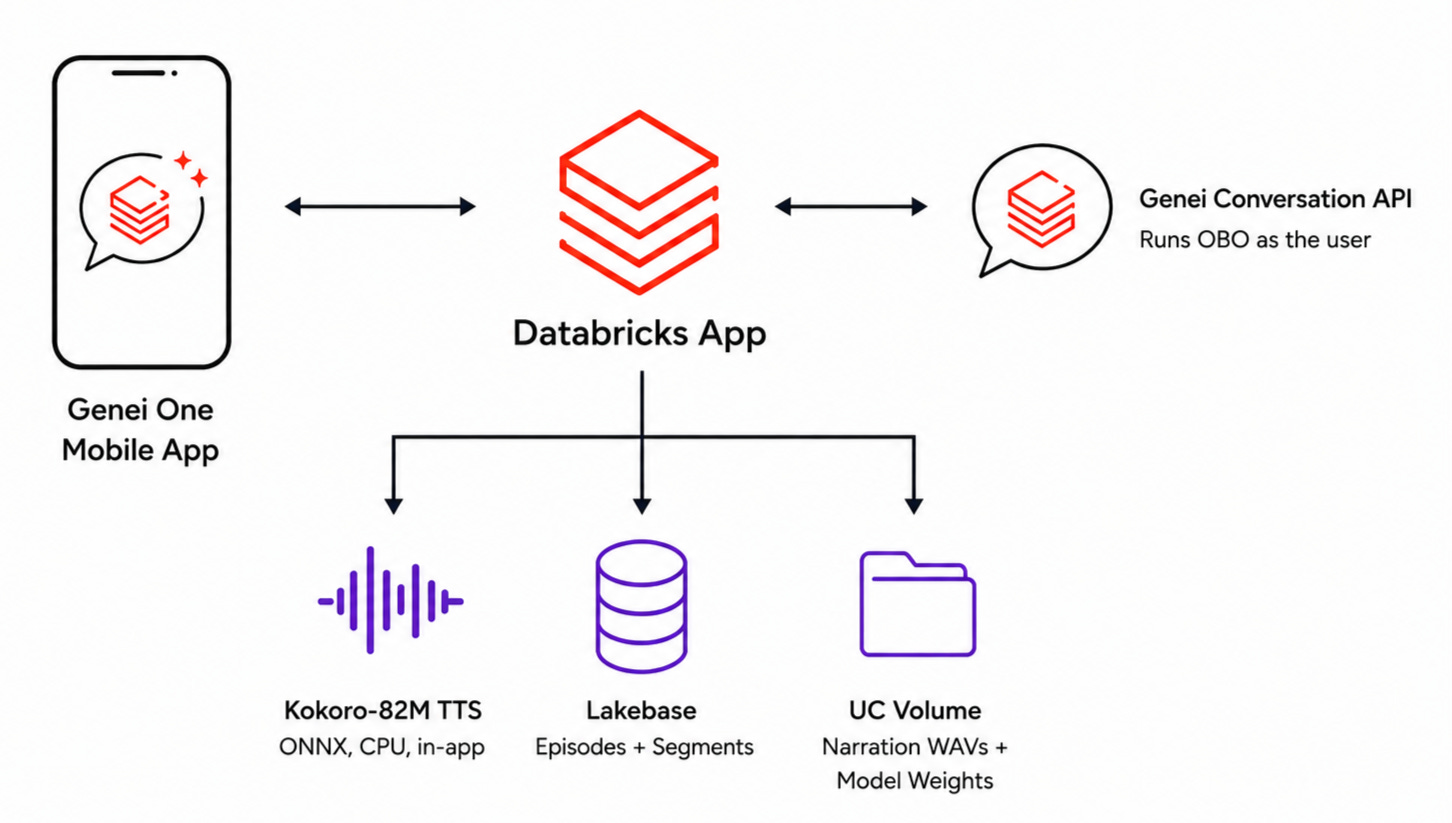
• 🗣️ Narrated answers — Each Genie summary is spoken aloud by an in-app voice model
• 🧠 No second LLM — Genie itself writes the spoken summary
• 📊 Details on tap — Exact figures, generated SQL, Genie’s reasoning, and result rows stay on screen
• 🔐 Runs as you — Every Genie query runs on-behalf-of the signed-in user, with their permissions
• 💾 Durable — Episodes live in Lakebase, audio in a UC Volume
• 📱 Mobile-first — GenieOne App enables your Databricks App to be available on mobile devices
Architecture
Prequisites
Databricks workspace with Databricks Apps enabled
Genie space you can query
Lakebase Instance
Unity Catalog Volume
Databricks App
Databricks CLI (v1.10+) with an auth profile
Setup Instructions
Download the application code and make the necessary updates to the config values in app.yaml. Download all files from repo:
https://github.com/adgitdemo/ad_databricks/tree/main/my-genie-podcaster
Provision storage. Create a Lakebase database (note its branch + database identifiers). Create a UC Volume in an existing catalog/schema (note /Volumes/<catalog>/<schema>/<volume>).
Configure the bundle. In databricks.yml, set the workspace host, the postgres resource (branch, database, CAN_CONNECT_AND_CREATE), two uc_securable VOLUME resources (READ_VOLUME + WRITE_VOLUME), and user_api_scopes: [dashboards.genie]. In app.yaml, set LAKEBASE_ENDPOINT (valueFrom: postgres) and DATABRICKS_VOLUME_AUDIO.
Stage the model. npm install && npm run setup:model to download the Kokoro weights into .hf-cache/…. Then databricks fs mkdir dbfs:/Volumes/<…>/_models/onnx-community/Kokoro-82M-v1.0-ONNX/onnx and databricks fs cp the four files (config.json, tokenizer.json, tokenizer_config.json, onnx/model_quantized.onnx) to the matching Volume paths. (On first boot the app copies them to local disk — no Hugging Face egress.)
Build, deploy, run. npm run build, then databricks bundle deploy --profile <p>, then databricks bundle run app --profile <p>. Open the printed app URL.
Note: users need access to their Genie space and its data, or Genie returns a permission error.
Usage
Tap New.
Enter a Genie space (by name or ID) and one or more questions.
Hit Create podcast. The app asks Genie, captures each SUMMARY and DETAILS, and pre-synthesizes the narration in the background.
Open the episode and press Play. Switch narrators from the voice picker. Expand “Detailed analysis” on any answer to see the figures, SQL, Genie’s reasoning, and a preview of the rows.
Demo
Open the “My Genie Podcaster” app from the One mobile App and use it!
This blog explores the art of the possible with Databricks Genie!