


My colleague and I spent the past few weeks hyper-tuning a Spark streaming workload — millions of rows per second, at the lowest cost we could manage, without breaking our latency SLA. What we found didn’t match what either of us expected going in.
Here are five lessons we learned over a week of benchmarking on Spark 4
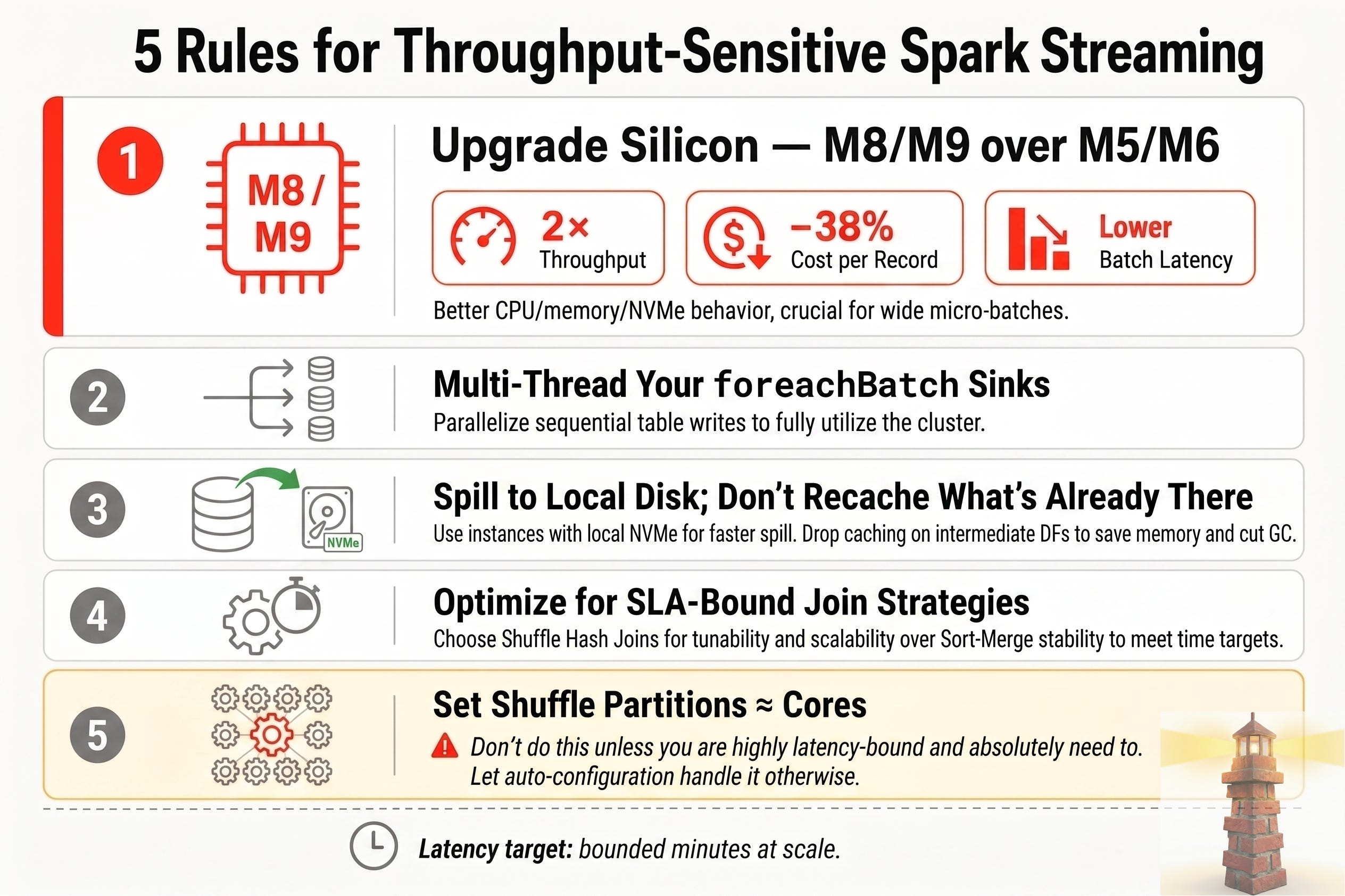
Rule 1: Upgrade the Silicon (M8/M9, Not M5/M6)
Before tuning shuffle partitions or threading, pick the right generation.
On the same workload — same Databricks Runtime, same node count, same pipeline — we moved from M6gd to M8gd and saw a rare three-way win:
2× throughput (more records per second)
~38% lower cost per record processed
Lower batch latency end to end
Newer Graviton generations (M8, and M9 when available) bring better CPU, memory bandwidth, and local NVMe behavior. That matters most when every micro-batch does shuffle, spill, and multi-table writes.
Practice: Don’t lock onto M5/M6 families because they’re familiar. Benchmark newest generation up on the same job before you optimize code. Often the biggest lever is hardware, not another spark.conf tweak.
Rule 2: Multi-Thread Your foreachBatch Sinks
foreachBatch runs once per micro-batch. If you write to more than one table (main, audit, dead-letter), sequential writes leave the cluster idle between commits.
Practice: Do transforms once, split the batch, submit writes in parallel from the driver.
from concurrent.futures import ThreadPoolExecutor

def process_batch(batch_df, batch_id):
    with ThreadPoolExecutor(max_workers=2) as executor:
        futures = [
            executor.submit(write_to_table_a, batch_df, batch_id),
            executor.submit(write_to_table_b, batch_df, batch_id),
        ]
        for f in futures:
            f.result()
Parallel writes mean more Spark jobs per batch — you’re trading wall-clock time for driver coordination. Profile before raising max_workers.
For a fuller production version of this — caching the batch once, fanning out to N tables instead of 2, propagating thread exceptions properly — see the reference notebook. Two companion videos walk through it: foreachBatch fundamentals first, then parallelizing the writes.
Rule 3: Spill to Local Disk, Don’t Recache What’s Already There
Every task writes its output to the disk on the machine it runs on. You can let that spill hit the network over EBS, or you can pick an instance family with disk physically attached to the node. The attached disk wins on performance, every time.
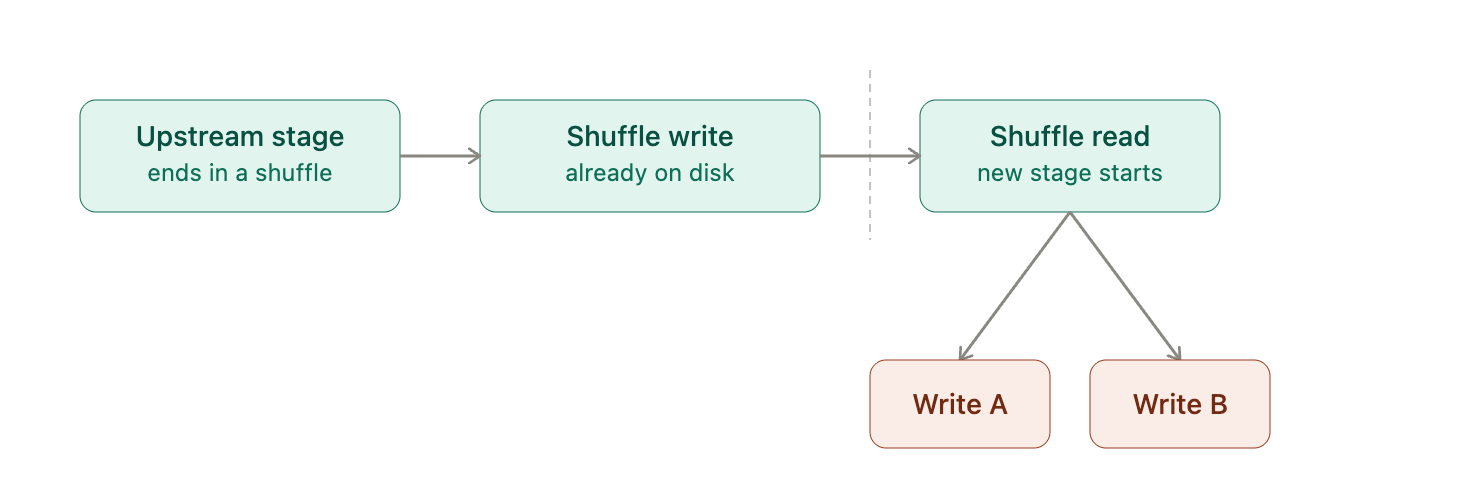
Default is simple: don't cache. When the fork happens after a shuffle — the batch already passed through a join, aggregation, or stateful dedup — the shuffle write already left a durable copy on local disk that Spark reuses automatically for any second write path, retry or independent action alike (look for a "skipped" stage in the Spark UI), so caching here only duplicates what's already there.
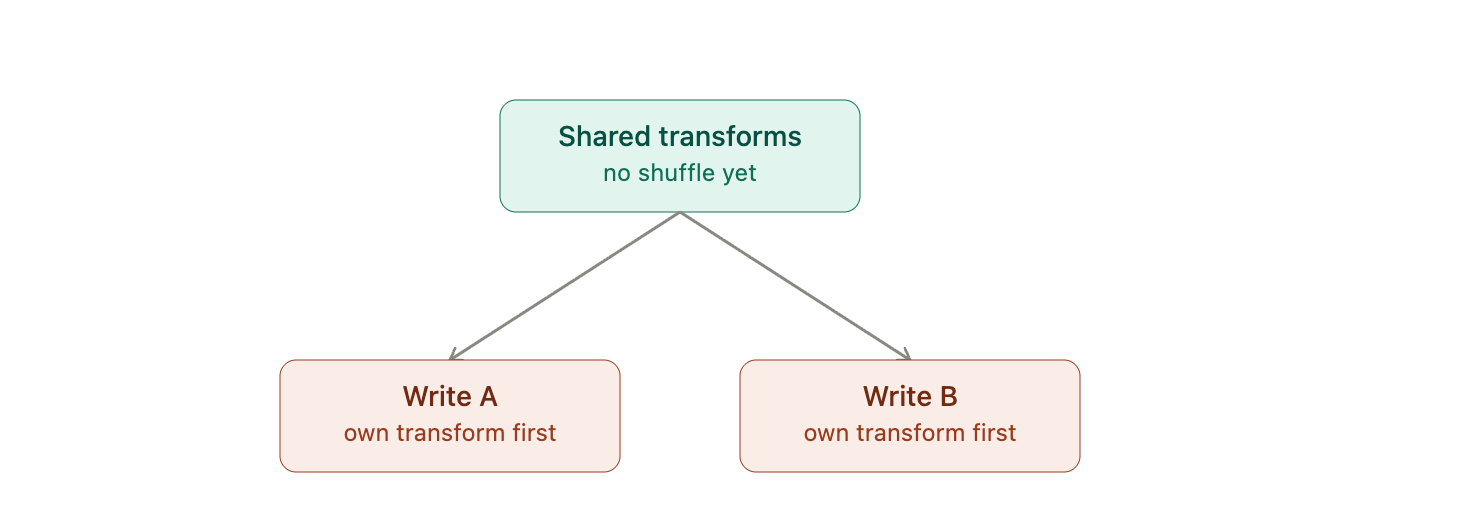
The judgment call lives in the other case: a fork before any shuffle, where a shared read and a few light transforms split straight into two writes with no durable file to fall back on. Skip the cache and both paths redo that shared work from scratch, source read included; cache it and you pay a serialize-then-deserialize round trip through the block manager instead. Which one wins depends on the weight of the shared transforms — a wide UDF or an expensive parse earns the cache, a couple of column selects don’t, and recomputing them twice is cheaper than the round trip.
Here’s the number that makes this rule worth enforcing: memory-optimized (R-series) instances carry at least a ~20% price premium over general-purpose compute — on every major cloud, not just one. Cut the unnecessary caching and you cut the memory pressure that pushes you onto R-series in the first place. That 20% doesn’t vanish — you either bank it as savings or spend it on more CPU. Cache when profiling proves it pays off, not by habit.
Rule 4: Optimize for Finishing on Time, Not Just Finishing
In a latency-bound streaming job, “did the job succeed” is the wrong question. The right one is “did it finish inside the SLA.” A batch that completes in 90 seconds against a 60-second budget hasn’t crashed — it’s succeeded and missed the point.
That reframes how you pick a join strategy. Sort-merge joins are stable: they spill to disk gracefully and rarely blow up outright. But they don’t respond to more hardware as easily — you can’t throw machines at a sort-merge join and expect a proportional speedup. (Full mechanics here.)
Shuffle hash joins do respond to more hardware. They’re less forgiving under memory pressure, but they scale with compute in a way sort-merge doesn’t. On an SLA-bound job, that tunability is worth more than the extra stability. (Full breakdown here.)
Practice: If your streaming job has an SLA attached, treat join strategy as a lever you tune on purpose — not whatever Spark defaults to.
Rule 5: Set shuffle partitions to match cluster cores
Highly discouraged, so unless you absolutely need to, you can just let auto do it for you
The only reason we set this is because we were heavily latency-bound and did not want to leave it to the auto algorithm. That means we were overly conservative.
On join-heavy streams, spark.sql.shuffle.partitions drives task size and scheduler load.
Too low → fat tasks, spill, OOM
Too high → tiny tasks, overhead, small files
Recommended Companion Reads
Now that you’ve upgraded your hardware and parallelized your sinks, here is how to take your high-performance streaming architecture to the next level:
Optimize Your Compute Storage: Moving beyond default node disk settings can dramatically reduce streaming latency. Learn how to Deploy and Manage Local SSDs on AWS or upgrade your block storage setup with GP3 Support on Databricks to instantly maximize write IOPS.
Master Advanced Join Tactics: Choosing the wrong join strategy can derail your SLA during transaction spikes. Read our step-by-step guides on How Shuffle Hash Joins Scale and why traditional Sort-Merge Joins Might Limit Your Streaming Performance.
Download the Implementation Notebook: Skip the boilerplate. Grab our ready-to-import Parallel ForeachBatch Script from GitHub, and check out the walkthrough videos on ForeachBatch Parallelization (Part 1) and ThreadPool Tuning (Part 2).
FAQ
When should I parallelize foreachBatch writes?
When a single micro-batch writes to multiple independent sinks, such as a main table and a dead-letter path. Parallelization helps when sink writes are a meaningful share of batch duration and the driver can coordinate the extra jobs safely.
Is caching inside foreachBatch usually a good idea?
No. In many streaming pipelines, especially after joins or aggregations, Spark has already materialized shuffle output. Adding .cache() can increase memory use and GC overhead without enough reuse to justify it.
Why does local NVMe matter for streaming jobs?
Because shuffle, spill, and write-heavy micro-batches are sensitive to disk performance. Faster local storage can reduce batch-time variability and improve throughput for join-heavy workloads.
Should I always change spark.sql.shuffle.partitions manually?
No, almost never unless you absolutely can live without them. Auto-optimized settings may be sufficient.
What does “success” mean for a latency-bound streaming job?
Success is not just that the query keeps running. Success means the pipeline consistently finishes each micro-batch within the target latency window and prevents backlog from growing during spikes.
How do I apply Rule 1 in azure databricks? Have you tested with cluster cpu series in azure?