

The Problem
Business users do most of their work outside of a data platform: sales reps draft proposals in Outlook, operations leads run their day in Teams, finance models everything in Excel.Yet the answers to most of their questions sit in Databricks: pipeline metrics, supply chain status, support SLAs, financial actuals, etc.
That gap between “where data lives” and “where people work” used to be bridged by reports and dashboards. Now the bridge is AI agents: assistants embedded in Teams, Outlook, Excel, Copilot Hub, Microsoft Foundry projects, or an in-house chat app. The user asks a question in their flow of work. The agent calls back to Databricks. The answer returns with proper governance applied.
The pattern is simple in theory. In practice, the integration involves a few interlocking decisions: which Databricks resources to wire up, how authentication flows, whether the agent supports MCP or only REST, whether users and Databricks share a Microsoft Entra tenant, and what governance controls you need. Get them wrong and you lose all the benefits of governance inherent to Databricks.
This post walks you through a decision tree to get to the right architecture, with the exact set of artifacts to share between the Databricks side and the agent side at the end.
Architecture Components
Before walking the tree, here are some quick definitions of the different Databricks functions we will be dealing with.
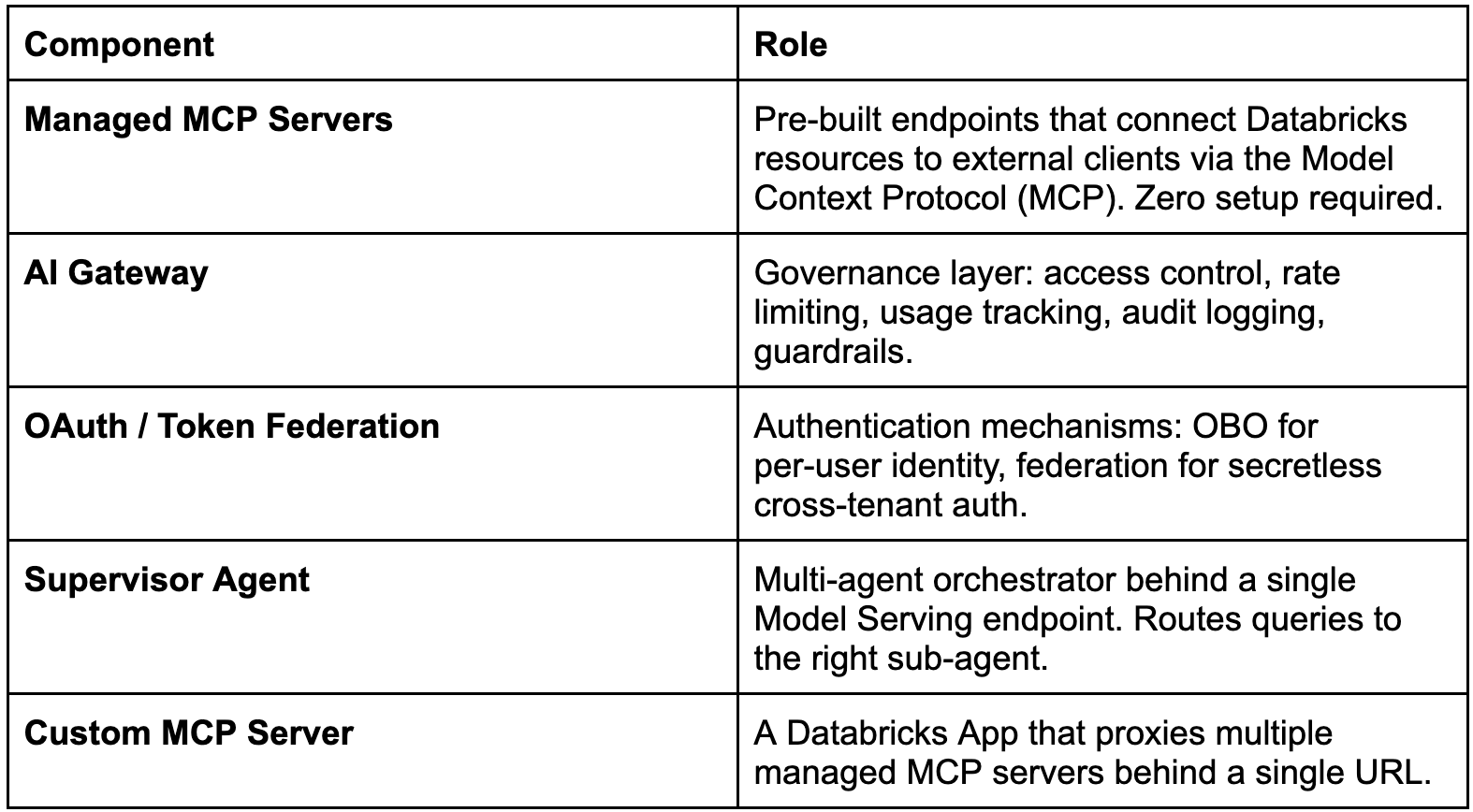
Question 1: Which Databricks Resources Need to Be Connected?
Databricks provides four managed MCP servers out of the box. Each connects a different resource type with its own URL pattern and OAuth scope.
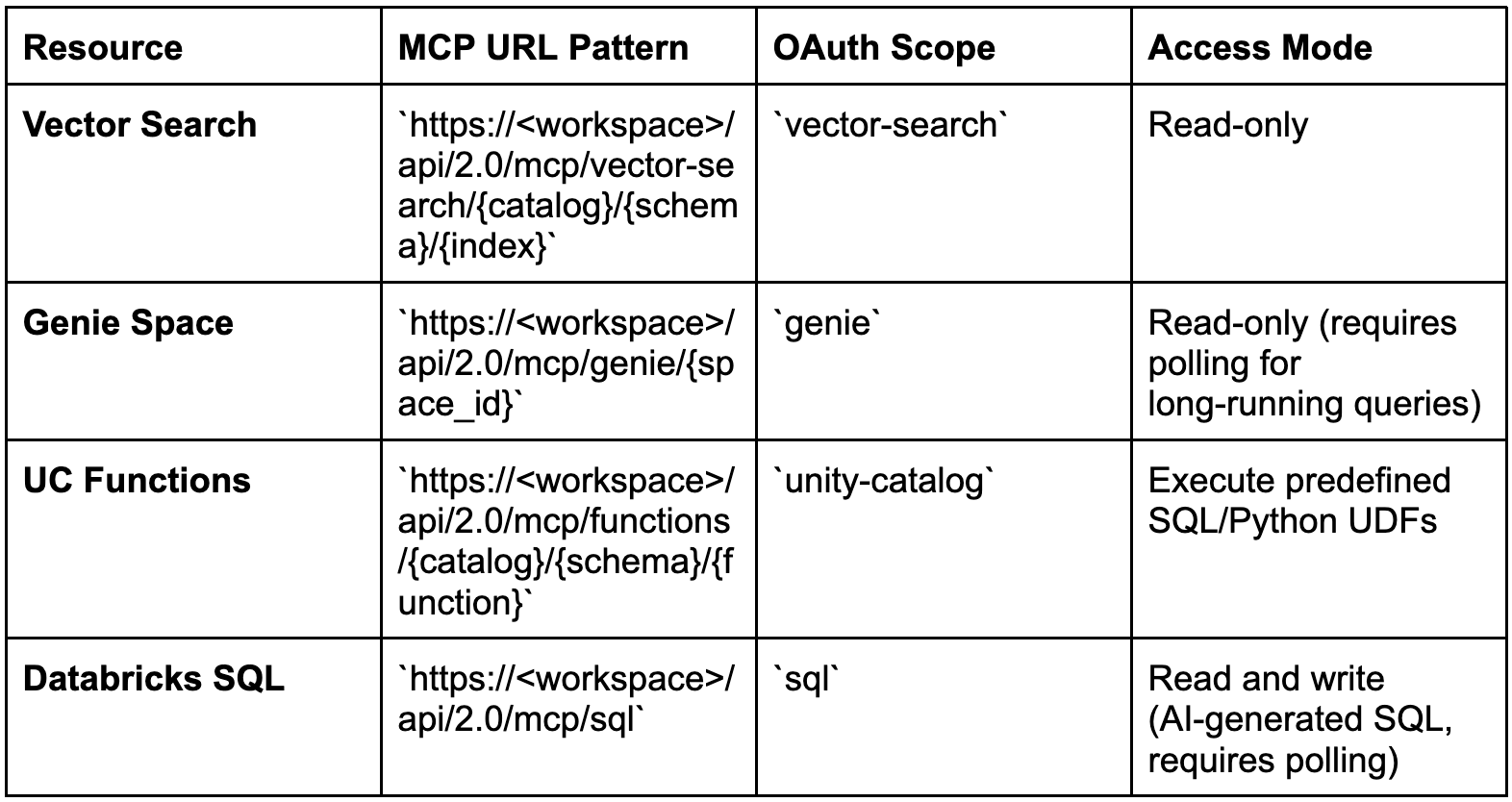
All four are governed by Unity Catalog permissions and visible in AI Gateway > MCPs.
Note on Vector Search: The managed MCP server works directly with indexes that use Databricks-managed embeddings; you send plain text and get plain text results. If you use self-managed embeddings, wrap the index in a Model Serving endpoint (for example, via VectorSearchRetrieverTool in a deployed agent) or a UC Function, and call that from the agent instead.
Question 2: How Many Databricks Endpoints, and Does the Agent Support Multiple Tool Endpoints?
This determines whether you connect a single URL or several.
Path A: Single resource
Connect one managed MCP URL directly. Simplest path: no orchestration needed.
Path B: Multiple resources, agent supports multiple endpoints
Create one OAuth application with combined scopes and hand the agent team all the MCP URLs. The same OAuth token works across all of them.
OAuth app scopes (combine as needed):
vector-search genie unity-catalog sql offline_access
Or use all-apis for blanket access (less restrictive).
One OAuth flow, one token, multiple MCP servers. The user authenticates once and the token carries the correct scopes for every resource.
Path C: Multiple resources, agent supports only one endpoint
Two options.
Option 1: Supervisor Agent (recommended for most cases)
Register each Databricks resource as a sub-agent of an AgentBricks Multi-Agent Supervisor Agent. The external agent connects to one Model Serving endpoint.
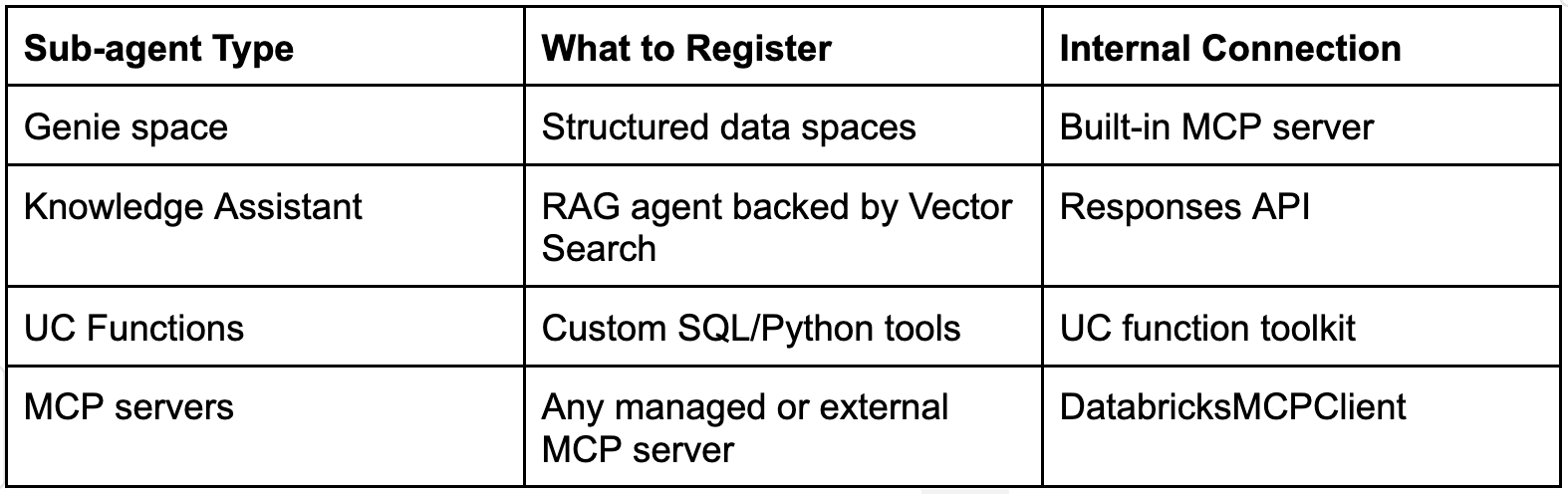
The external agent connects to a single REST endpoint: POST https://<workspace>/serving-endpoints/<supervisor>/invocations. The supervisor’s LLM handles routing: it reads the user’s query and delegates to the right sub-agent based on descriptions you provide.
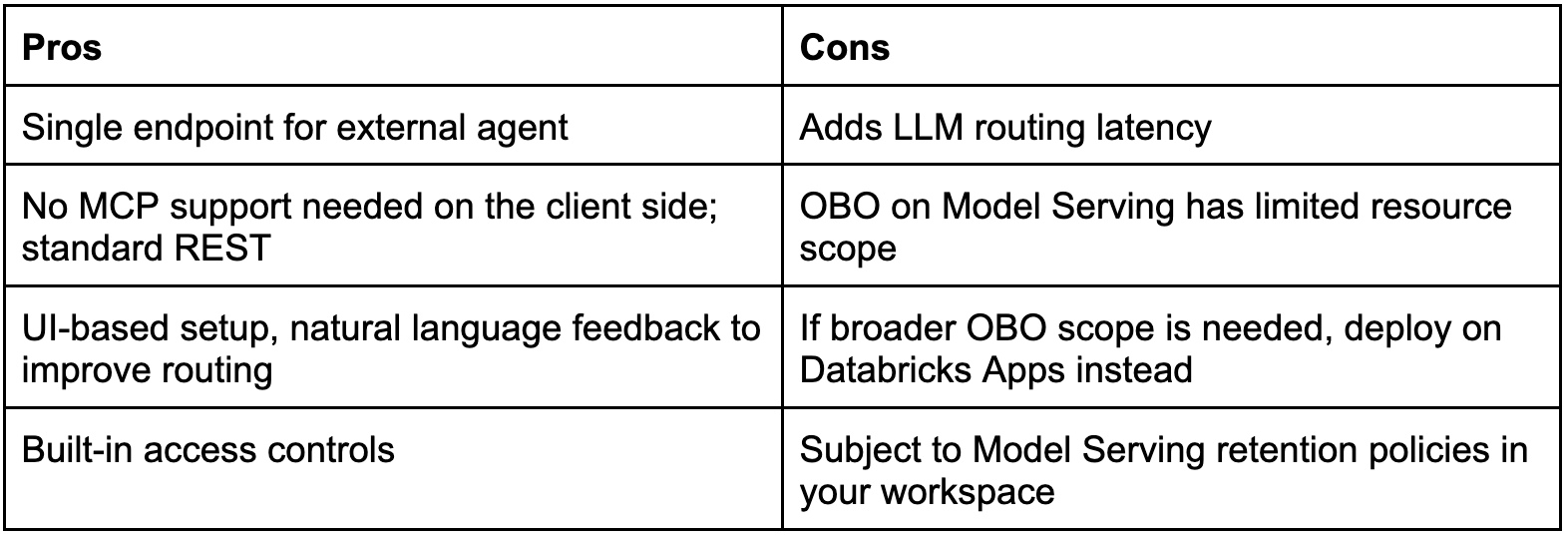
Option 2: Custom MCP Server (Databricks App)
Deploy a Databricks App that proxies to multiple managed MCP servers behind a single URL: https://<app-url>/mcp.
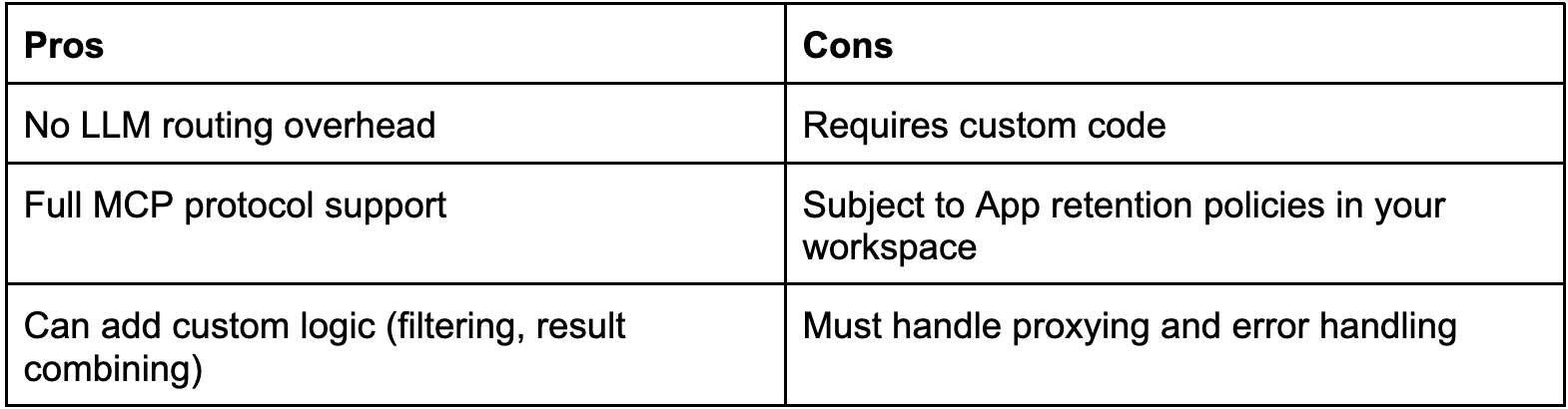
Decision rule: Minimal code with LLM-driven routing goes to Supervisor Agent. Lightweight deterministic proxying goes to Custom MCP App.
Question 3: What Authentication Model Is Required?
This is the most consequential decision. It determines how identity flows from the external agent to Databricks.
The key question: does the end user’s identity need to flow through to Databricks?
Yes: On-Behalf-Of (OBO) Authentication
The external agent authenticates on behalf of each individual user. Databricks receives the user’s identity, and Unity Catalog permissions are enforced per-user.
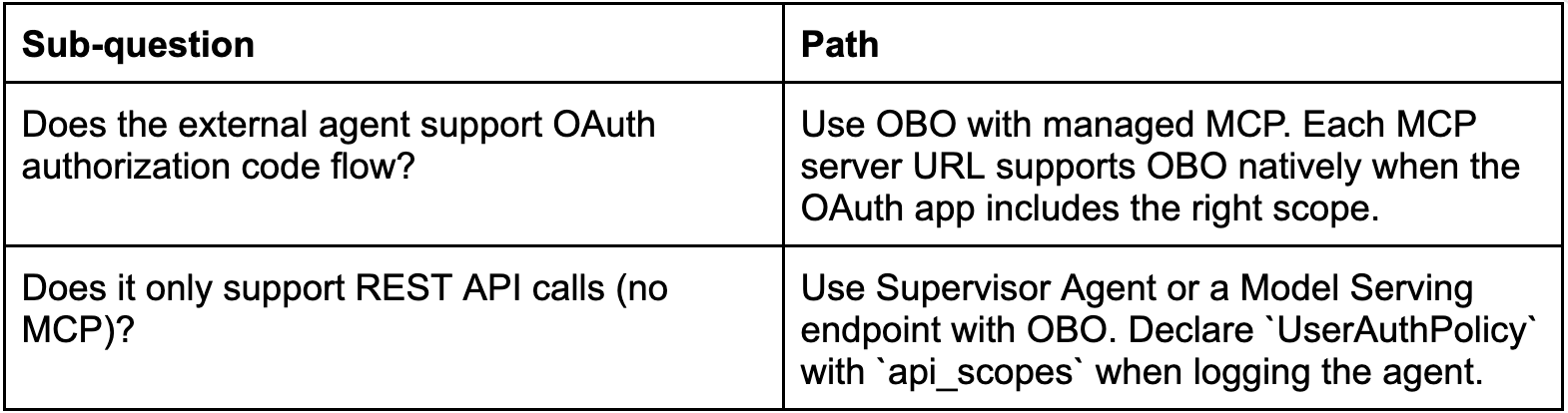
OBO-supported resources on Model Serving:
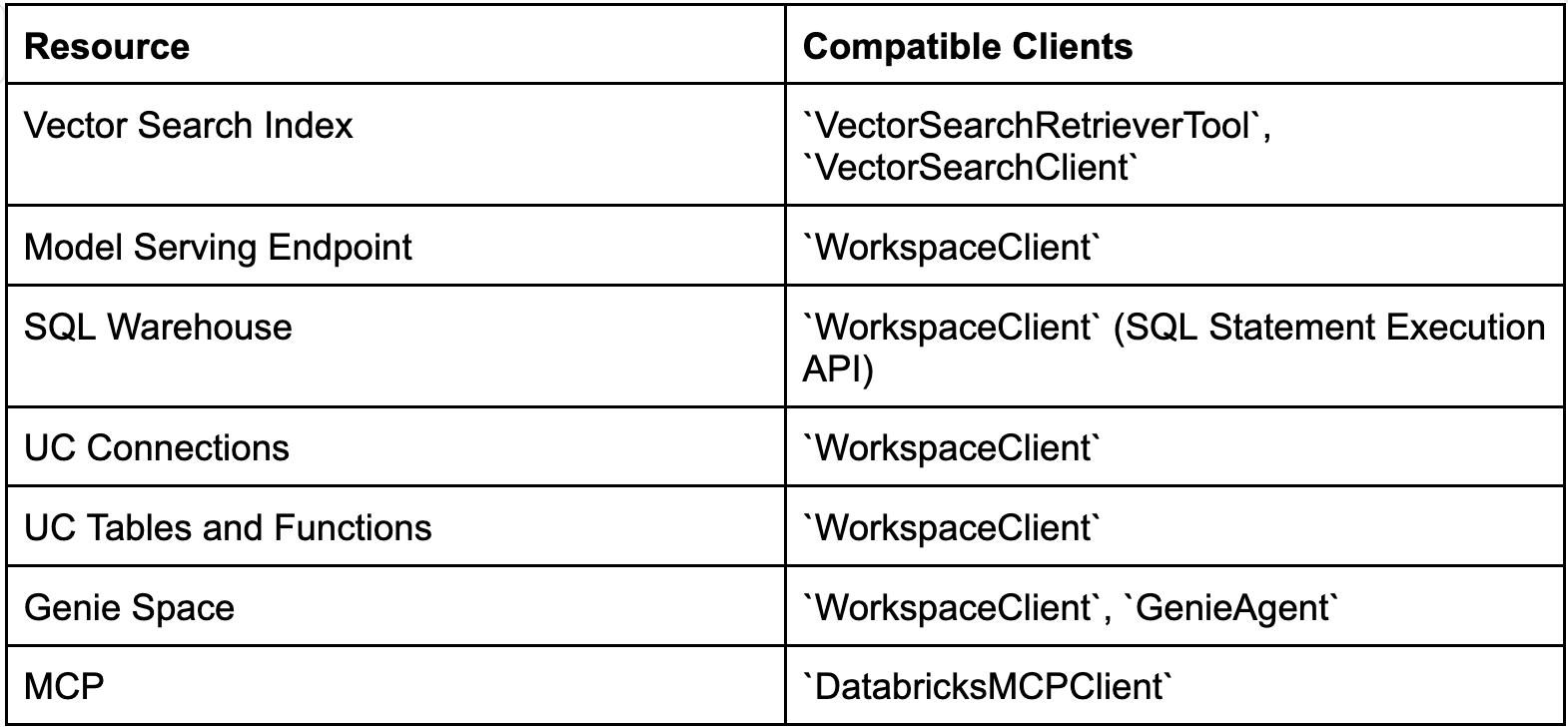
If you need OBO access to resources outside this list (e.g., UC Volumes), deploy on Databricks Apps instead of Model Serving. Apps support additional OAuth scopes.
No: Service Principal Authentication
The external agent authenticates as a single identity (service principal). All queries run under that SP’s permissions.
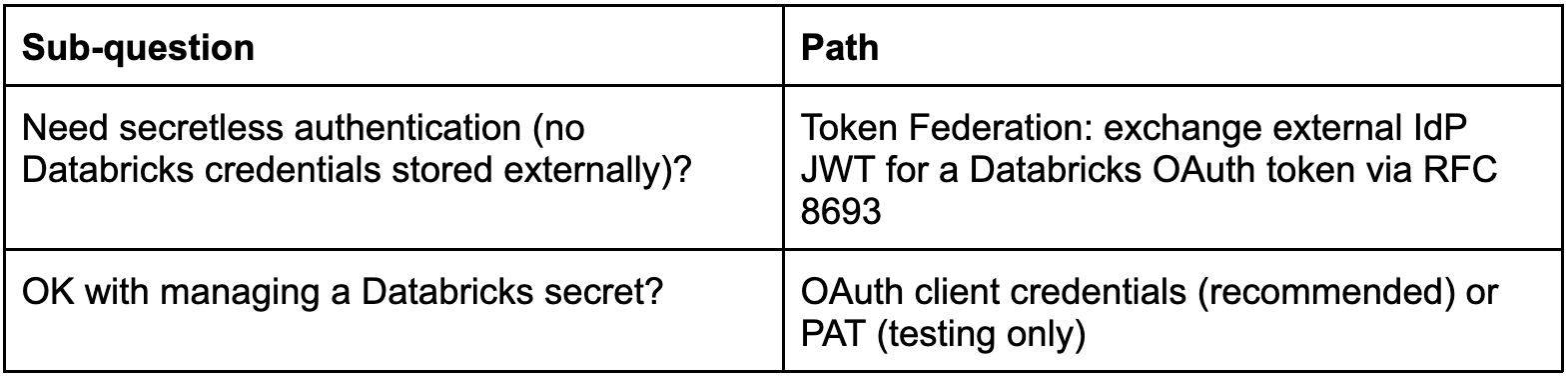
Authentication Method Comparison
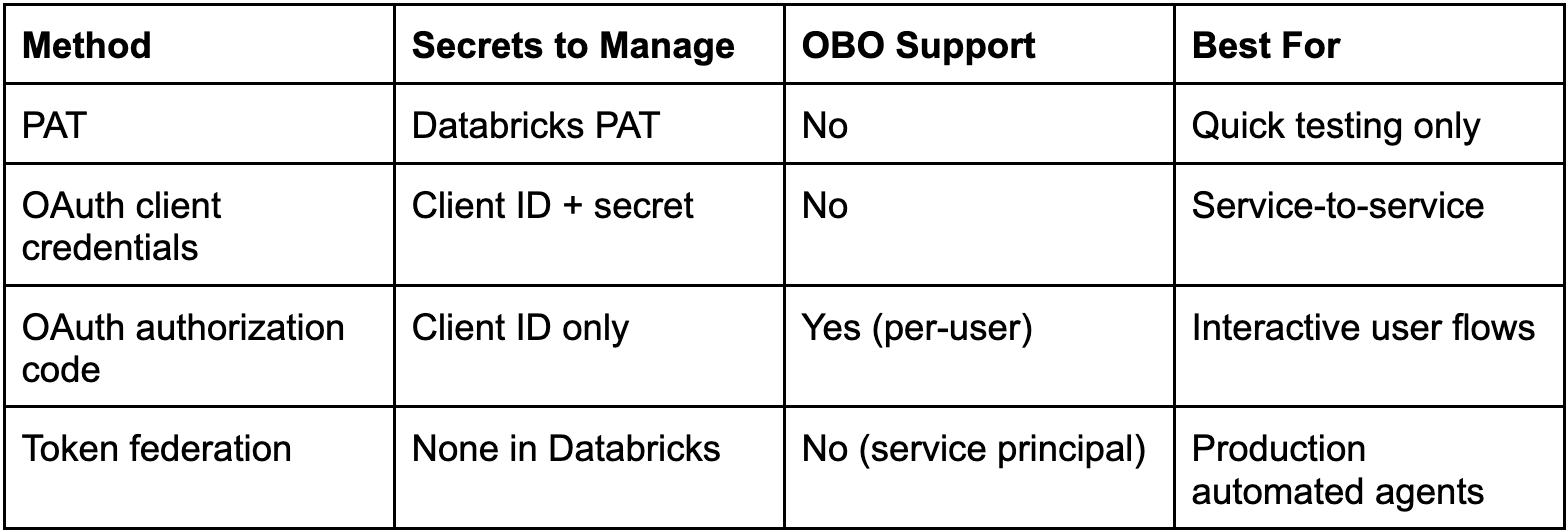
The question to ask the data security team: do different users need different access levels to the data behind these resources, or is a shared service account acceptable?
Question 4: Are Users and Databricks in the Same Azure Tenant?
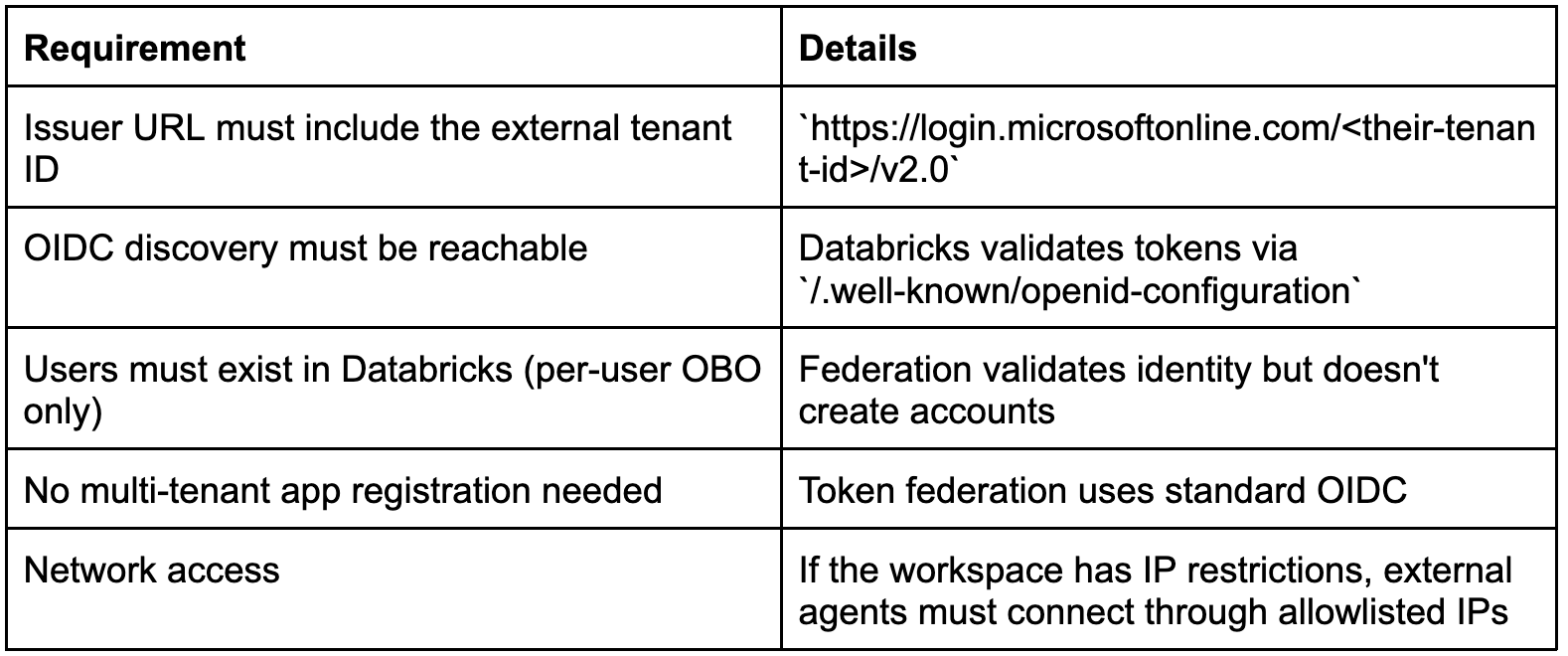
This question only matters if you chose OBO or token federation in Q3. With a simple PAT or client credentials inside the same org, skip to Q5.
Same tenant
Standard OAuth flows work directly:
Users already exist in Databricks via SCIM sync from the same Entra ID
OAuth authorization code flow authenticates users against the same tenant
No federation policy needed
Different tenants (cross-tenant)
Common in enterprise scenarios: users live in Tenant A (corporate Entra ID), but Databricks is associated with Tenant B.
Path A: Per-user OBO (users in external tenant need individual identity)
Create an account-wide federation policy:
Issuer: https://login.microsoftonline.com/<external-tenant-id>/v2.0
Subject claim: sub or oid (to match users by their Entra ID object ID)
Audience: Databricks account ID or custom value
Provision users in Databricks. Federation validates identity but does NOT create accounts. Use SCIM sync from the external tenant, or provision manually.
Each user’s Entra ID token is exchanged for a Databricks token carrying their identity.
Unity Catalog permissions apply per-user.
Path B: Service Principal (automated agent, no per-user identity)
Create a Databricks service principal in your Databricks account.
Create a service principal federation policy:
Issuer: https://login.microsoftonline.com/<external-tenant-id>/v2.0
Subject: The Entra ID app/service principal’s sub or oid claim
Audience: Databricks account ID
The external agent obtains a JWT from its own Entra ID tenant.
Exchanges it via:
POST https://<workspace>/oidc/v1/token
grant_type=urn:ietf:params:oauth:grant-type:token-exchange
subject_token=<entra-id-jwt>
subject_token_type=urn:ietf:params:oauth:token-type:jwt
Zero Databricks secrets cross the tenant boundary.
Cross-tenant requirements checklist
Question 5: What Governance Controls Are Needed?
AI Gateway is the enterprise control plane that sits between MCP servers and external agents. It provides the operational controls needed in production.
AI Gateway Capabilities for MCP
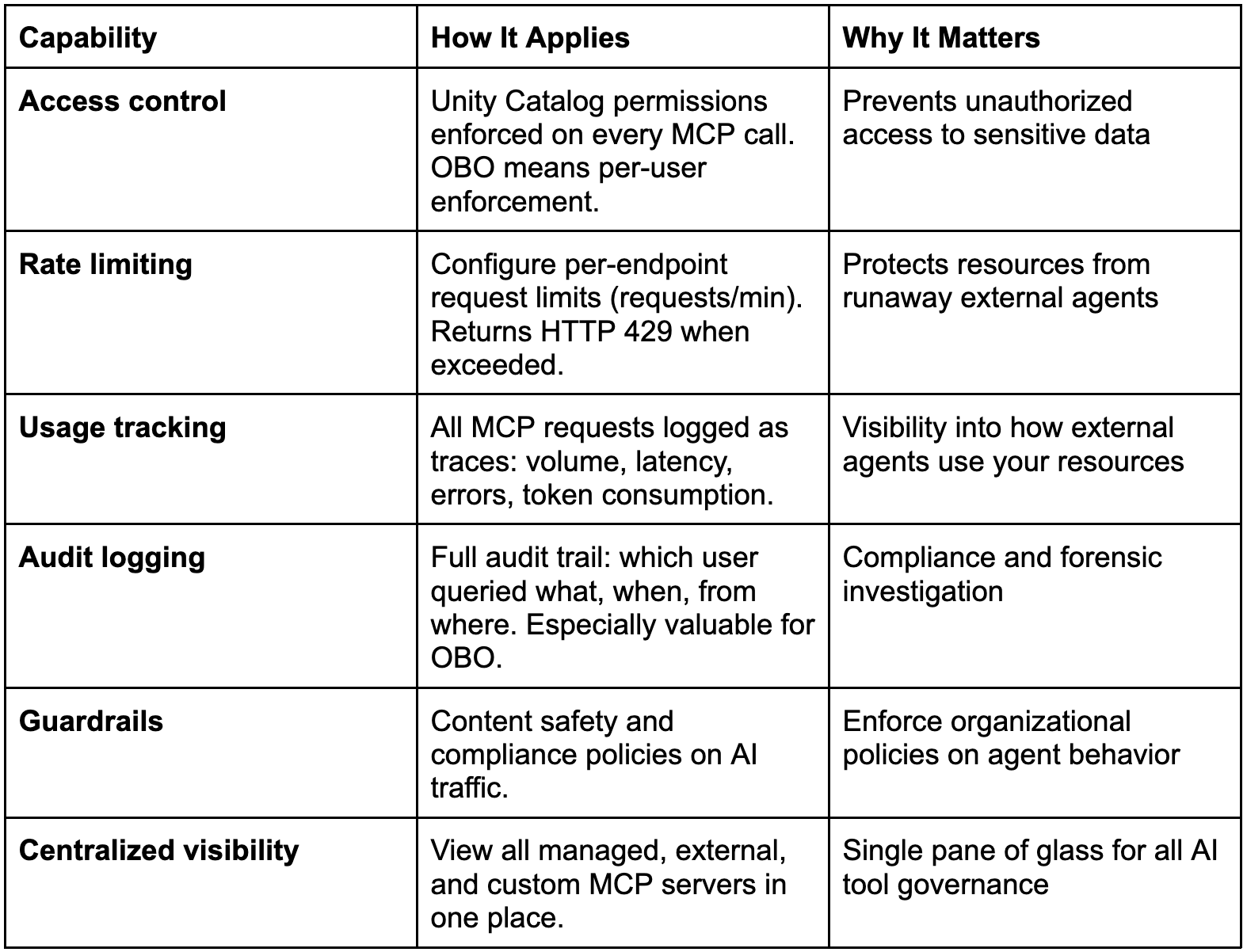
Find it in: Workspace sidebar > AI Gateway > MCPs.
Recommended governance setup
Rate limiting: set conservative limits initially, increase based on observed usage.
Usage tracking: enable from day one to establish a baseline.
Audit logging: required for any integration where per-user identity flows through (OBO).
IP allowlisting: restrict MCP server access to known external agent IPs.
Scope-limited OAuth: use granular scopes (vector-search, genie) instead of all-apis for production.
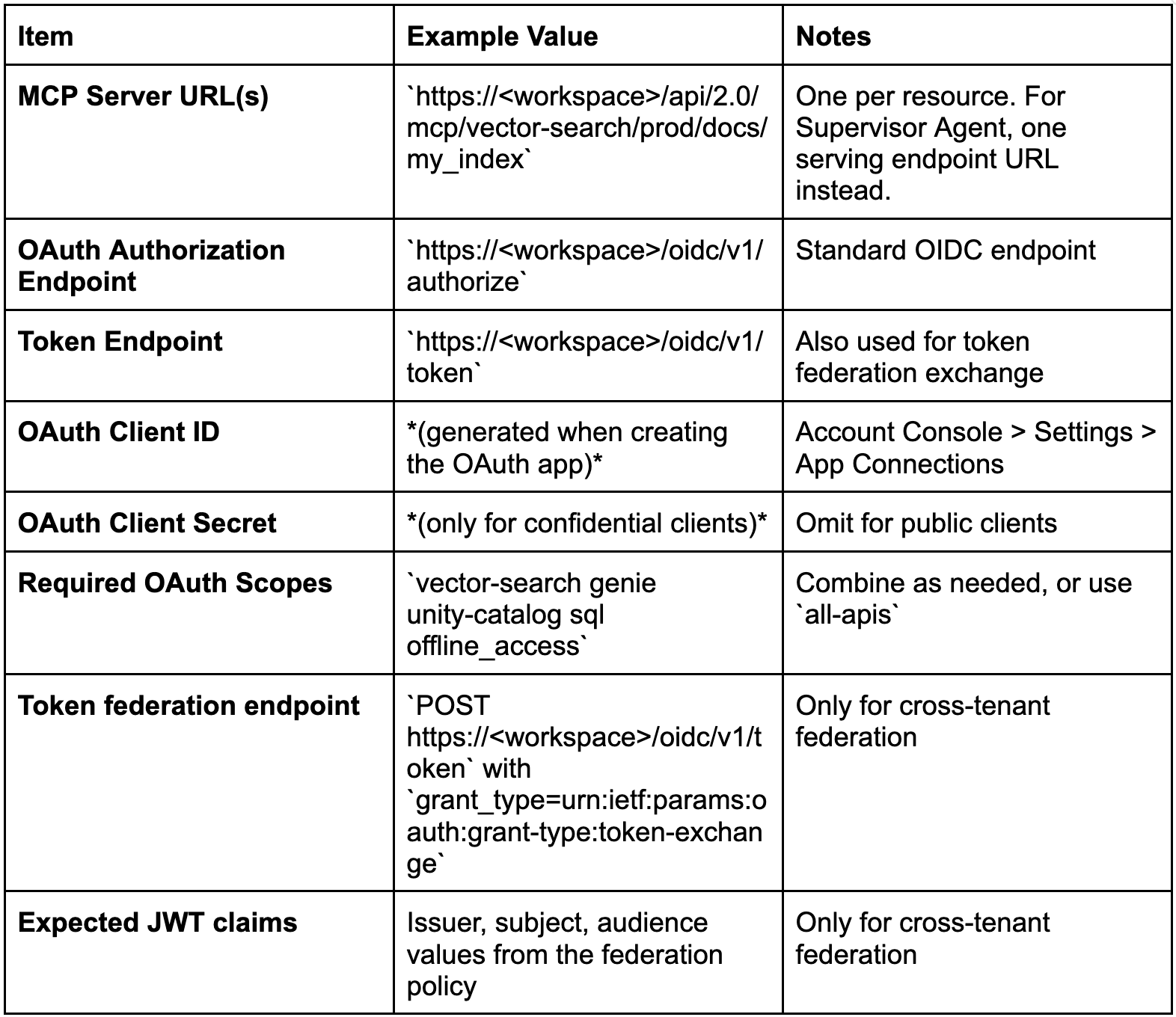
Question 6: What Information Needs to Be Exchanged Between Teams?
Setting up the integration requires a handshake between the Databricks team and the external agent team. Here is exactly what each side provides.
From the Databricks side
From the external agent team
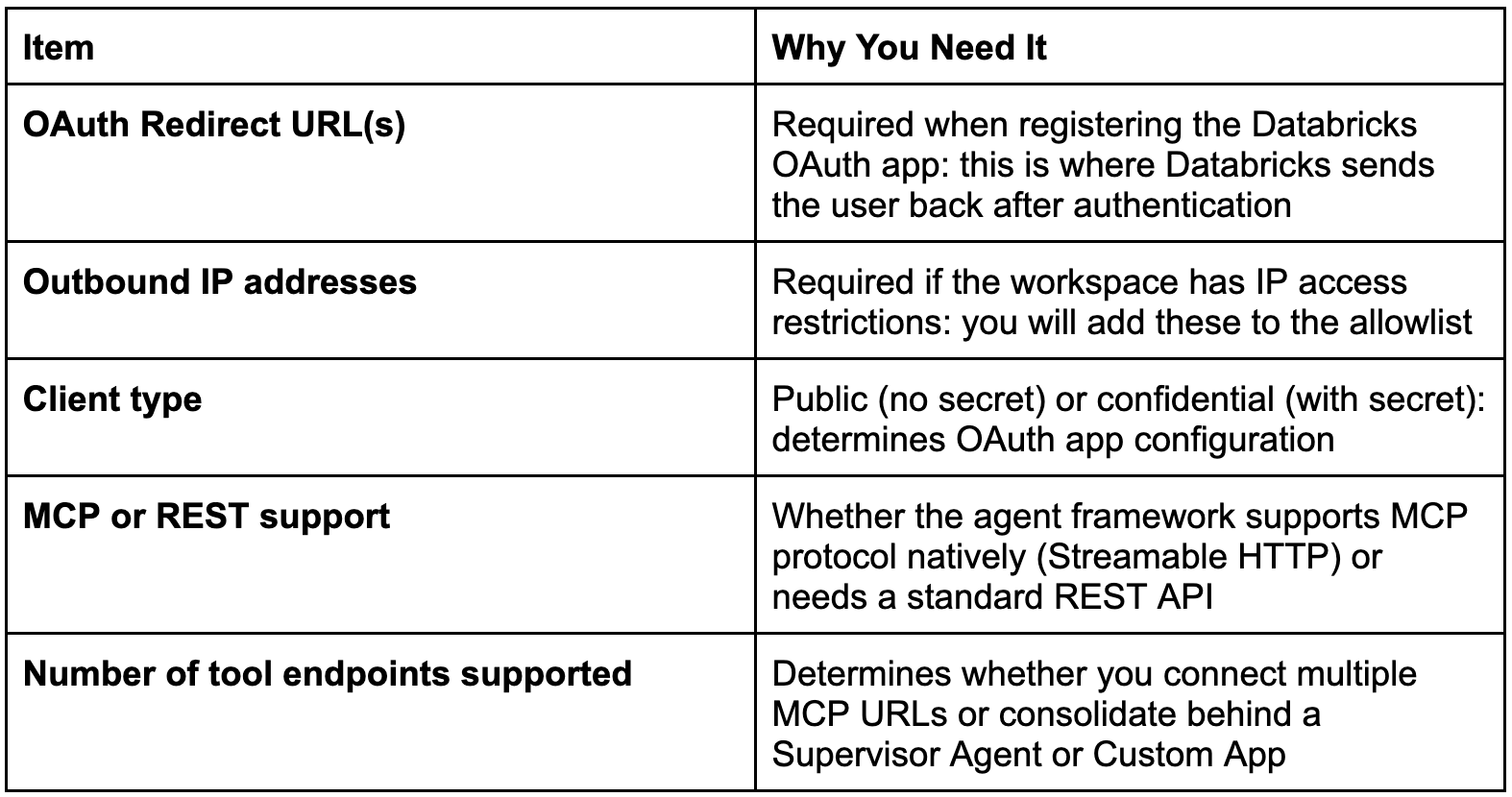
Setup steps on the Databricks side
Get redirect URLs and IPs from the external agent team.
Create the OAuth app: Account Console > Settings > App Connections > Add connection.
Name: descriptive (e.g., foundry-mcp-client)
Redirect URLs: from agent team
Client type: as specified by agent team
Scopes: combine as needed
Allowlist IPs in the workspace IP access list (if applicable).
Grant UC permissions: ensure users or SPs have access to the vector search index, Genie space, UC functions, or tables.
Share credentials: send the agent team the client ID, endpoints, and MCP server URLs.
Configure AI Gateway: set up rate limits, enable usage tracking.
Automation-friendly OAuth app creation via CLI:
databricks account custom-app-integration create --json ‘{
“name”: “foundry-mcp-client”,
“redirect_urls”: [”https://<redirect-from-agent-team>”],
“confidential”: true,
“scopes”: [”vector-search”, “genie”, “unity-catalog”, “offline_access”]
}’
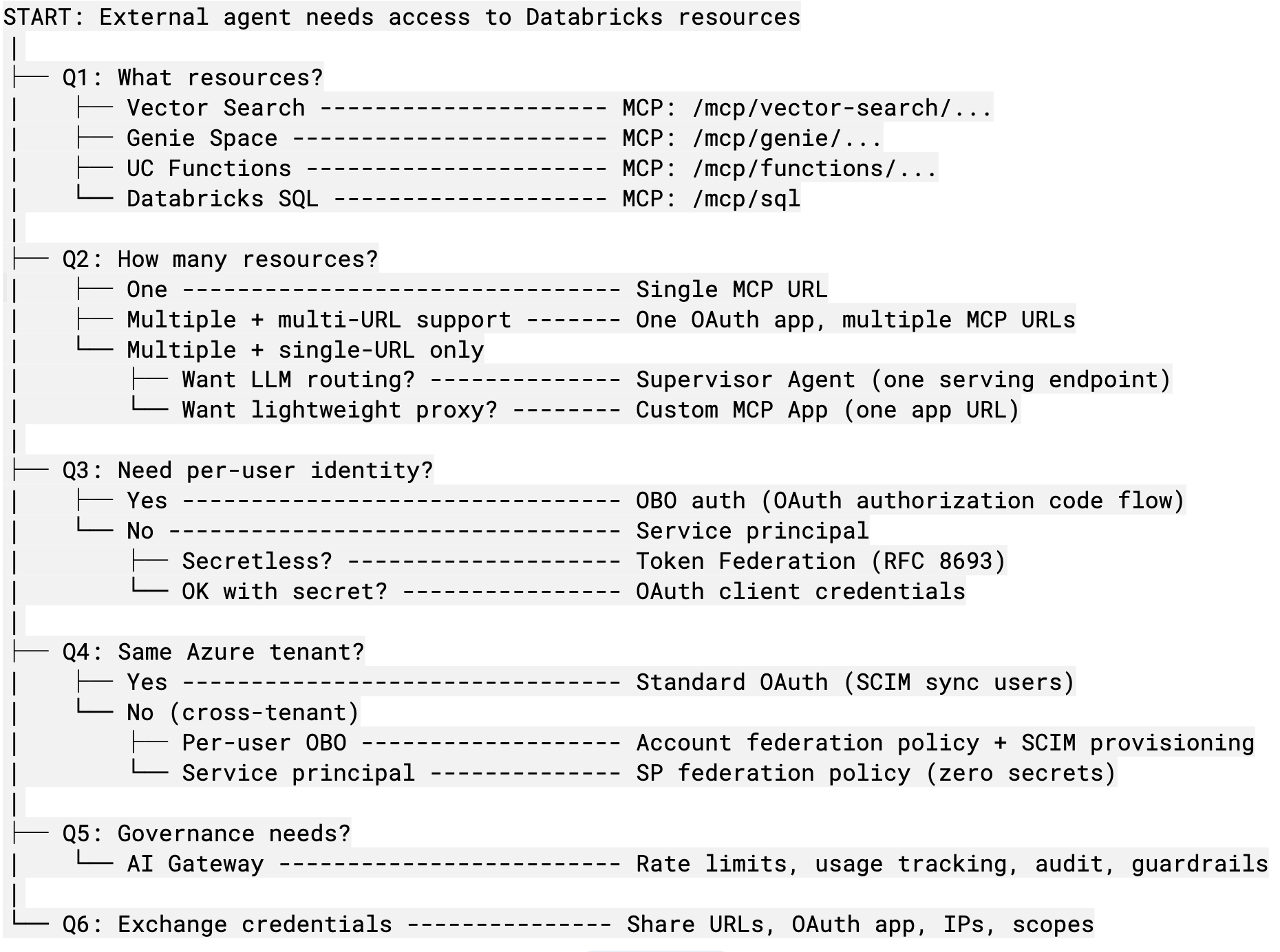
The Decision Tree at a Glance
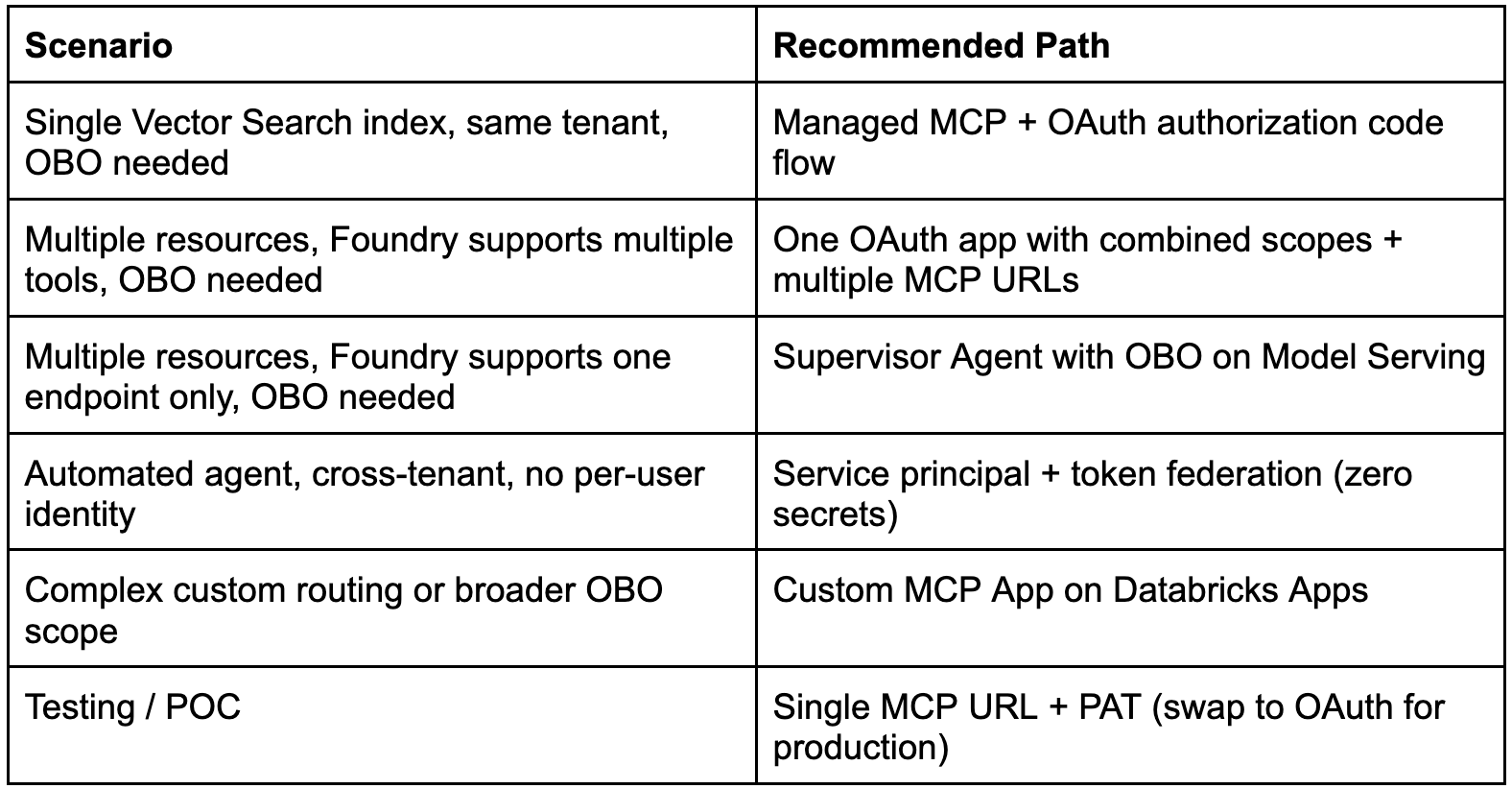
Common Scenarios (Quick Paths)
Closing Thoughts
Working through these six questions before writing any code keeps you from over-engineering a Supervisor Agent when a single MCP URL would have done the job, or from committing to OBO before confirming that your agent framework supports authorization code flow.
If you take only one thing from this post: answer the cross-tenant question early. Tenant topology determines whether you need a federation policy, and federation policies require account admin access on the Databricks side. Discovering that requirement after you have built half the integration is painful.
Done well, none of this complexity ever reaches the user. They open Teams, ask “what was our on-time delivery rate in the Northeast last week,” and get back numbers that respect their permissions, their region, their role. They never see the OAuth flow, the supervisor routing, or the federation policy. They just get the answer where they were already working. That is the whole point.
References
Glossary
Term
Definition
MCP
Model Context Protocol, an open standard for connecting AI agents to tools and data sources
OBO
On-behalf-of authentication: the agent acts with the end user’s identity and permissions
Token Federation
Exchanging an external IdP JWT for a Databricks OAuth token without storing Databricks secrets
AI Gateway
Databricks’ central governance layer for LLM endpoints, MCP servers, and coding agents
Supervisor Agent
A multi-agent orchestrator that routes queries to specialized sub-agents behind a single endpoint