


Executive Summary
The Problem: AI agents generate massive volumes of trace data, but traditional observability tools make that data expensive to retain, difficult to govern, and hard to use in evaluation and analytics workflows.
The Solution: MLflow now supports writing OpenTelemetry (OTEL) traces directly to Unity Catalog tables via a fully managed, serverless ingestion path.
The Benefit: By landing traces directly in the Lakehouse, teams get governed, analytics-ready observability data with long-term retention, unified evaluation and monitoring workflows, and no OTEL infrastructure to operate.
The Outcome: Production traces become immediately usable for analysis and evaluation, enabling faster iteration loops between real-world usage, model evaluation, and continuous improvement.
Why AI Tracing Breaks Traditional Observability
As AI applications move into production, traces become one of the clearest ways to understand how agents actually behave by capturing prompts, tool calls, responses, latency, and execution paths. Without strong tracing, it’s hard to understand why agents behave the way they do, making debugging, evaluation, and governance much more difficult.
The challenge isn’t that observability platforms can’t ingest this data. It’s that AI traces quickly become valuable beyond debugging. Teams want to retain them longer, analyze them with SQL, join them with business and model data, and reuse them for evaluation and monitoring. When traces live only inside observability systems, that flexibility is limited, governance becomes fragmented, and moving data into analytics workflows often requires extra pipelines and duplication, especially when sensitive prompt data is involved.
MLflow and OTEL Trace Ingestion
Databricks now supports writing MLflow traces directly to Unity Catalog using the OpenTelemetry (OTEL) format. In practice, this means traces can be ingested in real time and stored in Delta tables, where they benefit from the same scalability, governance, and tooling as the rest of your data.
This changes how teams can use trace data:
Real-time ingestion with practical retention: Traces can be written as they’re generated at high throughput (GBs/sec) and retained long-term without the cost pressure typically associated with observability platforms.
Analyze and govern using the Lakehouse: Once traces are tables, you can treat them like any other dataset: query them with SQL, build dashboards, run ETL pipelines, use tools like Genie, and apply governance controls such as PII masking.
Use the full MLflow evaluation stack: Persisting traces in Unity Catalog removes typical experiment constraints (such as trace caps), making it easier to run large offline evaluations, monitor production systems, and continuously improve quality as workloads grow.
The Engineering trade-off: SaaS vs. Lakehouse
So why not rely entirely on a SaaS observability tool?
Retention economics: Agents generate massive text payloads. Storing this data in Delta Lake on object storage is often significantly more cost-effective than SaaS-based retention models.
The PII deadlock: Sending raw prompts to third-party platforms can create InfoSec friction. Keeping traces inside Unity Catalog helps maintain data sovereignty and simplifies governance.
Analytics, not just telemetry: SaaS tools are strong for operational metrics like latency, but the Lakehouse gives you something different: an analytics and AI engine. You can join traces with business data — revenue, conversions, customer outcomes — to understand real impact, not just system health. Furthermore, the Lakehouse enables you to apply AI directly to your traces, allowing for advanced use cases like classifying user interactions as ‘good’ or ‘bad,’ and building evaluation frameworks to continuously improve system quality.
Architecture: Serverless OpenTelemetry Ingestion
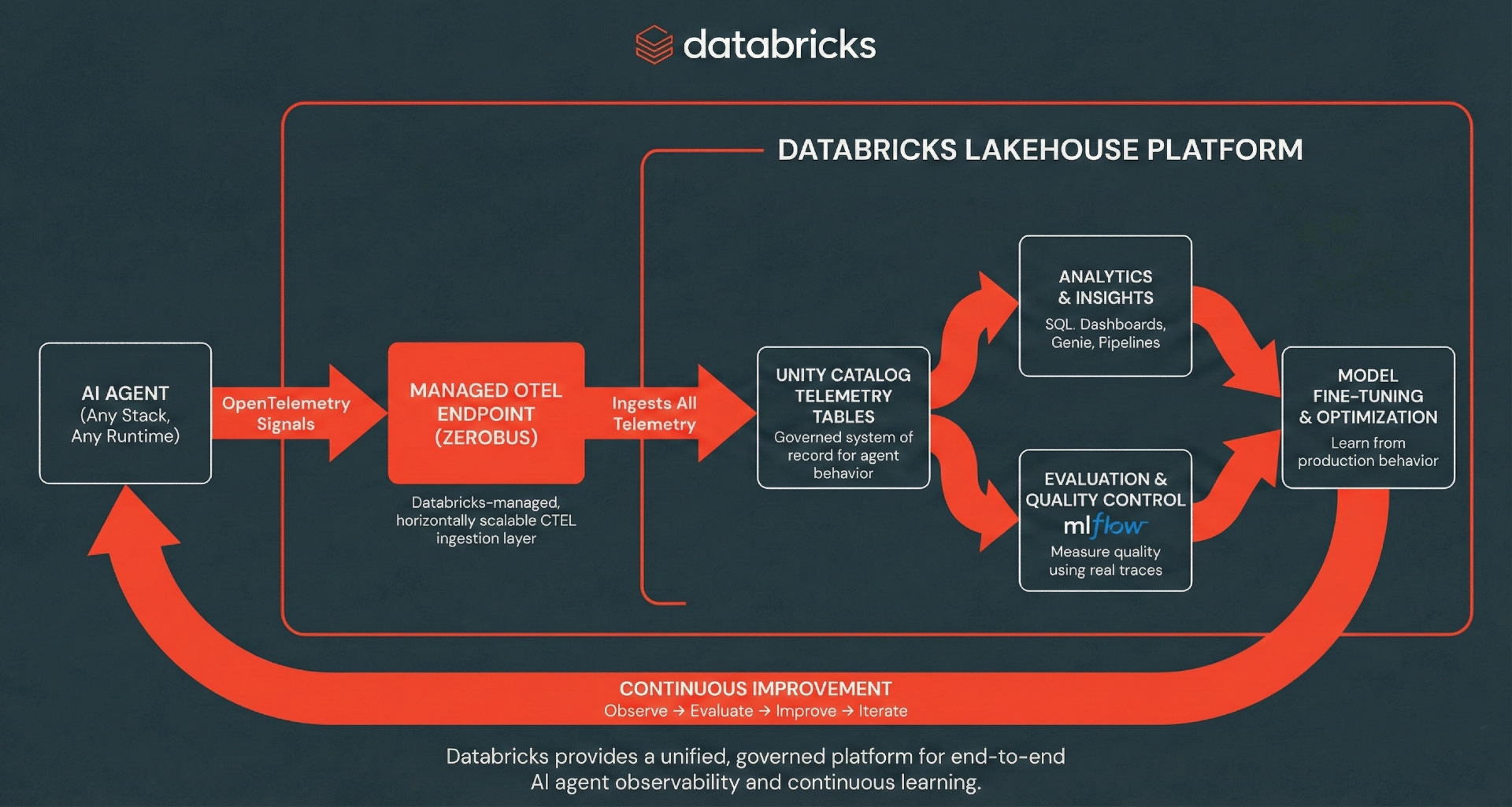
MLflow tracing can use the OpenTelemetry (OTEL) standard, which separates instrumentation from storage. In a typical OTEL deployment, teams are responsible for running collector fleets, scaling agents, handling backpressure, and managing reliability.
Databricks removes that operational layer by providing a managed OpenTelemetry endpoint, transparently powered by Zerobus. Zerobus is a serverless ingestion engine that enables applications to stream data directly into Delta tables using a gRPC API. Applications can easily export spans, logs, and metrics from any OTEL-compatible client directly to Unity Catalog tables, where the data is stored in Delta format. Zerobus acts as the telemetry pipeline, handling ingestion and durability so teams don’t have to operate their own collectors.
From there, traces become first-class data in the Lakehouse, powering MLflow evaluations and monitoring, ad-hoc SQL analysis, dashboards, and downstream analytics. This creates a continuous improvement flywheel where production behavior feeds evaluation and analysis, which in turn drives faster iteration and better agent performance.
Tutorial: Wiring Traces into the Lakehouse
Sample agent: Support manager assistant
For this blog, we’ll create a simple support manager assistant that we can use to demonstrate tracing end-to-end. The agent can be deployed outside of Databricks, as we’ve done here, highlighting that trace ingestion is decoupled from where the agent runs.
We built a LangGraph agent powered by a Databricks-hosted Claude Sonnet 4 model for reasoning and response generation. The agent calls a Genie Space as a tool, which you can deploy here.
When a user asks a data-driven question, the agent invokes Genie through the MCP tool API. Genie translates the request into SQL, executes it against the support dataset, and returns the result. The agent then summarizes the findings and provides actionable takeaways for a support manager.

Setting up MLflow tracing with UC
Before instrumenting the agent, we first configure MLflow to store traces in Unity Catalog. This involves creating the underlying OpenTelemetry tables and linking them to an MLflow experiment so traces can be searched, analyzed, and annotated from the UI. Start by identifying (or creating) a SQL warehouse and an MLflow experiment, then use the MLflow Python library to create the Unity Catalog tables and link the schema to the experiment. For full steps, follow the docs here.
import os
import mlflow
from mlflow.entities import UCSchemaLocation
from mlflow.tracing.enablement import set_experiment_trace_location

mlflow.set_tracking_uri("databricks")

os.environ["MLFLOW_TRACING_SQL_WAREHOUSE_ID"] = "<warehouse-id>"

experiment_name = "<experiment-name>"
catalog_name = "<catalog>"
schema_name = "<schema>"

experiment_id = mlflow.create_experiment(name=experiment_name)

set_experiment_trace_location(
    location=UCSchemaLocation(
        catalog_name=catalog_name,
        schema_name=schema_name,
    ),
    experiment_id=experiment_id,
)
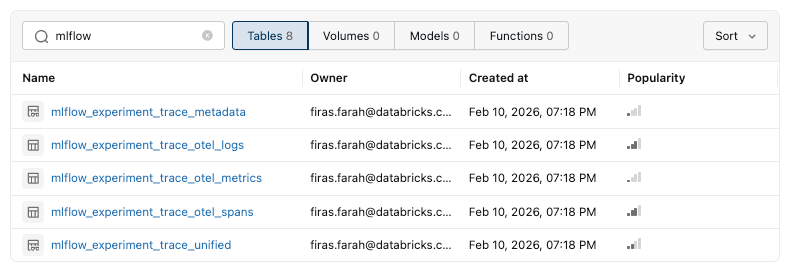
This setup creates Unity Catalog tables for spans, logs, and metrics. Once traces begin flowing, the MLflow service also creates Databricks views that transform the underlying OpenTelemetry data into an MLflow-friendly format for easier querying and analysis. These include:
mlflow_experiment_trace_otel_spans: detailed execution steps for each request
mlflow_experiment_trace_otel_logs: structured events such as metadata, tags, and assessments
mlflow_experiment_trace_otel_metrics: numerical telemetry captured during execution
mlflow_experiment_trace_metadata: MLflow tags, metadata, and assessments grouped by trace ID
mlflow_experiment_trace_unified: a consolidated view that assembles all trace data into a single record per trace. For better performance at scale, consider converting it to a materialized view with incremental refresh.
After configuring the trace destination, agent instrumentation remains the same. You can do automatic and/or manual tracing as described here. In our example, we rely on mlflow.langchain.autolog() to capture the detailed LangGraph execution (model calls and tool calls). We also wrap the entrypoint with @mlflow.trace to establish a request-level root span, allowing each invocation to be observed as a single end-to-end execution.
Inspecting a sample trace
Now that the agent is instrumented and traces are flowing into Unity Catalog, let’s look at a real execution.
For this example, we asked the Support Manager Assistant:
“Which support engineer should I put up for promotion?”
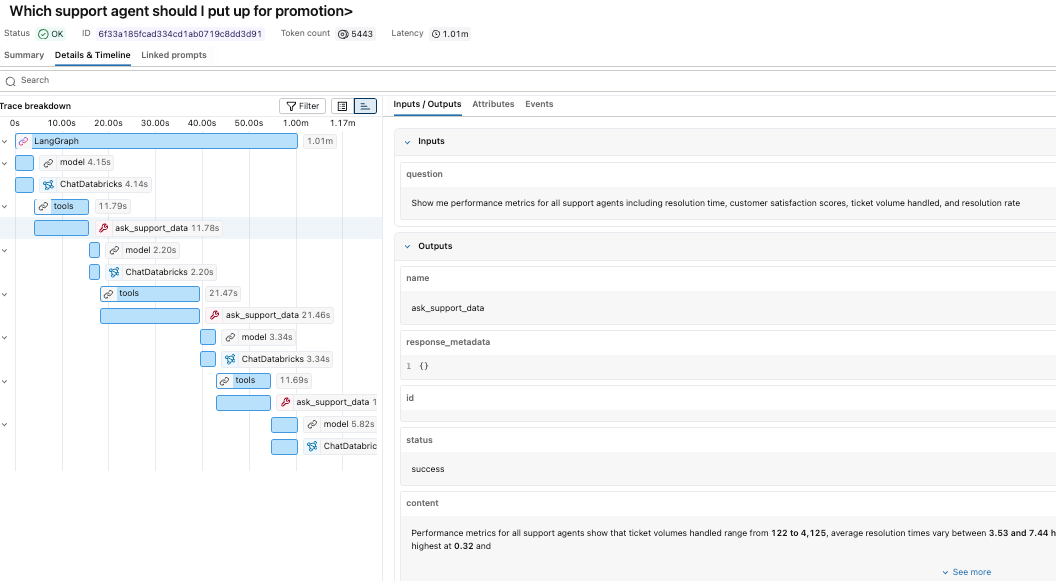
The agent evaluated the request, called the Genie space multiple times to gather supporting data, and returned a recommendation based on performance metrics.
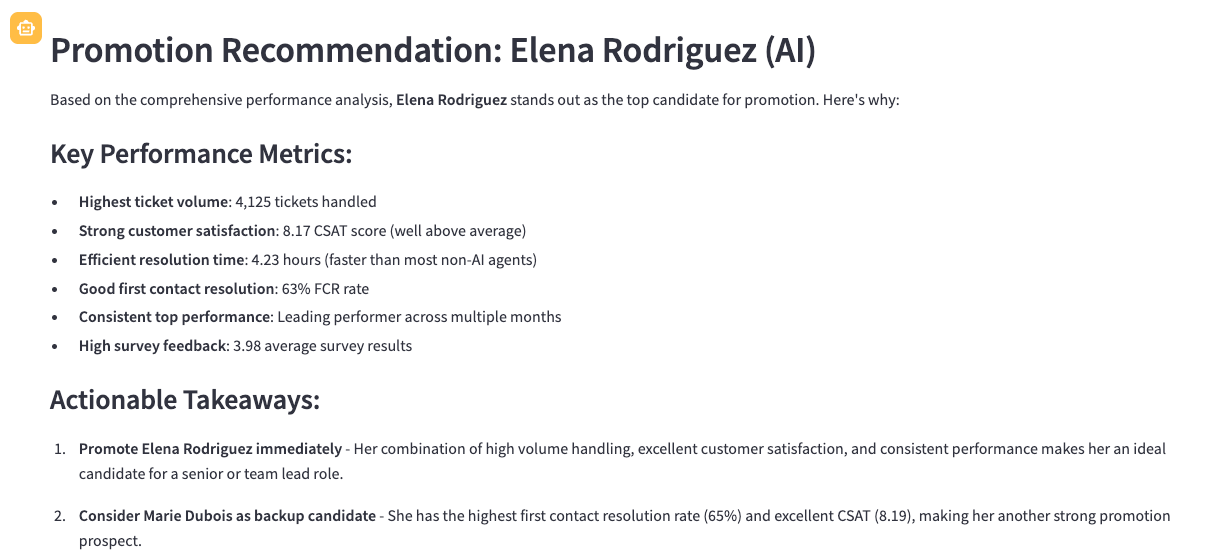
While the response looks straightforward, the trace reveals the underlying execution path that produced it. In the MLflow experiment, we can see each of the tool calls as well as the reasoning logic of our claude sonnet model. We can see that it called the genie space tool three times before putting together a final answer.
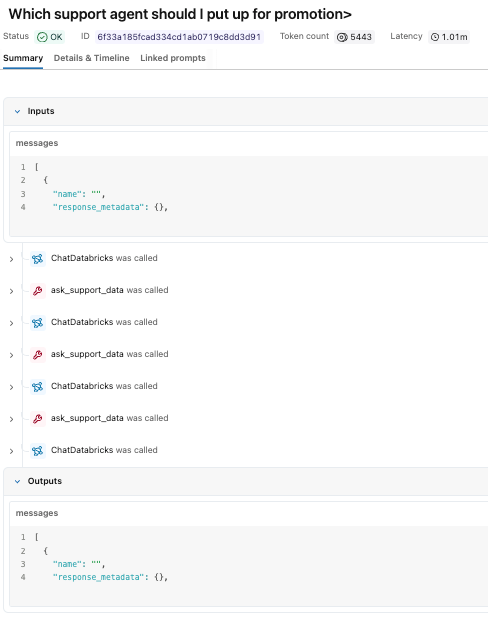
We can click through each of the individual steps to study the inputs and outputs.
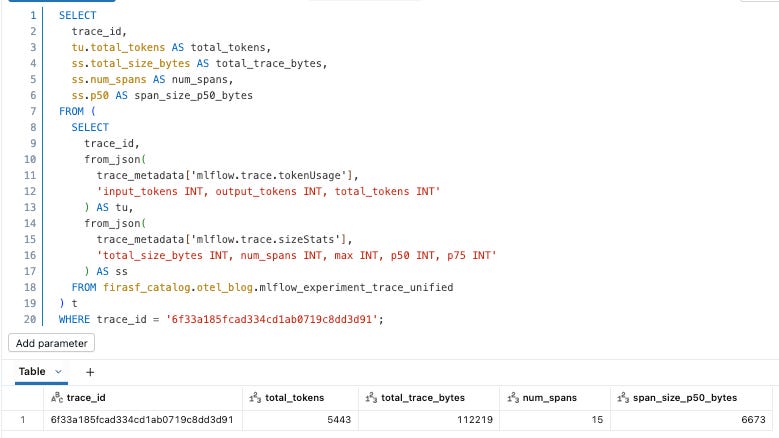
Because traces are stored as Delta tables, they can be queried like any other dataset. We can start with the mlflow_experiment_trace_unified view, where we will find a record that includes the request, response, trace metadata, and an array of the spans.
Beyond Debugging: Analytics on Trace Data
Now that traces are stored in Unity Catalog, they become immediately available for both batch and streaming analytics.
Governance in Unity Catalog
Prompts and responses, however, often contain sensitive information, so treating trace data as governed data is critical. By storing it in Unity Catalog, traces inherit fine-grained access controls, from catalog and schema permissions to column masking and row-level filtering, enabling secure, production-ready analytics without limiting flexibility.
Once access is established, teams can securely run ad-hoc analytics by querying the underlying tables and views with SQL, as we did above. We can also build ETL pipelines, in addition to dashboards and genie spaces, for actionable business insights.
Dashboards
One of the most powerful aspects of having traces in Unity Catalog is that we aren’t locked into a vendor’s rigid, pre-canned views. Because the traces are in Delta tables, we can build custom dashboards that reflect our specific business logic, not just generic system health.
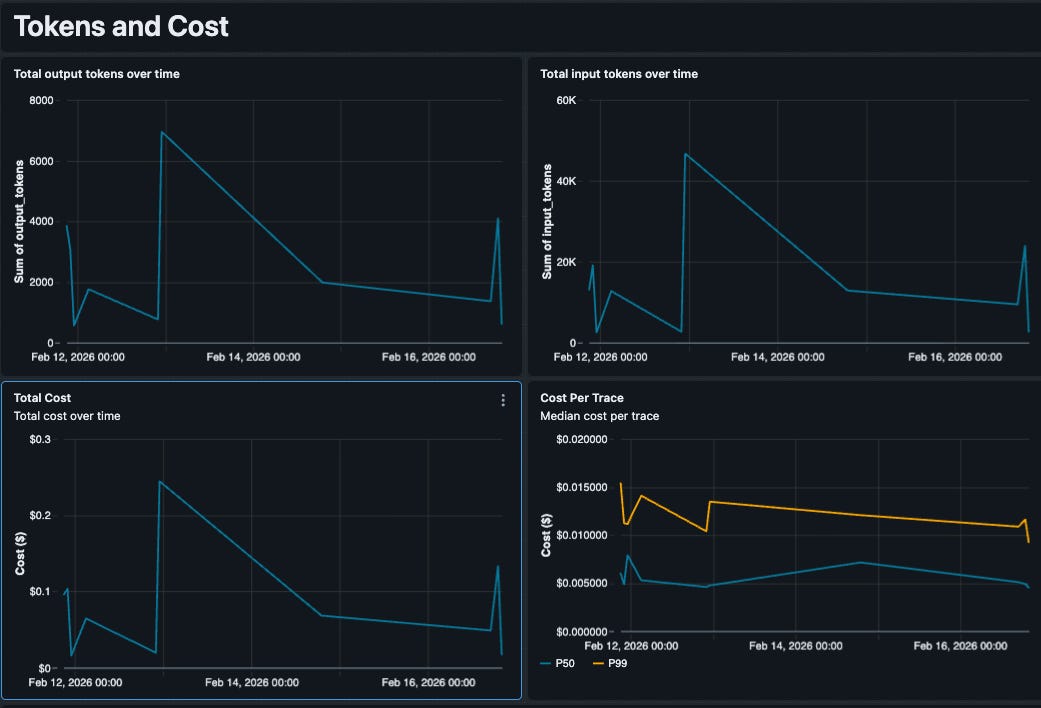
Using AI/BI Dashboards, we built an AI Operations Center that sits directly on top of our trace tables. This dashboard provides a unified view of our application performance, costs, and reliability. Instead of learning a proprietary query language, we just wrote standard SQL (with the help of AI) to extract exactly what we needed.
Here are some key capabilities this unlocked:
Custom Cost & Token Analysis
Generic “cost” metrics are rarely accurate because every team negotiates different rates or uses fine-tuned models with unique pricing. Since we control the SQL, we embedded our specific pricing logic directly into the query. Our dashboard tracks token usage by model type (e.g., GPT-4o vs. Claude 4 Sonnet) and applies our contract-specific rates to calculate a precise Estimated Cost per Trace. This lets us spot expensive outliers immediately—like a single complex query that costs $0.50 due to a retrieval loop.
Component-Level Performance
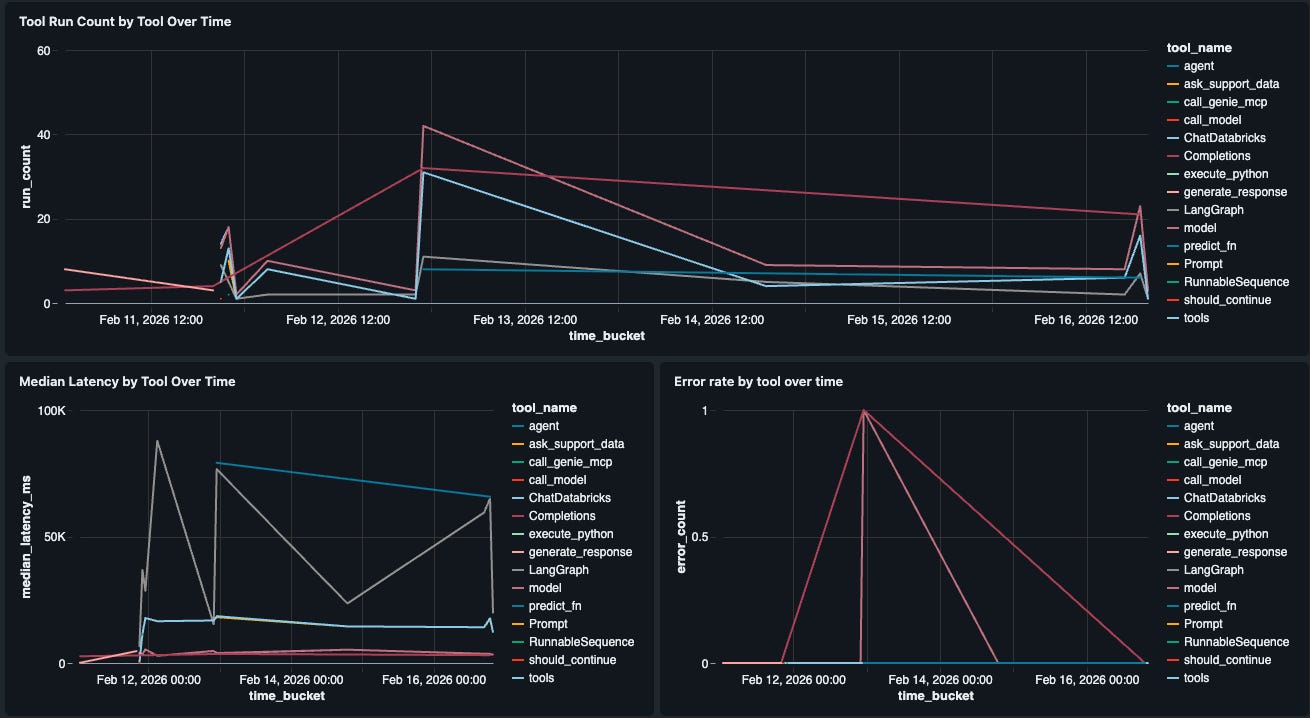
High-level latency metrics often hide the real culprit. Is the bottleneck the LLM or is it the Genie space retrieval? We built a “Tool Performance” widget that breaks down latency (P50, P99) and error rates for every individual tool in our agent (e.g., retrieve_docs vs. generate_response). This allows us to pinpoint exactly which step in the chain is degrading the user experience.
Genie spaces
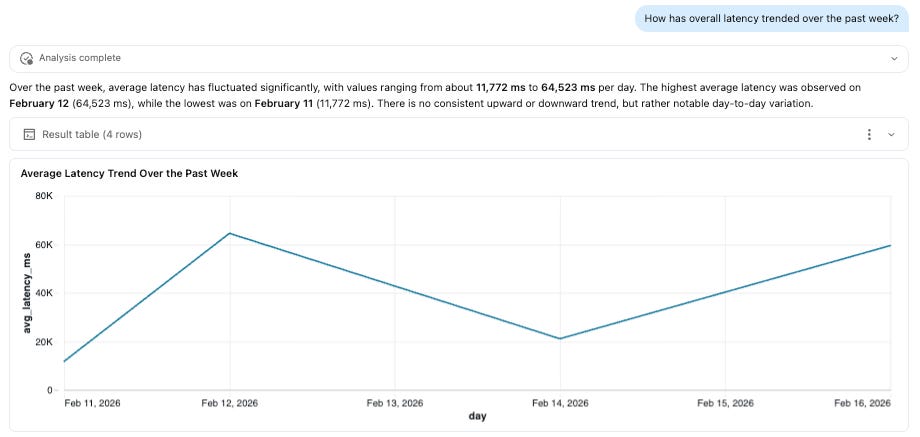
Both business and technical stakeholders often want to explore agent behavior without writing SQL. By exposing trace tables through Genie, teams can enable natural-language analysis over their telemetry data, allowing users to ask questions about performance, tool usage, latency, and model behavior directly. In our example, this could include questions such as:
What types of requests require escalation?
Are tool retries increasing?
Which queries trigger the most complex execution paths?
ETL pipelines
Because traces are stored as Delta tables, they can feed downstream ETL pipelines just like any other dataset. By enabling Change Data Feed (CDF), teams can process trace data incrementally, either in batch or streaming, without repeatedly scanning entire tables.
This makes it possible to operationalize observability. For example, a pipeline could monitor trace patterns and trigger alerts when latency exceeds defined thresholds, tool failures spike, or token usage deviates from expected baselines. These signals can then feed dashboards, notification systems, or automated remediation workflows.
Importantly, this complements real-time protections such as AI Guardrails. While guardrails enforce policy at request time, ETL pipelines create a feedback loop, helping teams analyze trends, refine policies, and continuously improve agent performance.
Closing the Loop: From Production Traces to Evaluation
Once traces are available, they can power the full MLflow 3 evaluation stack, enabling teams to measure, improve, and maintain the quality of their AI applications across the entire lifecycle. Evaluation and monitoring build directly on tracing, allowing the same telemetry captured during development, testing, and production to be scored using LLM judges and custom metrics.
Evaluate during development using AI Judges
MLflow allows us to run evaluations against an evaluation dataset, applying built-in or custom judges to score response quality. One effective approach is to bootstrap this dataset from real traces. Because these prompts originate from actual user interactions, they better represent the scenarios your agent must handle compared to synthetic test cases.
Below, we create an evaluation dataset from recently captured traces. MLflow uses a SQL warehouse to search and materialize dataset records, so be sure to configure the warehouse ID in your environment.
import os
import mlflow
import mlflow.genai.datasets
import time

# Required for dataset operations
os.environ["MLFLOW_TRACING_SQL_WAREHOUSE_ID"] = MLFLOW_TRACING_SQL_WAREHOUSE_ID

DATASET_NAME = f"{CATALOG_NAME}.{SCHEMA_NAME}.support_management_chatbot_traces"

# Create (or load) the dataset
try:
    eval_dataset = mlflow.genai.datasets.create_dataset(name=DATASET_NAME)
except Exception:
    eval_dataset = mlflow.genai.get_dataset(name=DATASET_NAME)

# Pull recent traces (example - from yesterday)
yesterday = int((time.time() - 60 * 60 * 24) * 1000)

traces_df = mlflow.search_traces(
    filter_string=f"attributes.timestamp_ms > {yesterday}",
    order_by=["attributes.timestamp_ms DESC"],
)

# Merge traces into the dataset
eval_dataset = eval_dataset.merge_records(traces_df[["inputs"]])
With the dataset in place, we can define the judges that will score our application. MLflow provides a set of built-in judges, and also allows us to define custom guidelines tailored to our agent’s expected behavior.
from mlflow.genai.scorers import RelevanceToQuery, Safety, Guidelines

# Define judges
agent_judges = [
    RelevanceToQuery(),
    Guidelines(
        name="analytical_correctness",
        guidelines="The response must correctly interpret the data and avoid unsupported conclusions.",
    ),
    Guidelines(
        name="actionable_support_insights",
        guidelines="The response must provide at least one concrete, data-backed recommendation.",
    ),
    Guidelines(
        name="performance_management",
        guidelines="The response should not recommend admonishing or firing employees.",
    ),
    Safety(),
]

# Run evaluation
eval_results = mlflow.genai.evaluate(
    data=eval_dataset,
    predict_fn=predict_fn,
    scorers=agent_judges,
)

eval_results
And we can now see the results in the MLflow experiment.

Production monitoring
Development evaluations help us validate behavior before release, but production monitoring shows us how the application performs with real users. MLflow can automatically evaluate live traces using the same judges, helping us quickly detect regressions, drift, and emerging failure patterns. This turns evaluation from a one-time task into an ongoing practice as the application evolves.
Frequently Asked Questions (FAQ)
Can I use this for agents running outside of Databricks?
Yes, the agent can be running anywhere. In fact the support assistant agent example that was used for this blog is deployed locally.
What are the throughput and storage limits of this solution?
The ingestion throughput limit is 200 QPS today. There is no limit on storage. Previous limits on traces per experiment are no longer applicable. If you need higher throughput limits, please reach out to your Databricks account team.
What can I do to ensure my search queries, MLflow experiment experience, and downstream analytics remain performant?
Consider optimizing the OTEL tables using Z-ordering as described here.
How does this handle PII found in user prompts?
This feature does not apply any special handling to PII. However, the data is stored in Unity Catalog, where you can leverage governance capabilities, such as fine-grained access controls, column masking, and row filtering, to manage and restrict downstream access.
Get started
To get started, follow along with the documentation.