Check out Databricks native Slack Integration before implementing a custom solution!
https://docs.databricks.com/aws/en/genie-one/genie-slack
Connect multiple Databricks Genie spaces to Slack with per-user authentication, intelligent routing, semantic caching, and audit logging — all deployed as a Databricks App. A production-grade Slack bot that brings Databricks Genie directly into Slack, allowing users to ask natural-language questions across multiple data domains without leaving their workspace.
Special Thanks
I extend my sincere thanks to Sunil Patil (https://www.linkedin.com/in/pppsunil/) for his invaluable help during the brainstorming phase. His insights were instrumental in solving the complex challenge of managing multiple genies across multiple Slack channels. This project definitely levelled up thanks to his help!
Features
Multi-Genie Support: Route questions to the right Genie space based on channel, thread, AI classification
Per-User Authentication: Use OAuth 2.0 User-to-Machine with PKCE so queries run under each user’s Unity Catalog permissions
Threaded Conversations: Maintain Genie context across Slack threads
Semantic Cache: Reuse answers for similar questions using Databricks Vector Search
Delta-Aware Cache Invalidation: Automatically invalidate cached answers when underlying Delta tables change
Audit Logging: Track user activity, cache hits, latency, errors, and Genie usage in Delta tables
Reliable Genie Calls: Handle rate limits with retry, exponential backoff, and adaptive polling
Native Deployment: Run the entire application as a Databricks App with no external infrastructure
Architecture
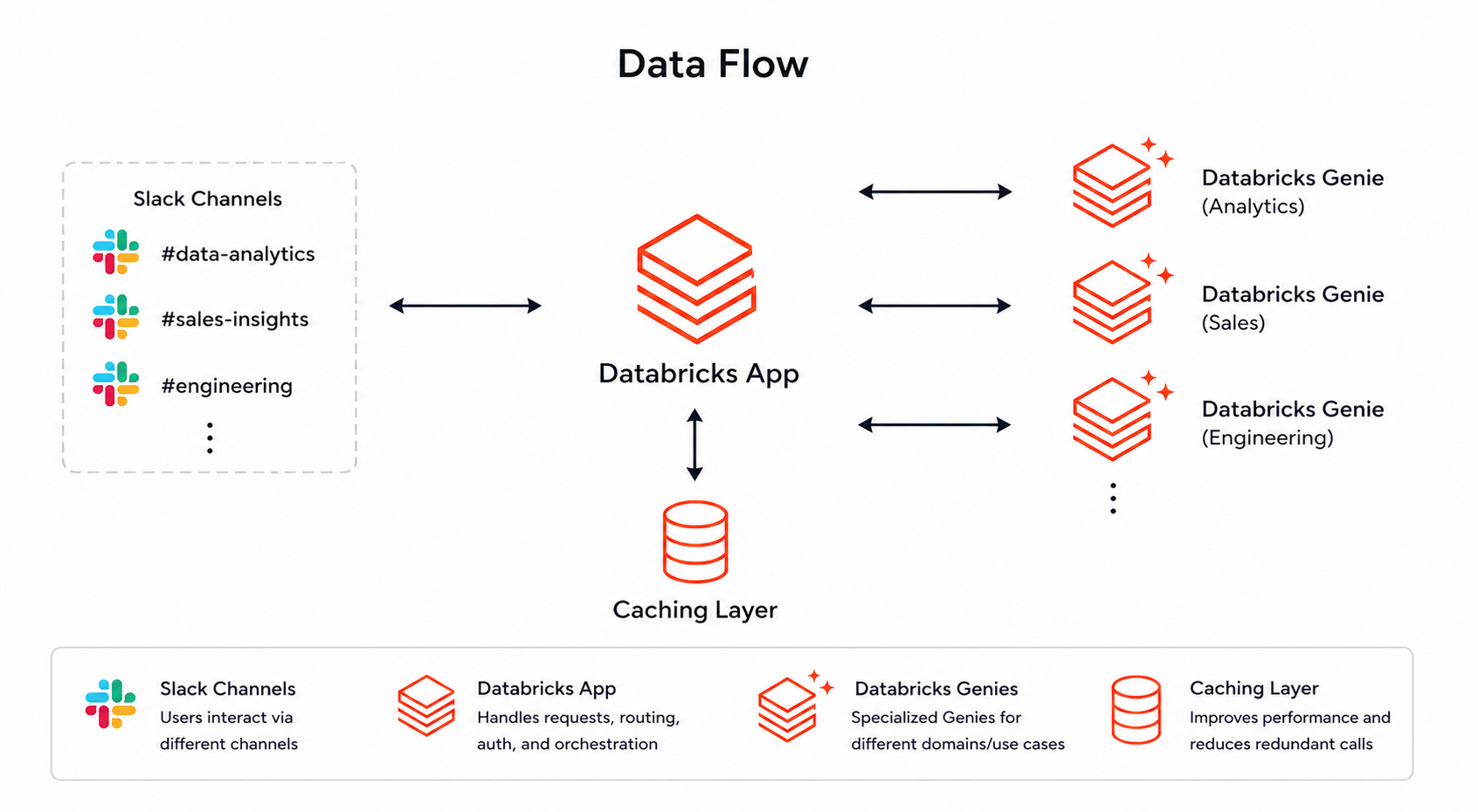
The application runs as a Databricks App and uses two services:
Slack Bolt in Socket Mode to listen for messages, mentions, button clicks, and threaded replies
Flask to handle OAuth callbacks and health checks
When a user asks a question in Slack, the bot follows this flow:
1. Checks whether the Slack user has a valid Databricks OBO token
2. Routes the question to the correct Genie space
3. Looks for a semantically similar cached response
4. Validates cached answers against Delta table versions
5. Sends the question to Genie on cache miss
6. Formats the response in Slack with SQL, tables, and suggested follow-ups
7. Writes cache metadata and audit logs to Delta
Prerequisites
1. Databricks workspace
Active Databricks workspace
One or more Genie spaces
SQL Warehouse
Unity Catalog permissions
Vector Search endpoint and index
2. Slack App
Slack workspace with admin access
Slack app with Socket Mode enabled
Bot token and app-level token
3. OAuth App
Databricks OAuth application configured for User-to-Machine authentication
Redirect URI pointing to the Databricks App callback endpoint
4. Download the application code and make the necessary updates to the config values in app.yaml. Download all files from repo: https://github.com/adgitdemo/ad_databricks/tree/main/multi-genie-multi-slack-channel-app
Setup Instructions
1. Slack App Setup
Create a Slack app and enable Socket Mode.
Under OAuth & Permissions, add these bot token scopes:
app_mentions:read
chat:write
im:history
im:read
im:write
channels:history
groups:history
users:read
Subscribe to these bot events:
app_mention
message.im
message.channels
message.groups
Install the app to your workspace and save:
Bot User OAuth Token
App-Level Token
Signing Secret
2. Databricks OAuth Setup
Create a Databricks OAuth application for User-to-Machine authentication.
Configure the redirect URI to point to the Flask callback route exposed by the Databricks App.
The bot uses OAuth 2.0 with PKCE to securely link each Slack user to their Databricks identity. After authentication, the user’s pending question is automatically processed, so they do not need to re-type it.
3. Databricks Workspace Setup
Prepare the required Databricks resources:
Genie spaces
SQL Warehouse
Cache Delta table
Audit Delta table
Vector Search endpoint
Vector Search index
Catalog and schema permissions
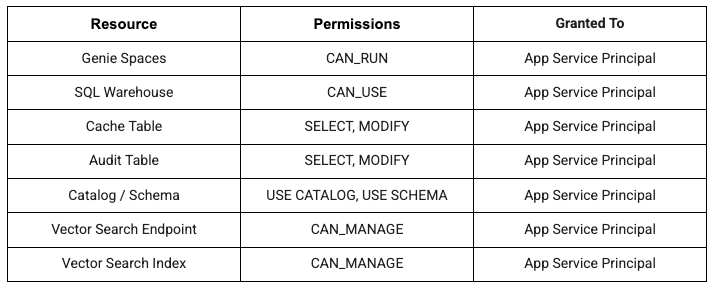
Permission Grants Summary
4. Configure the Application
Update the application configuration with:
Slack bot token
Slack app token
Slack signing secret
Databricks workspace URL
OAuth client ID
OAuth redirect URI
Genie space mappings
Default Genie space alias
SQL Warehouse ID
Cache table name
Audit table name
Vector Search endpoint and index
Cache similarity threshold
Optional Service Principal fallback flag
Example routing configuration:
{
“trips-data”: {
“space_id”: “your-trips-genie-space-id”,
“description”: “Questions about trips, pickup locations, fares, and distance”
},
“finance”: {
“space_id”: “your-finance-genie-space-id”,
“description”: “Questions about revenue, spend, forecasts, and financial KPIs”
}
}
Usage
In Slack
Direct Messages:
Send a DM to your bot
Ask questions like: “Show me sales data for last month”
Channel Mentions:
Invite the bot to a channel: /invite @YourBotName
Mention the bot: @YourBotName what are the top 10 customers?
Threaded Conversations:
Continue asking questions in a thread
The bot maintains conversation context within threads
Demo Time
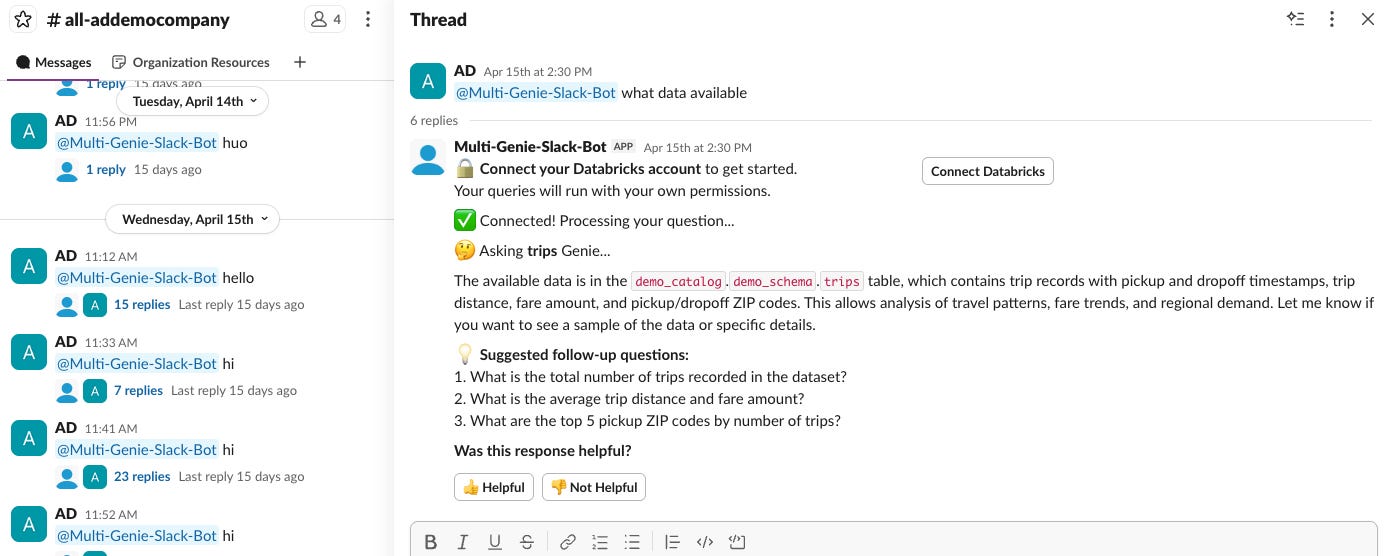
In the General Slack Channel, the bot will use the default Genie Space to answer questions.
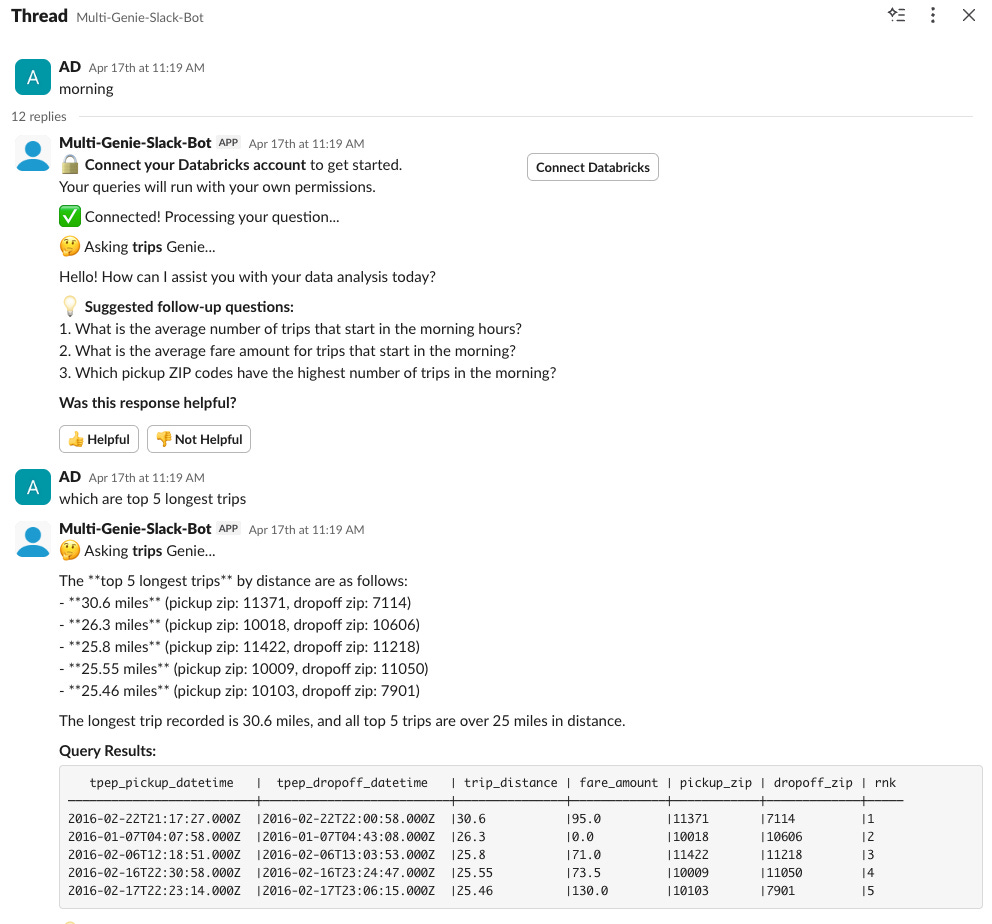
DM Thread, the bot will use the default Genie Space to answer questions.
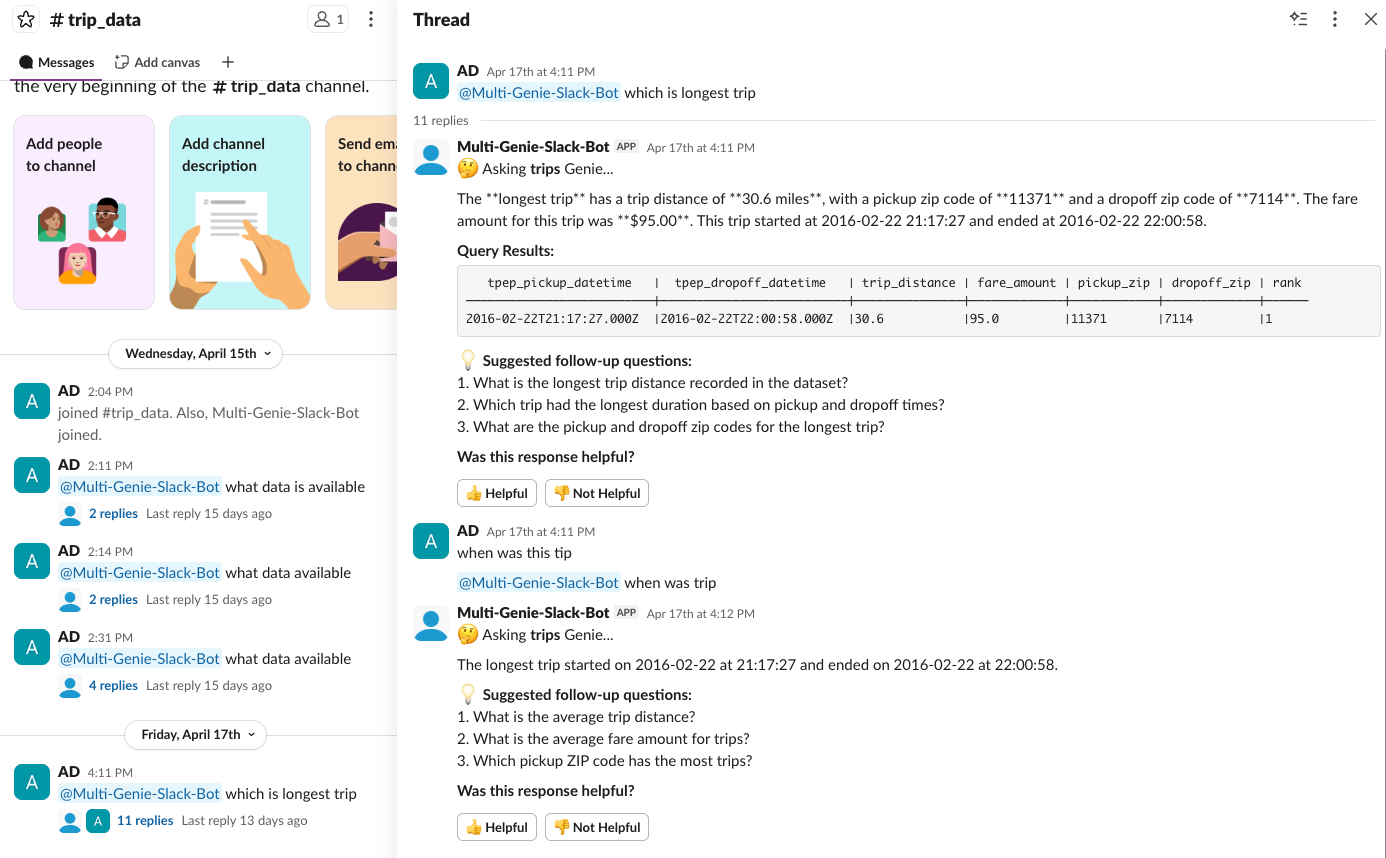
In a dedicated Trip Slack Channel, the bot will use the Trip Genie Space to answer questions.
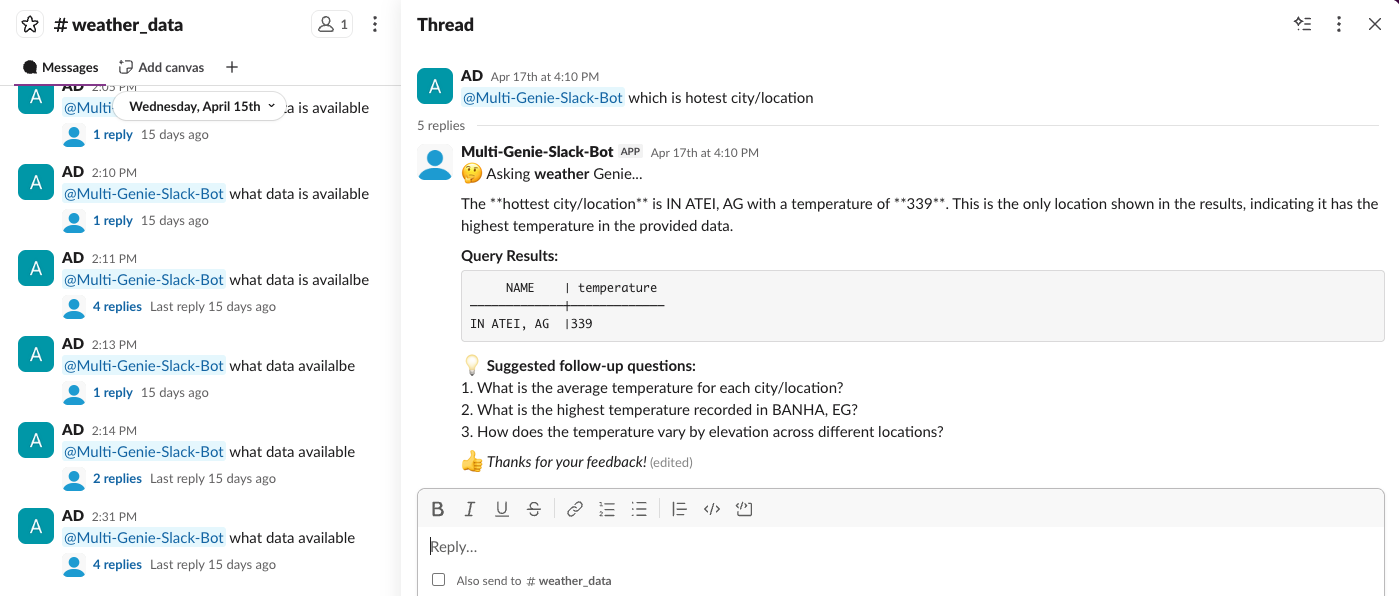
In a dedicated weather Slack Channel, the bot will use the Weather Genie Space to answer questions.