

As data volumes grow and access patterns become more demanding, traditional data layouts can quickly become a bottleneck. This post walks through a real-world migration to Liquid Clustering, focusing on the architectural limitations that triggered the change, the challenges encountered during the transition, and the practical fixes that made the migration successful at scale.
The goal was simple but demanding: near-real-time data availability and consistently fast query performance across large time ranges, even in the presence of late-arriving data and massive daily ingestion volumes.
Why Traditional Partitioning Fell Short and How Liquid Clustering Solves It
The original architecture relied on continuous streaming ingestion into Bronze tables from Kafka, followed by scheduled batch jobs that populated optimized Silver tables.Bronze tables were partitioned by date, while Silver tables were partitioned and z-ordered by relevant keys. When everything arrived on time and tables were fully optimized, query performance was excellent.
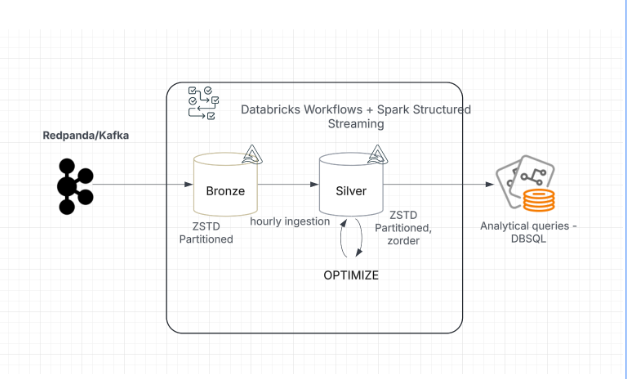
The problem began with late-arriving data.
Some events arrived days—even weeks—after their original event time. These records landed in partitions that had already been optimized, slowly reintroducing small, unoptimized files into previously clean partitions. Over time:
File counts ballooned
Queries that once ran in ~10 seconds stretched to a minute or more
Performance degraded steadily as more late data accumulated
The only way to recover performance was to re-optimize entire partitions repeatedly, which became increasingly expensive and time-consuming at scale. Rigid partition boundaries simply did not work well with unpredictable arrival patterns.
This is where Liquid Clustering became a natural fit. Instead of relying on static partitions, Liquid Clustering incrementally maintains data layout quality as data arrives. It continuously rebalances files based on clustering keys, reducing the need for repeated full rewrites and making late-arriving data far less disruptive.
Liquid Clustering addresses these issues with a multi-dimensional, incremental clustering strategy. It removes rigid partition boundaries, continuously reorganizes poorly clustered segments, and supports both eager clustering (during ingestion) and lazy clustering (post-ingestion). Using a tree-based multi-column clustering, it improves data skipping and maintains predictable, low-latency query performance even on large, late-arriving datasets.
Where Liquid Met Production Reality: Scaling Challenges and Fixes
While Liquid Clustering addressed the core architectural issue, the migration itself surfaced a new set of challenges primarily driven by scale.
High-Throughput Ingestion and Backfills
One of the first challenges during the migration to Liquid Clustering was handling the existing historical data. To adopt the new layout strategy, tens of terabytes of data per day over several months had to be backfilled and reorganized. This was challenging because the platform also had to continue processing new streaming data and maintain Silver tables for analysts. Running backfill and OPTIMIZE jobs simultaneously put the system under extreme load, pushing cluster resources to their limits.
Long-Running OPTIMIZE Jobs After Enabling Liquid
After enabling Liquid Clustering, OPTIMIZE runtimes increased noticeably—not because of Liquid alone, but due to the scale at which it was introduced. Large historical backfills were running alongside ongoing ingestion, forcing OPTIMIZE to process very large data volumes under heavy skew. Certain clustering stages ended up handling disproportionate amounts of data, resulting in large shuffles, disk spills, and increasingly unpredictable runtimes.
To address this, eager clustering was enabled for streaming writes, moving a portion of the clustering work into ingestion. This reduced the amount of reorganization required during OPTIMIZE and helped stabilize optimization runtimes, especially once batch sizes were increased and clustering work was better distributed across the cluster.
In addition, Liquid-specific tuning played a critical role in improving OPTIMIZE stability at scale. Key adjustments included:
Enhanced data skipping was enabled to reduce unnecessary data movement during clustering, significantly lowering shuffle volume and improving OPTIMIZE efficiency.
Increased clustering parallelism was also configured to distribute clustering work more evenly across the cluster, reducing skew and stabilizing runtimes for large and wide tables.
For workload-specific tuning and the exact configuration details, we recommend reaching out to Databricks, as the optimal settings can vary based on data volume and cluster characteristics.
To further reduce reliance on manual OPTIMIZE jobs, we also leveraged Predictive Optimization (PO) to automatically manage optimization workloads—this topic is discussed in more detail in the upcoming section.
Eager Clustering at Scale: Small File Challenges
While eager clustering reduced the amount of work during OPTIMIZE, it introduced a new challenge when streaming batches were too small. This was especially noticeable during large historical backfills, where each batch was around 40 GB. Although each batch was locally clustered, the small size meant that OPTIMIZE still had to rewrite many small files, resulting in high write amplification, longer runtimes, and increased operational overhead.
Solution: Batch Size as a Critical Lever
One of the most important lessons from this migration was how sensitive eager clustering is to batch size, particularly for backfills. Increasing batch sizes to larger, more meaningful units—around 1 TB per batch—changed the behavior dramatically (particularly during petabyte-scale backfills) . Larger batches allowed eager clustering to produce larger, better-clustered files upfront, which significantly reduced or even eliminated downstream OPTIMIZE work. This not only shortened OPTIMIZE runtimes but also lowered overall operational overhead by triggering fewer jobs and improving system stability during high-volume backfill processing.
Infrastructure Constraints
Another challenge emerged from the existing cluster configuration. At petabyte-scale, OPTIMIZE planning occasionally failed due to driver disk exhaustion, caused by large Spark event logs generated during complex optimization planning. The original cluster setup, designed for partitioned tables, was no longer sufficient to handle the heavy resource demands of Liquid Clustering and large backfills.
Solution: Reducing Event Log Volume
The issue was mitigated by tuning Spark to limit event log growth during OPTIMIZE planning. This significantly reduced the size of driver-side logs, preventing disk exhaustion and allowing large optimization jobs to complete reliably even while ingestion workloads continued to run.
For workload-specific tuning and exact configuration details, we recommend reaching out to Databricks.
Cluster and Runtime Constraints
The existing cluster configuration was no longer sufficient to handle simultaneous high-volume ingestion and large-scale OPTIMIZE jobs. Under petabyte-scale workloads, resource contention could slow down processing and introduce instability.
Solution: Right-Sizing Compute and Updating Runtime
To address this, cluster capacity was increased where needed, reducing reliance on spot instances and favoring on-demand workers for stability during long-running OPTIMIZE operations. In addition, the latest DBR 17.3 runtime was adopted for all new Liquid tables, leveraging improvements that enhanced performance, stability, and optimization efficiency at scale.
Cluster capacity was adjusted to reduce reliance on spot instances for long-running OPTIMIZE jobs, favoring on-demand workers where stability mattered most.
Predictive Optimization: Powerful, but Needs Guardrails
Once we stabilized OPTIMIZE runtimes and tuned eager clustering, the next focus was on reducing reliance on manual optimization jobs. For this, we leveraged Predictive Optimization , which automatically determines when and how to run clustering operations based on table state and data layout.
Concurrent manual OPTIMIZE jobs sometimes conflicted with PO runs in a few cases , causing transaction failures. Limited observability made it difficult to track PO activity and determine how much data remained unoptimized, which could lead to degraded query performance.
To address this, we implemented several best practices:
Monitor PO activity using system.storage.predictive_optimization_history to track execution and outcomes.
Fallback manual OPTIMIZE jobs are run whenever PO does not execute successfully.
Results: Performance, Freshness, and Simpler Operations
The migration to Liquid Clustering delivered clear, measurable improvements:
Query performance improved dramatically—around 50% faster for most queries and up to 90% faster for long-range scans
File counts were cut roughly in half, reducing I/O overhead
Data freshness improved from hours to minutes, enabling near-real-time analytics
Operational overhead dropped significantly with UC-managed tables and automated optimization
Legacy partitioning was eliminated, reducing technical debt and modernizing the architecture
Final Thoughts
Liquid Clustering fundamentally changes how data layout is managed at scale. By moving away from rigid partitions and embracing incremental, adaptive clustering, it becomes possible to handle late-arriving data, massive ingestion volumes, and evolving schemas without sacrificing performance or driving up costs.
The key is understanding the operational nuances: batch sizing, clustering strategy, Liquid-specific tuning, cluster configuration, and optimization automation. When those pieces come together, Liquid Clustering can unlock faster queries, fresher data, and a far more resilient data platform.
For readers interested in diving deeper: