

If you’re running continuous streaming on serverless Lakeflow, there’s a feature working behind the scenes that most people don’t know exists. It’s called Microbatch Pipelining, it’s enabled by default, and it fundamentally changes how your streaming pipeline processes data.
It overlaps the Plan, Execute, and Commit phases across multiple batches simultaneously, shrinking the gap between batches to near zero and delivering meaningfully fresher data. It’s on by default. It’s serverless only. And it’s the reason your continuous pipeline on serverless Lakeflow get more from the same hardware.
This post breaks down what it does, how it works, and why it matters for data freshness.
How Streaming Normally Works: One Batch at a Time
Every Spark Structured Streaming pipeline processes data in microbatches. Each microbatch goes through three phases:
Plan — Determine the next slice of data to process (read offsets from the source, discover new files, define batch boundaries)
Execute — Run the Spark SQL transformations on the executors
Commit — Write the results to Delta and persist the checkpoint
On classic compute, these phases run strictly sequentially. Batch 1 must complete all three phases — Plan, Execute, Commit — before Batch 2 even begins planning.
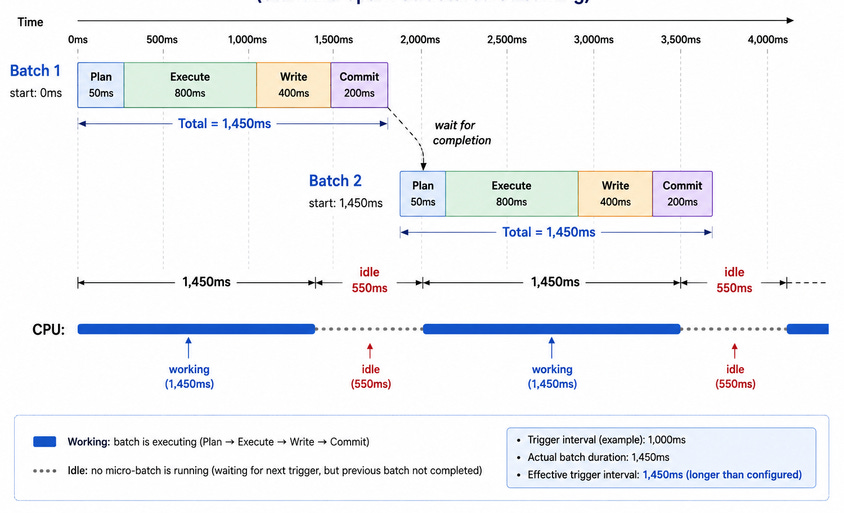
If each batch takes ~1.45 seconds end-to-end, processing 4 batches takes ~5.8 seconds. During the Plan and Commit phases, your executors are largely idle — waiting for the driver to finish its work before they get the next batch to process.
What Microbatch Pipelining Changes
On serverless Lakeflow pipelines, Microbatch Pipelining is enabled by default. Instead of waiting for Batch 1 to finish entirely, the engine determines the data boundaries for Batch 2 while Batch 1 is still executing. While Batch 2 executes, Batch 3 is already planning. Up to 4 microbatches can be in flight at the same time.
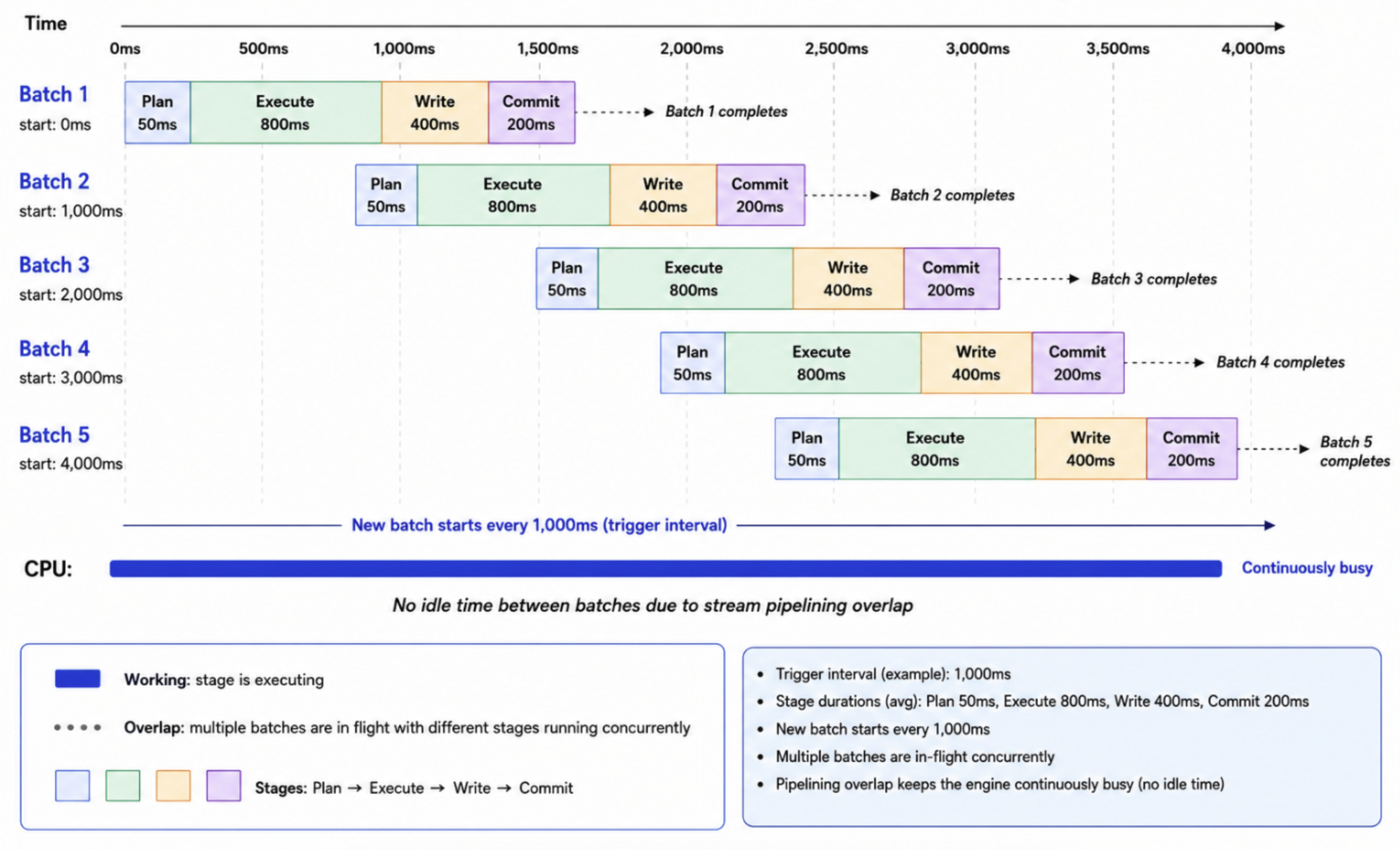
The key insight is that the phases of different batches overlap — the planning of the next batch runs concurrently with the execution of the current one, and commits are staggered so they don’t conflict.
How the Overlap Actually Works
Each streaming query gets its own thread pool (prefixed microbatch-runner) that manages up to 4 concurrent batches. The overlap isn’t random — there are synchronization points between batches to maintain correctness:
Batch N+1 can begin planning as soon as Batch N’s offsets are committed to the write-ahead log (after the Plan phase), even while Batch N is still executing.
Batch N+1 can begin executing once its own planning is complete, even if Batch N hasn’t committed yet.
Commits are serialized — Batch N+1 waits for Batch N’s commit to complete before committing its own results. This preserves exactly-once semantics and checkpoint ordering.
This means the expensive Execute phase — where the actual data transformations happen on the executors — runs in parallel across multiple batches, while the lightweight Plan and the ordering-sensitive Commit phases are carefully coordinated.
What This Means for Data Freshness
The practical impact is significant. With sequential execution, your data freshness is bounded by the full batch cycle time — if each batch takes 10 seconds, new data waits up to 10 seconds before the next batch even starts processing it.
With pipelining, the next batch starts planning almost immediately after the current batch begins executing. Data that arrives during Batch 1’s execution is picked up by Batch 2’s planning phase — which is already running. The effective freshness improves because the gap between batches shrinks to near zero.
In a benchmark on serverless Lakeflow pipelines, the Silver query showed:
Average batch duration: 2,242 ms (against a 1-second trigger interval)
Batch overlap observed in 99.7% of batches
Up to 3 microbatches in flight simultaneously
Nearly every batch was pipelined with its neighbors. The pipeline was continuously processing overlapping batches rather than waiting in a sequential queue.
Key Details
Serverless only. Microbatch Pipelining is enabled by default on serverless Lakeflow pipelines. It is not available on classic compute and there are no plans to enable it there.
Up to 4 concurrent batches. The default maximum is 4 in-flight microbatches per streaming query, controlled by spark.databricks.streaming.execution.pipelined.maxInflightBatches.
Concurrency compounds. For a pipeline with N streaming tables, each table can have up to 4 concurrent batches. A pipeline with 30 streaming tables could have up to 120 concurrent batches across all queries — all sharing the same driver.
You can turn it off. If your workload doesn’t benefit from pipelining (e.g., the pipeline is already keeping up with the source rate), you can disable it:
spark.databricks.streaming.forceDisablePipelinedExecution = true
This reverts to sequential execution.
When Pipelining Helps Most
Microbatch Pipelining delivers the biggest freshness improvement when:
Batch duration exceeds the trigger interval. If your trigger interval is 1 second but each batch takes 3 seconds, sequential execution falls behind. Pipelining keeps up by overlapping batches.
The pipeline has many flows. More streaming tables means more opportunities for parallel batch execution across queries.
The workload is stateless. Stateless transformations (appends, filters, maps) pipeline cleanly. Stateful operations (aggregations, deduplication) have additional synchronization requirements.
It helps less when:
The pipeline is already idle between batches. If each batch finishes well within the trigger interval, there’s nothing to overlap — pipelining has no work to pipeline.
The driver is memory-constrained. Each in-flight batch holds execution state on the driver. With many streaming tables and 4 concurrent batches each, driver memory pressure can increase. For pipelines with 30+ flows, monitor driver memory if pipelining is enabled.
FAQ
Q: Is Continuous mode always better than Triggered mode?
A: No. Triggered mode is often preferable for periodic or bursty data when minutes or hours of latency are acceptable. Continuous mode is more appropriate for steady arrivals and low-latency requirements.
Q: What is stream pipelining?
A: Stream pipelining allows eligible queries in Serverless Spark Declarative Pipelines to overlap work from successive micro-batches rather than requiring strictly serial end-to-end completion.
Q: Is micro-batch pipelining the same as Spark task parallelism?
A: No. Task parallelism occurs within one micro-batch. Stream pipelining allows work associated with different micro-batches to overlap.
Q: Does pipelining eligibility guarantee overlapping batches?
A: No. A query may be eligible but show no overlap when its batch duration is shorter than its trigger interval, as occurred with the Gold query.
Q: How should I select a trigger interval?
A: Choose an interval that meets the workload’s freshness SLO while avoiding sustained backlog or instability. Do not reduce the interval solely to produce concurrent batches.
References
https://community.databricks.com/t5/technical-blog/triggered-vs-continuous-mode-a-deep-dive-into-serverless/ba-p/164327Triggered vs. Continuous Mode: A Deep Dive into Serverless Lakeflow Spark Declarative PipelinesConfigure a serverless pipeline — this is the official doc that mentions Stream Pipelining by name
https://learn.microsoft.com/en-us/azure/databricks/ldp/serverless/“Stream pipelining: To improve utilization, throughput, and latency for streaming data workloads such as data ingestion, microbatches are pipelined... enabled by default in serverless pipelines.”Streaming on serverless compute — confirms stream pipelining is on by default, has the use-case table
https://learn.microsoft.com/en-us/azure/databricks/compute/serverless/streaming/“Stream pipelining is enabled by default in serverless Lakeflow pipelines. Microbatches run concurrently rather than sequentially.”Pipeline event log — for readers who want to measure freshness using
flow_progressandstream_progresseventshttps://learn.microsoft.com/en-us/azure/databricks/ldp/monitor-event-logs/Best practices for Lakeflow pipelines — triggered vs continuous mode guidance
https://learn.microsoft.com/en-us/azure/databricks/ldp/best-practices/index/Configure Structured Streaming trigger intervals — explains the trigger model that MBP builds on
https://learn.microsoft.com/en-us/azure/databricks/structured-streaming/triggers/Monitor pipelines — overview of all monitoring options (UI, event log, system tables)
https://learn.microsoft.com/en-us/azure/databricks/ldp/observability/