

You built a Databricks App that serves an MCP server. Nice. Now people want its tools in Genie One, Cursor, and Claude Code. Skip the shared service principal token; all three can call your app as the person using them.
TL;DR
Cursor and Claude Code call
https://<your-app-url>/mcp/directly; Genie One goes through a Unity Catalog MCP Service and HTTP connection.Either way, the app gets a token its workspace issued to the human user, and the Databricks Apps proxy forwards that user’s identity.
The only account-admin step: register one public OAuth client with each AI client’s redirect URI. The rest is client config and grants.
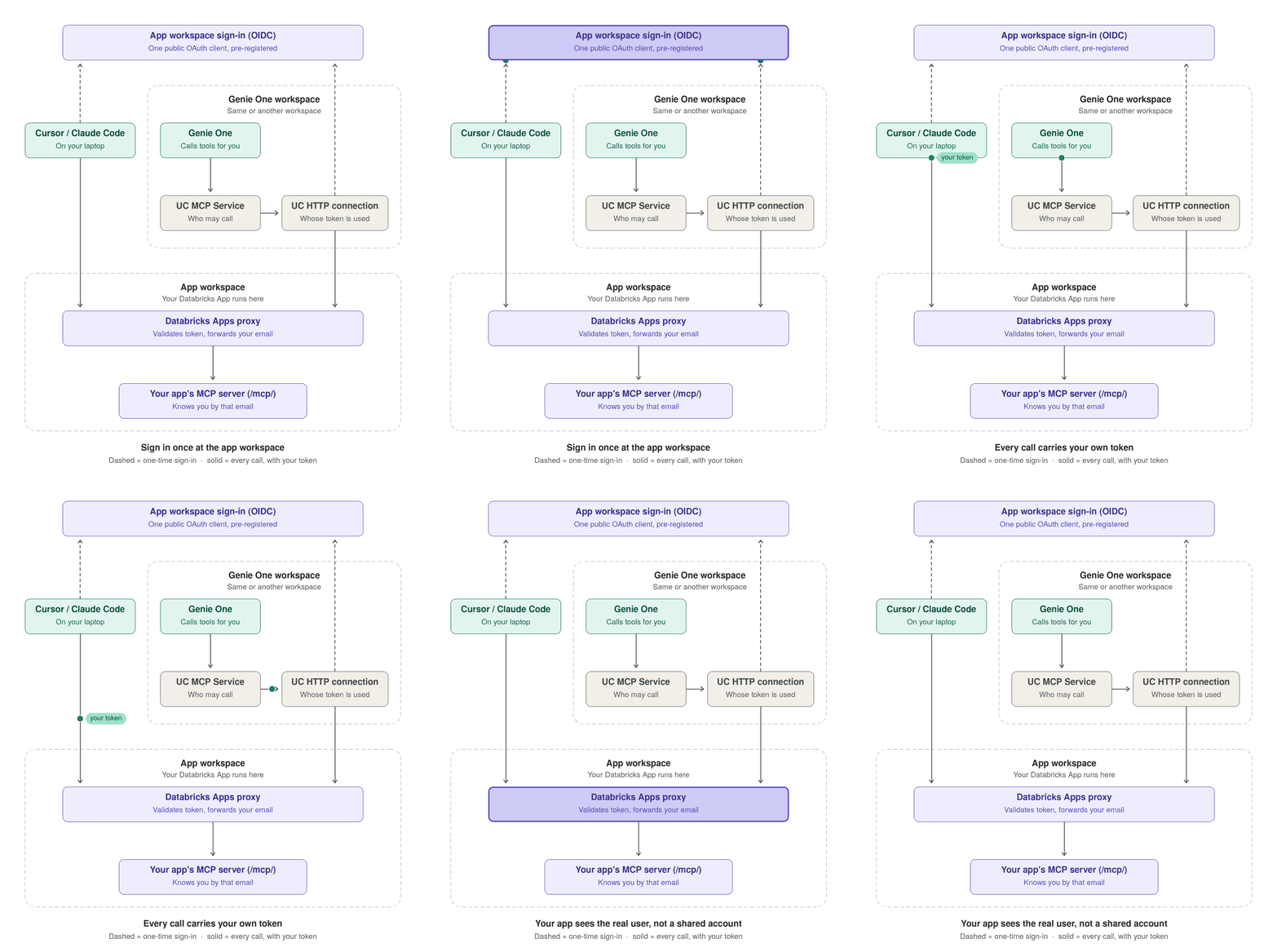
How it works: two paths, one identity
Direct path. Cursor and Claude Code connect to the app’s Streamable HTTP MCP endpoint, https://<your-app-url>/mcp/.
Governed path. Genie One calls a Unity Catalog MCP Service, which calls the same app URL through a Unity Catalog HTTP connection.
Identity. On both paths, the app receives a token issued by the app’s workspace for the human user. The Databricks Apps proxy validates it and forwards the user’s identity (X-Forwarded-Email, X-Forwarded-User). The app resolves the user from those headers, so data is owned by the person.
Discovery. Databricks Apps publish OAuth protected-resource metadata (RFC 9728) at /.well-known/oauth-protected-resource/mcp/, pointing at the workspace’s OIDC server. Databricks OIDC supports PKCE and public clients (no secret; PKCE protects the sign-in instead), but not dynamic client registration. So AI clients can’t register themselves; they need a pre-registered public OAuth client, and one can serve all three.
That last point explains most of the setup, and most of the errors.
The one account-admin step: register a public OAuth client
An account admin of the account that owns the app’s workspace creates a public (no secret) custom OAuth app connection: Account Console → Settings → App connections, or databricks account custom-app-integration create.
Scopes:
all-apis offline_access(optionallyopenid email profile).Redirect URIs:
Cursor:
http://localhost:8787/callback, the callback current versions useClaude Code:
http://localhost:<callbackPort>/callback, for example port 8080Genie One:
https://<genie-workspace-host>/login/oauth/http.html, for every hostname that workspace uses, vanity ones included
Updates replace the whole redirect list, so always include the existing URIs. Then grant CAN_USE on the app to the users and groups who should use it.
Connect Cursor to the MCP endpoint
Add the server to ~/.cursor/mcp.json. Current Cursor versions read auth.CLIENT_ID and ignore the Claude-style oauth.clientId.
{
  "mcpServers": {
    "my-app": {
      "url": "https://<your-app-url>/mcp/",
      "auth": { "CLIENT_ID": "<client-id>", "scopes": ["all-apis", "offline_access"] }
    }
  }
}
Then open Settings → Tools & MCP, click Connect, and sign in once in the browser.
Connect Claude Code to the MCP endpoint
Add the server with the CLI, then add scopes so its mcpServers entry in ~/.claude.json matches the JSON below.
claude mcp add --transport http --client-id <client-id> --callback-port 8080 -s user my-app https://<your-app-url>/mcp/"my-app": {
"type": "http",
"url": "https://<your-app-url>/mcp/",
"oauth": { "clientId": "<client-id>", "callbackPort": 8080, "scopes": "all-apis offline_access" }
}Run /mcp, select the server, and choose Authenticate. Both clients store and refresh tokens themselves. No proxy scripts, no token commands.
Connect Genie One through Unity Catalog
In the Genie One workspace, create a Unity Catalog HTTP connection:
Type: OAuth U2M (user-to-machine), per user
Host:
https://<your-app-url>, with base path/mcp/Authorization endpoint:
https://<app-workspace-host>/oidc/v1/authorizeToken endpoint:
https://<app-workspace-host>/oidc/v1/tokenClient ID and scope: your public client ID and
all-apis offline_access
Then create a Unity Catalog MCP Service on top of it, such as <catalog>.<schema>.<service>. Each user signs in once (from Genie One’s connections or the service’s sign-in page), attaches the service in a chat (+ → More connections), and asks Genie to use the tools.
How Unity Catalog governs Genie One access
The MCP Service is the access check. It decides who may call: USE CATALOG and USE SCHEMA on its catalog and schema, plus EXECUTE on the service.
The HTTP connection is token management. It stores each user’s token from their one-time sign-in, refreshes it, and attaches it to calls.
Callers need no privileges on the connection itself.
Tokens are per user. Every Genie One call carries the caller’s own token, never a shared one.
Use a catalog and schema your audience can reach. A personal catalog only works for you.
Genie One in a different workspace? Same setup
Genie One can live in another workspace, even on another cloud: the connection signs users in against the app’s workspace, which issues the token. Register the Genie workspace’s callback on the public client, and if the app workspace uses IP access lists, allow the Genie workspace’s gateway egress.
Five traps we hit, and their fixes
The first two stem from false assumptions: that you can borrow the app’s own OAuth client, and that clients register themselves.
invalid_clientat token exchange. You reused the app’s built-in OAuth client. It’s confidential; only the Apps platform has its secret. Use a separate public client.does not support dynamic client registration. The client isn’t reading your client ID (wrong config key), or a running session still has old config. Fix the key, then reconnect.redirect_uri ... not registered. The OAuth client is missing that AI client’s callback, or the Genie workspace’s vanity hostname. Add it.Default scopes. Unless you pin them, clients request the scopes the app advertises, often
iam.*, which may not be on your client. Pinall-apis offline_access.Not Acceptable: Client must accept text/event-stream. You opened/mcp/in a browser. That’s normal.
Why it matters
One app, one sign-in model, every AI client: real-user identity on every call, Unity Catalog governance for Genie One, and no shared token or proxy script to babysit. For more, see the Databricks docs on MCP, custom MCP servers, and Apps authorization, which covers both identity models.
FAQ
Q: What is an MCP server on Databricks Apps? A: An MCP server you build yourself and run on . Apps provides the compute and an HTTPS URL that AI clients connect to over Streamable HTTP. You can start from a template, wrap an existing REST API, or deploy an MCP server you already have. See and the MCPs overview.
Q: How is this different from Databricks-provided or external MCP servers? A: Databricks-provided MCPs (Genie One, Databricks SQL, Slack, GitHub and others) live in system.ai and need no hosting. External MCP servers are third-party or self-hosted servers you register in Unity Catalog. A custom server on Databricks Apps is your own code. This post registers it as an external MCP Service so Genie One can use it.
Q: Do I need a separate MCP server for each AI client? A: No. Cursor, Claude Code and Genie One all use the same https://<your-app-url>/mcp/ endpoint and the same public OAuth client.
Q: What’s the difference between app authorization and user authorization? A: With app authorization, everyone shares the app’s service principal. With user authorization (on-behalf-of-user), Databricks forwards the user’s identity and token, so Unity Catalog row filters and column masks apply to that person. See and Authentication for agents.
Q: Can I use a personal access token instead of OAuth? A: Not for servers on Databricks Apps; those require OAuth. PATs only work for local testing against Databricks-provided or registered MCPs.
Q: Why can’t Cursor or Claude Code register their own OAuth client? A: Databricks MCP endpoints (RFC 7591). So an account admin pre-registers one public client that uses PKCE. Discovery follows the MCP authorization spec and RFC 9728 protected-resource metadata.
Q: How do I create the public OAuth client? A: In the account console, go to Settings → App connections → Add connection and clear Generate a client secret. Or run databricks account custom-app-integration create. See . all-apis covers non-SQL APIs, and offline_access lets clients get refresh tokens.
Q: What scopes should I request? A: For an app-hosted server, include the app’s user-authorization scopes plus offline_access, and grant CAN USE on the app. See .
Q: How do I connect Cursor and Claude Code? A: Start with the Databricks guides for Cursor and Claude Code. Each client’s own MCP docs cover its config details: Cursor MCP docs and Claude Code MCP docs. Using Codex instead? See Connect Codex.
Q: What is a Unity Catalog HTTP connection, and do Genie One users need privileges on it? A: An is a Unity Catalog securable that stores endpoint and credential details and handles OAuth token refresh and per-user sign-in. When you go through an MCP Service, users need USE CATALOG, USE SCHEMA and EXECUTE on the service, not privileges on the connection. See Unity Catalog connections.
Q: Can I also use Genie One from Claude or ChatGPT? A: Yes. The Genie One MCP server works in the other direction: it exposes Genie to outside MCP clients.
Q: Does this work when Genie One is in a different workspace or cloud? A: Yes, as long as the connection signs users in against the app’s workspace. If that workspace uses IP access lists, allow the Genie workspace’s egress IPs.
Q: I changed my OAuth client and nothing happened. Why? A: Changes to an OAuth app connection . Wait, then reconnect the client.