

TL;DR
Domains are a Unity Catalog organizing and discovery layer, built on governed tags — not a new securable type, and not an access-control mechanism.
They sit on top of your existing catalog/schema layout, letting you overlay business structure (Finance, Customer, Risk) without moving data.
Design top-level domains around business capabilities — Function, Region, Brand, or Business Unit — and spend your one subdomain level deliberately.
Keep domains, meaning (Pages), measures (Metric Views), and access (grants/ABAC) as separate concerns; collapsing them is the most common design mistake.
Access always stays with Unity Catalog privileges — a domain’s Owner and Contact fields are metadata only.
Where domains fit in Genie Ontology
Genie Ontology is the AI-ready business semantic layer that grounds Genie and every business-facing search — it’s how the platform knows what your data means, not just where it sits. It combines a Modelled Ontology you curate and govern with inferred context Genie learns automatically from existing tables, queries, dashboards, and notebooks. Each piece of context gets an authority score based on source, usage, and freshness; Genie ranks the relevant pieces, resolves conflicts, and answers using only sources each user is permitted to see.
The Modelled Ontology has three components, grouped as Unity Catalog Semantics: Domains, Pages, and Metric Views. The most common design mistake is collapsing them — treating a domain as if it also carried meaning, metric logic, or access rights. It doesn’t. Domains organize assets by business purpose and assign an owner; Pages supply meaning; Metric Views supply measures. Each Page belongs to exactly one domain or subdomain, and a domain typically holds many terms and metrics, so domains are the scaffold the other two hang from.
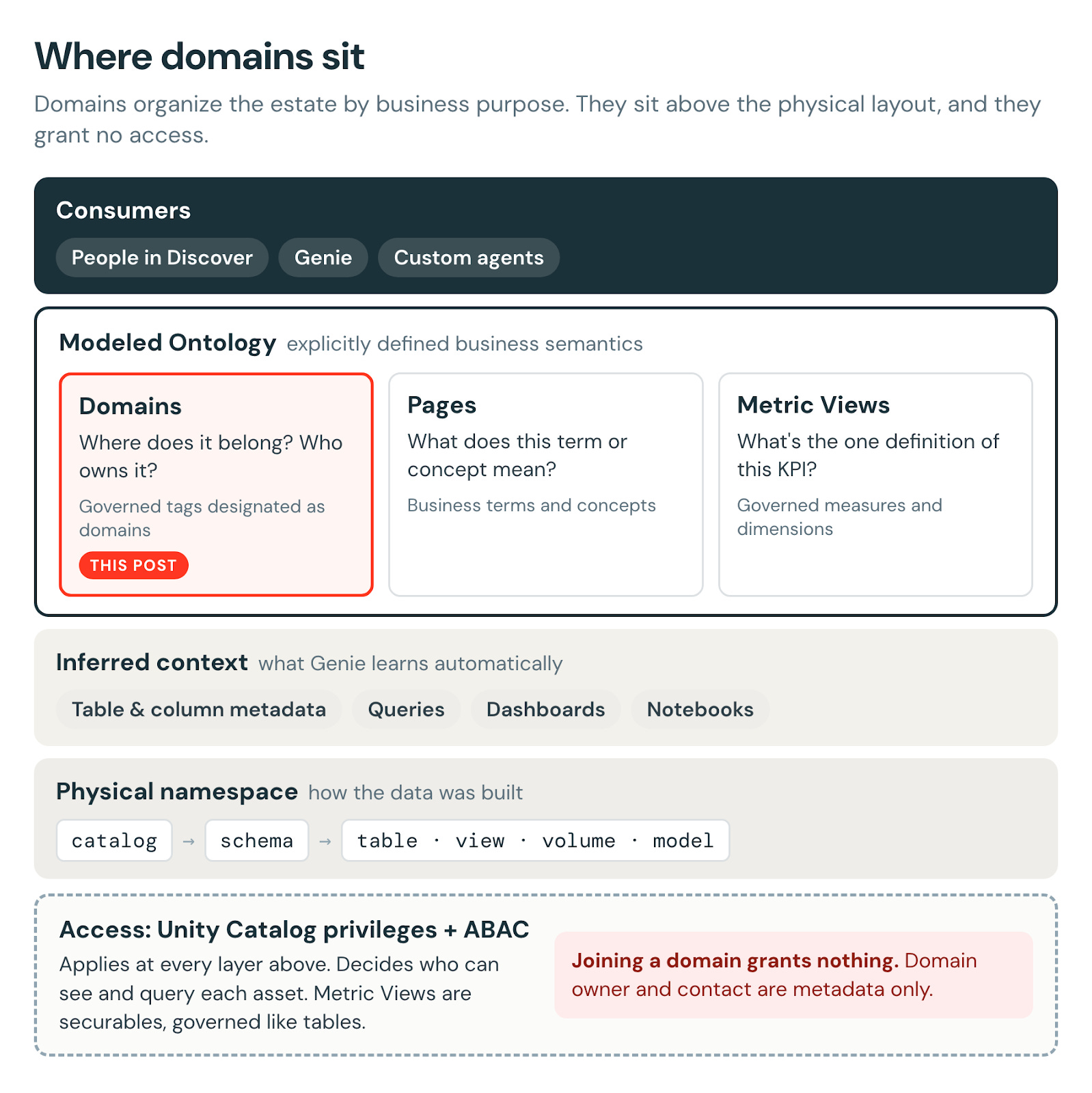
Figure 1. Where domains sit: above the physical layout, granting no access.
That scoping matters as the semantic layer grows. Once an estate holds hundreds of Metric Views across dozens of business areas, the hard part stops being reaching a definition and becomes choosing the right one — and domain, owner, and certification are exactly the filters that narrow that choice. The same curation pays off twice: it makes the estate easier for people to browse and gives Genie a trusted, business-scoped signal for retrieval.
Why domains, and why now
Most Unity Catalog estates are organized the way they were built — by source system, pipeline, or environment — which rarely matches how the business thinks about its data (”Marketing,” “Risk,” “Customer 360”). A domain is the top-level unit of data ownership: a business function, region, brand, or unit with a real, accountable team. Subdomains add one level of nesting (e.g., Finance → Tax).
This separates physical data ownership (who runs the pipeline) from business ownership (who defines what the data means) — one of the main reasons domains exist. In a small team, the people who build a pipeline also know what the data means and who should use it. As organizations grow, these jobs come apart: pipeline teams own how data arrives, while business stewards own what it means. Domains give the second group a place to stand, independent of where the bytes live.
It helps to name the two areas of responsibility explicitly, so problems land with the right owner. A pipeline owner is accountable for freshness and SLAs, job failures, schema changes, and cost — “the table didn’t refresh this morning” gets fixed in the pipeline or job. A domain owner or data steward is accountable for business logic, metric definitions, certification, and being the person to ask — “revenue here excludes refunds, and it shouldn’t” gets fixed in the domain’s Pages, Metric Views, and asset metadata.
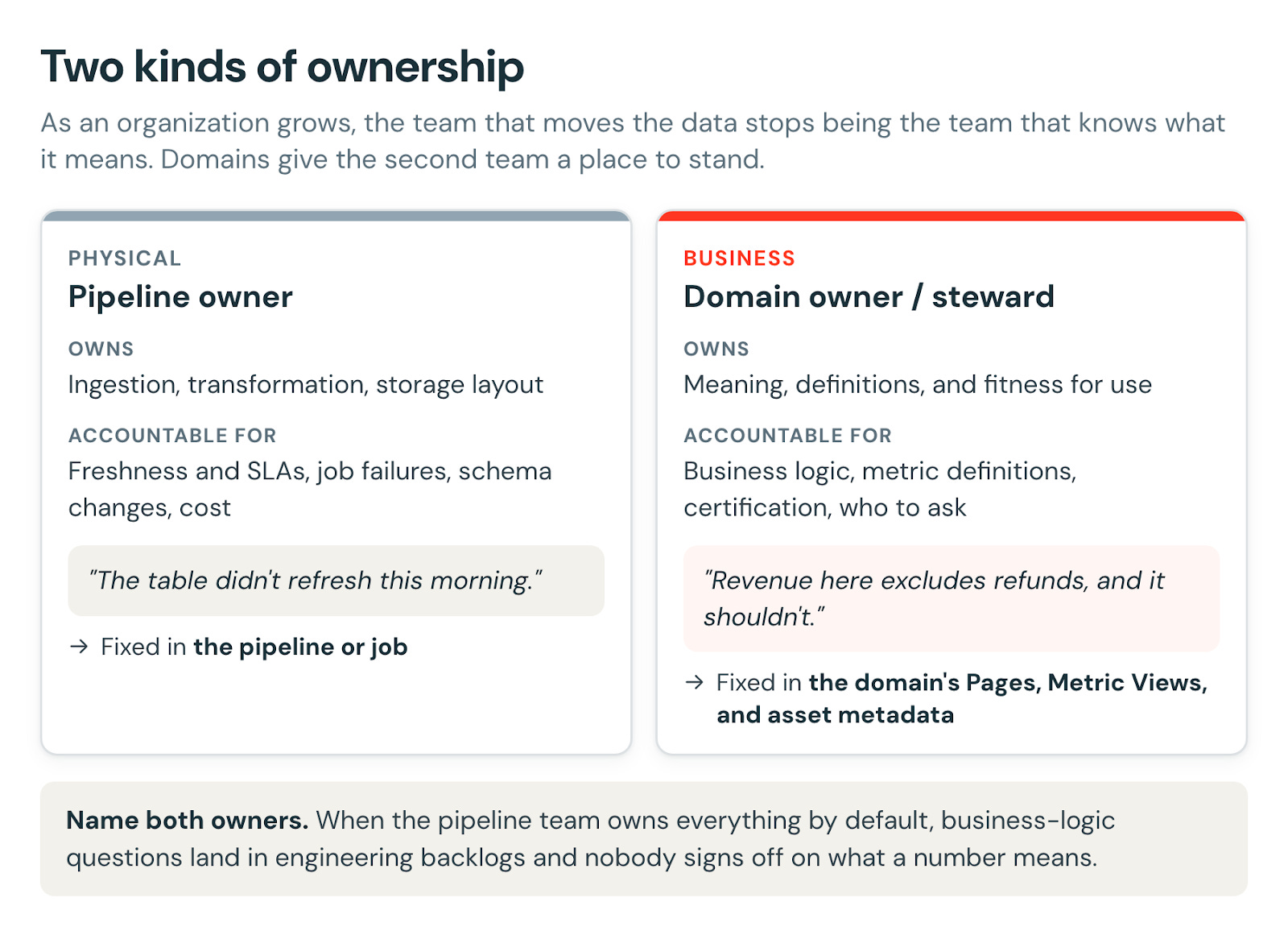
Figure 2. Two kinds of ownership, and where each kind of problem gets fixed.
When everything is owned by the pipeline team by default, business-logic questions end up in engineering backlogs and nobody signs off on what a number means. Domains make the business side of ownership visible and assignable.
The idea isn’t new — it’s common across enterprise catalogs and Data Mesh/Data Fabric architectures. What’s different is that Databricks makes domains native to the platform, built on Unity Catalog governed tags, rather than bolted on via a separate product.
As of this writing, Domains, subdomains, and Discover are in Public Preview on AWS, Azure, and GCP; Pages is in Beta; Genie Ontology is in Public Preview; Metric Views are GA. Check the docs for current status.
How domains actually work
A few mechanics drive almost every design decision:
A domain is a governed tag designated as a domain — not a new securable. A subdomain is a child tag ({parentDomain}/{subdomain}), nested exactly one level deep.
Assets join a domain by applying the backing tag, via the “Add to Domain” picker, or indirectly through a subdomain. Membership is many-to-many — any taggable securable or workspace asset can belong to multiple domains at once.
Each domain is its own tag key, not a value — that’s what makes multi-domain membership possible, since tag values are mutually exclusive but keys aren’t.
Tagging a catalog or schema cascades to everything inside it — the fastest way to fill a domain when a schema maps cleanly, and a blunt instrument when it doesn’t.
Browsing a parent domain rolls up its subdomains, but only shows what the viewer is already permitted to see.
Domains are account-level (governed tags replicate globally) while Discover is enabled per workspace. A single domain can even span multiple metastores — it isn’t tied to one. Two consequences: never put sensitive text in domain names or descriptions, and expect the same domain to look different across workspaces.
There’s a ceiling: 300 domains/subdomains per account, and each also counts against the account’s 1,000 governed-tag limit (at the time of writing).
Domains confer no access. Owner and Contact are metadata only.
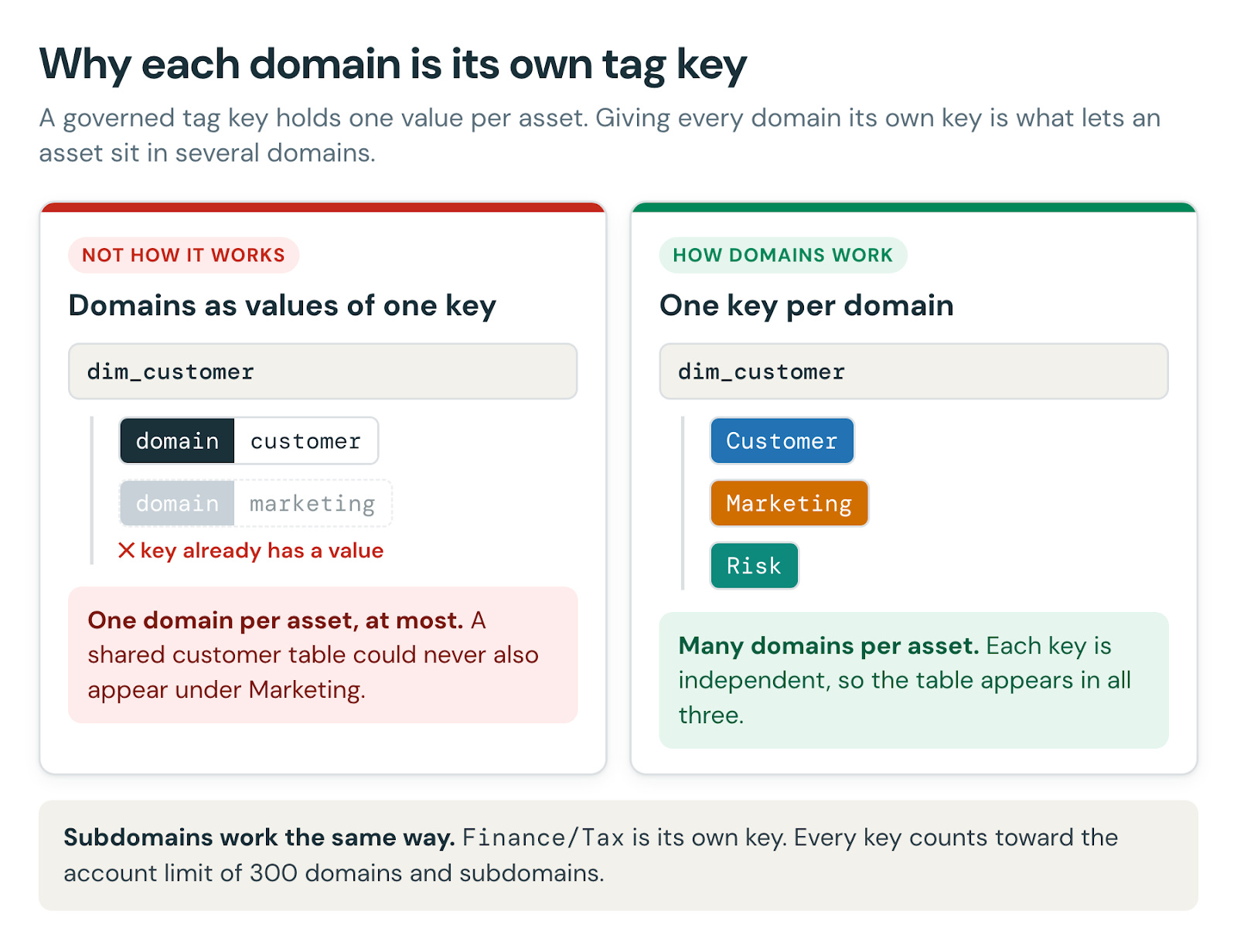
Figure 3. Why each domain is its own tag key.
The tradeoff of one key per domain. Every domain and subdomain uses up a governed tag (see the limit above), and governed tags are account-wide, so adopt a naming convention that keeps domain tags distinct from your other governed tags. Questions like “which domains is this asset in?” mean checking several keys rather than reading one value. And if you ever write ABAC policies against domain tags, you need a condition per domain — one more reason to keep access on its own tags (see “Domains and access control” below).
Managing domains needs curator permissions: account-level MANAGE DISCOVER, or MANAGE on a specific domain or subdomain. Day-to-day curation needs ASSIGN TAG on the domain’s tag plus APPLY TAG on the asset.
Design principles for your domain taxonomy
Model the business, not the plumbing
Base top-level domains on business capabilities, never source systems or pipelines. Source-system groupings feel natural to engineers and useless to everyone else: if your top-level domains read like a list of your ingestion connectors, start over.
So what should the top level look like? The four most common patterns we see with customers are below. Treat them as illustrative examples, not a fixed taxonomy — most real organizations blend them.
Function — grouped by type of work (Sales, Finance, HR). Owned by a cost-center lead with no standalone P&L. Common in single-product or single-market orgs with one central data team.
Region — grouped by geography (North America, EMEA, APAC). Owned by regional leadership, often with a regional P&L, and usually driven by regulation or data residency. Common in banks, insurers, telcos, and multinationals.
Brand — grouped by market-facing identity, such as the separate brands of a consumer-goods or automotive group. Owned by a brand team, usually with its own P&L. Common in CPG, retail groups, hospitality, and automotive.
Business Unit — a self-contained business (Retail, Commercial, Wealth, Markets) with a full P&L, often its own ERP and data team. Common in conglomerates and diversified groups.
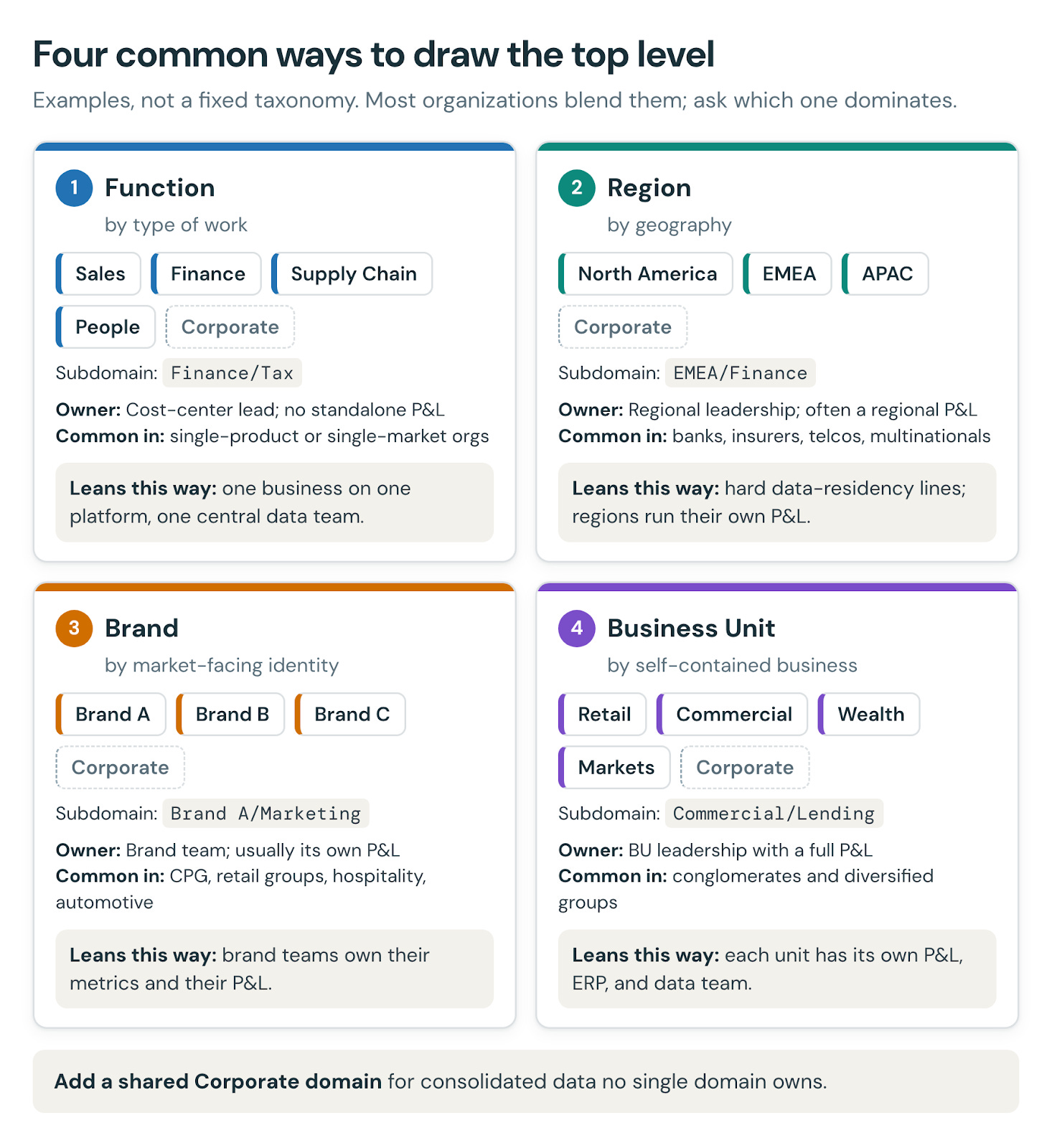
Figure 4. Four common ways to draw the top level. Most organizations blend them.
Rather than a decision tree, a few signals tell you which pattern dominates: separate P&Ls lean Business Unit; hard data-residency lines lean Region; brand-owned P&Ls lean Brand; one business on one platform leans Function. Whichever dominates, add a shared Corporate domain for consolidated data no single domain owns — group finance, enterprise reference data, cross-business KPIs.
You have exactly two levels — spend them deliberately
Keep 8–15 coarse top-level domains and add subdomains only where a domain is genuinely large or has distinct sub-owners. Where you do subdivide, find the greatest common denominator of how your domains naturally break down — the subdivision that holds up across most of them. That’s a modelling exercise, not a mechanical rule: the dimensions you didn’t choose for the top level don’t automatically become your subdomains. If you’re wishing for a third level, a top-level domain is really two.
Signs you’ve mis-sized: subdomains with one or two assets (that’s a tag, not a subdomain); a single “Analytics” domain that owns half the estate (too coarse); or a top level so broad that subdomains are doing all the real work.
One clear owner per domain and subdomain
Every domain needs a named, accountable owner, not a committee. Owner/Contact are metadata, not permissions — their job is answering “who do I ask?”, turning a Slack scavenger hunt into a one-click answer. If two teams both claim a domain, that’s a signal to split it into subdomains with distinct owners. If an asset sits in several domains, own it where it’s mastered; membership elsewhere is a reference that helps people find it, not co-ownership.
Keep domains decoupled from physical layout
A domain can span multiple catalogs and schemas with no data movement — design the taxonomy you want, then map assets into it. That decoupling is the feature’s superpower: it lets you present a clean business view without a risky migration.
Design for discovery first
Optimize for a person (or agent) browsing for data they don’t know exists: business-recognizable names, no jargon, shallow trees, and certification signals so people can tell the golden asset from the abandoned one. A good test: could a new analyst find “customer churn” data in under three clicks without asking anyone?
Stable at the top, flexible below
Top-level domains should map to durable capabilities; absorb reorgs in subdomains, which are cheaper to reshape. A volatile top level erodes trust and breaks bookmarks, dashboards, and mental models. Get names right from day one — a domain’s name is its tag key and can’t be changed later. You can edit a domain’s subtitle and description, but changing its name means creating a new domain, re-tagging assets, and deleting the old one.
Mapping domains onto catalogs and schemas
Three common layouts: schema-per-domain (a clean greenfield 1:1 mapping), catalog-per-business-unit (a top-level domain gathers schemas within one catalog, subdomains map to individual schemas), and domains spanning multiple catalogs (a “Customer” concept scattered across raw, curated, and data-science catalogs can be pulled into one business view without touching the physical layout).
Rule of thumb: map domains to the gold/consumption layer first, then decide case-by-case whether raw/silver assets belong in the same domain or a separate “raw/engineering” domain. Tag a schema when it maps cleanly to one domain; tag individual assets when a schema mixes domains or holds scratch tables you don’t want surfaced.
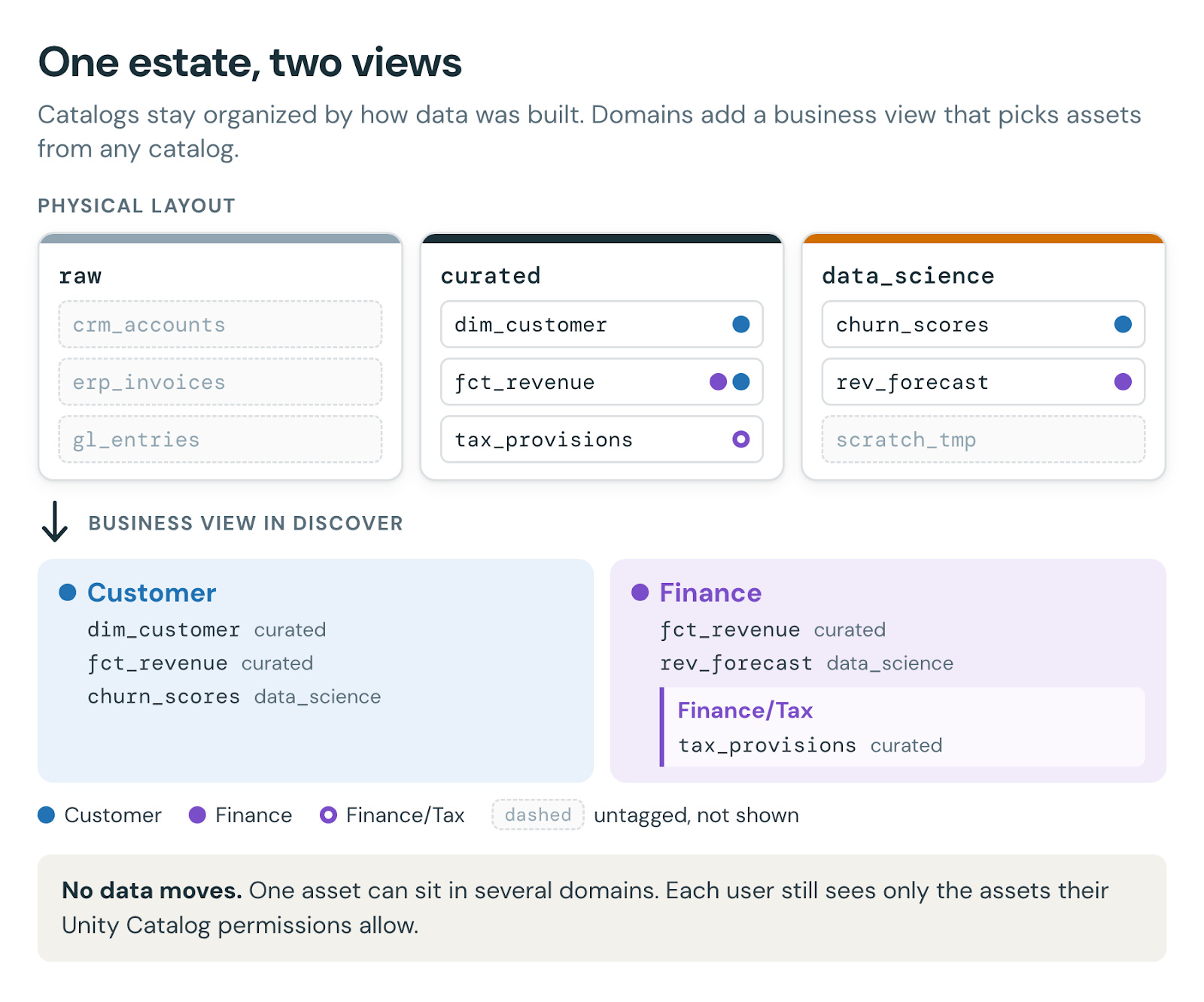
Figure 5. One estate, two views: domains pick consumption-ready assets from any catalog, with no data movement.
A domain is an overlay, not a remedy — confirm resolved identity, documented grain, and readable metadata on your gold layer before laying domains over it.
Domains as the enabler of a Data Mesh on Databricks
Domains are the Unity Catalog primitive that makes a domain-driven Data Mesh practical: each business domain gets an owner, a home for its data products, and a place in a shared discovery experience — without splitting the platform into separate stacks. Domain ownership, data-as-a-product, and federated governance map directly onto UC domains, grants, and ABAC, while Discover serves as the self-serve browsing index. The key insight: you get decentralized ownership without decentralized infrastructure — one metastore, one governance model, one discovery surface, with a business-shaped view on top.
Domains and access control: what they do not do
This is the most common misconception, so it’s worth stating plainly: domains are a curation and discovery layer, not an authorization mechanism. Assigning an asset to a domain does not grant or revoke access — users still need BROWSE/VIEW to see it listed and the underlying Unity Catalog privileges to query it. You also can’t make a domain private: there’s no setting that restricts a published domain to specific users or groups, and the only role you can assign on a domain is the curator role that lets someone manage it. (Before publishing, a draft domain is visible only to curators.) What each person sees inside a domain follows their permissions on the assets, not the domain — so don’t reach for domains to hide a business area. Owner/Contact remain metadata only.
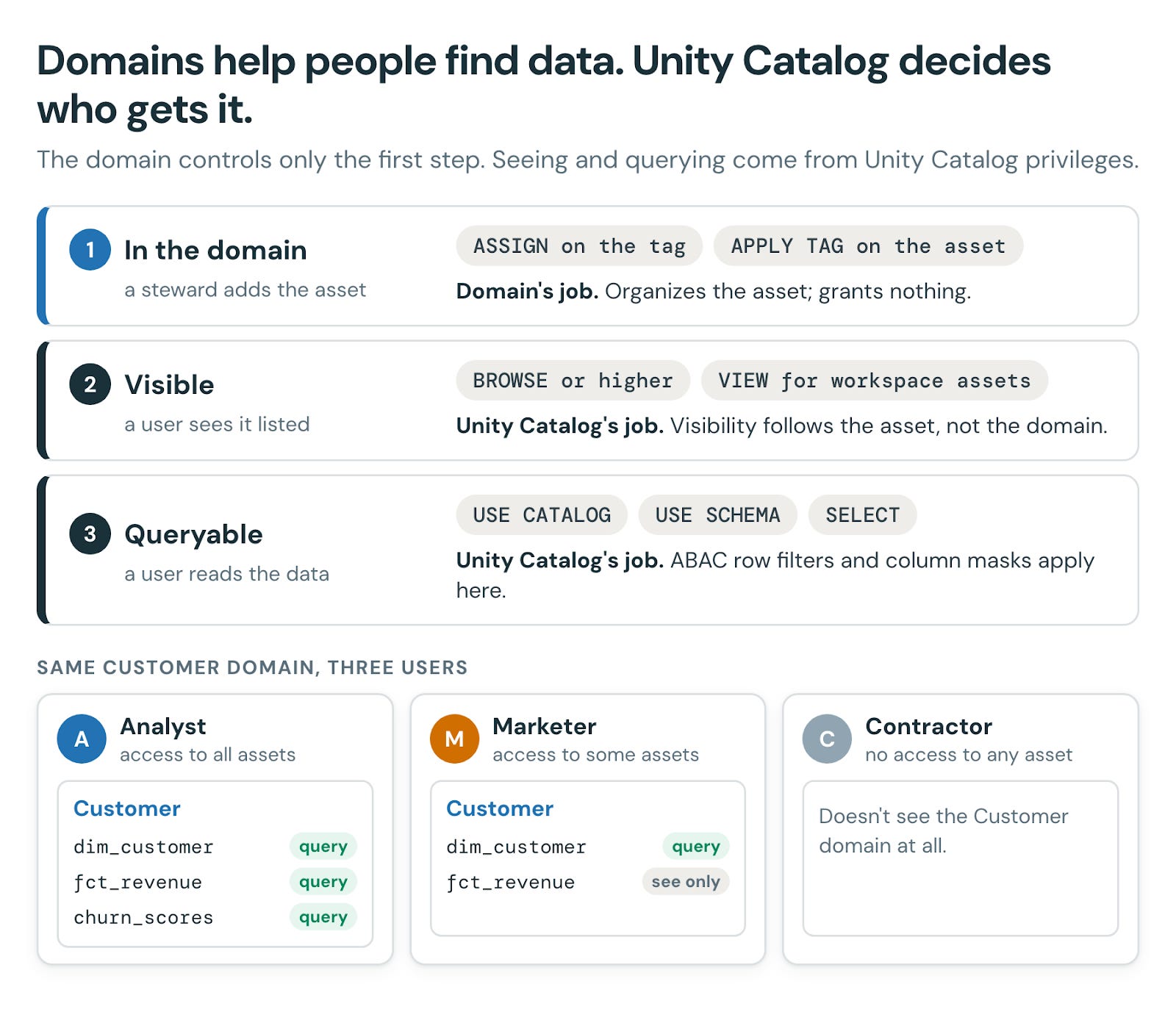
Figure 6. Domains help people find data; Unity Catalog decides who gets it.
Governed tags, including domain tags, are valid ABAC attributes. Row filter and column mask policies use them to protect data a user can already access; they don’t grant access to tables (yet). ABAC GRANT policies can grant privileges by tag, but today only on models, model and MCP services, and (in Beta) agent services and skills. So for tables and views, domain membership doesn’t provision access.
If your access policies need a business-area attribute, model it as its own tag — a single key with controlled values — rather than reusing your discovery domain tags. The two shapes look similar but serve opposite purposes: one decides what a user can see, the other helps them find it. Keep access in grants and ABAC policies; use domains only to organize and surface what people can (or can request to) access.
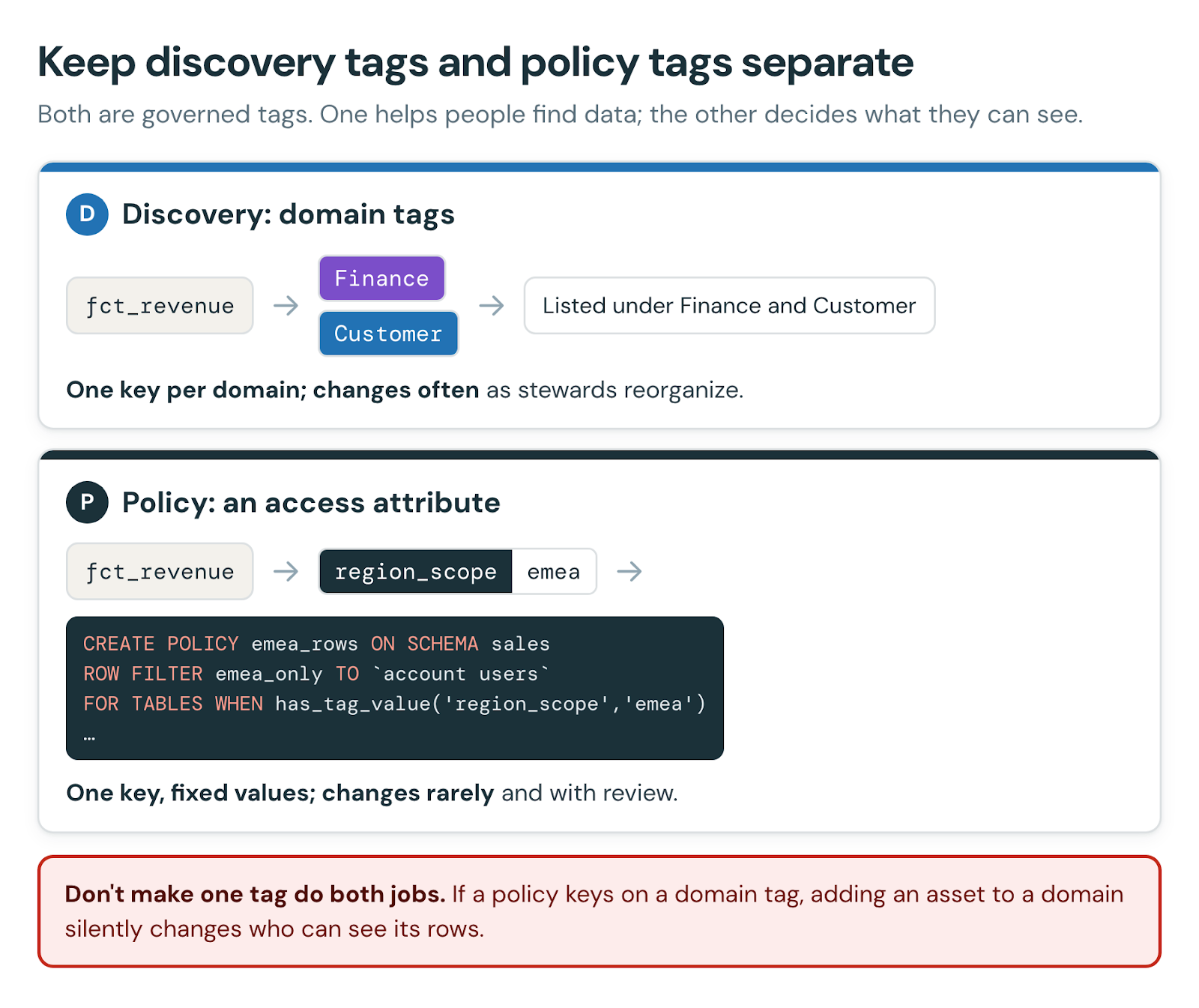
Figure 7. Keep discovery tags and policy tags separate.
Operating model, ownership, and anti-patterns to avoid
Stand up one high-value domain first, prove the pattern, then expand — don’t attempt an enterprise-wide rollout at once. Assign a named owner per domain/subdomain, govern top-level domain creation centrally, and delegate curation below. Link Pages and Metric Views to domain assets rather than duplicating descriptions, certify production-ready assets, and route feedback to the layer that actually owns the fault — a definition belongs in a Page, a measure in a Metric View, organization in the domain. Manage the taxonomy itself (domains, subdomains, owners) as code via the REST API or Terraform, and review it quarterly.
Common anti-patterns: mirroring the org chart instead of modeling capabilities; expecting domains to enforce access; reusing one tag for both discovery and ABAC policy; wishing for a third nesting level; source-system domains at the top (the exception: a pipeline team can keep a clearly labeled, source-aligned “Raw / Engineering” domain for the assets it owns, separate from the business taxonomy); one-asset subdomains; co-owning shared assets instead of picking a home; treating a domain as the semantic model itself; and placeholder names you’ll regret, since domains can’t be renamed.
Getting started checklist
Confirm the foundation: resolved identity, documented grain, readable metadata on gold tables.
Inventory your gold/consumption assets.
Pick the dominant pattern — Function, Region, Brand, or Business Unit — plus a shared Corporate domain.
Draft 8–15 durable top-level domains with names you’ll keep.
Name an owner for each domain.
Add subdomains only where scale or ownership demands it.
Map assets into domains — tag schemas where they map cleanly, assets individually otherwise — and certify production-ready ones.
Operationalize one high-value domain end-to-end first, then expand.
Link Pages and Metric Views to domain assets.
Keep access in grants/ABAC, on its own tags.
Set a quarterly review cadence.
FAQ
Q: Is a Unity Catalog domain a new type of securable object?
A: No. A domain is a governed tag that has been designated as a domain. It doesn’t change where data lives or create a new access boundary.
Q: Can one asset belong to more than one domain?
A: Yes. Because each domain is modelled as its own tag key rather than a value, membership is many-to-many — an asset like “Customer” can sit in both “Marketing” and “Risk” at once.
Q: Do domains control who can see or query data?
A: No. Domain membership and the Owner/Contact fields are metadata only. Access is governed entirely by Unity Catalog privileges and, where relevant, ABAC policies.
Q: How many levels of subdomains can I create?
A: Exactly one. A domain can have subdomains, but subdomains cannot have their own sub-subdomains. If you need a third level, your top-level domain probably needs to be split.
Q: Can I rename a domain later?
A: No. A domain’s name is its governed tag’s key, which is immutable. Renaming requires creating a new domain, re-tagging assets, and deleting the old one — so choose names you’ll keep.
Q: Do domains require restructuring my catalogs and schemas?
A: No. Domains are a logical overlay built on tags, so a single domain can span multiple catalogs and schemas without moving any data.