

The Python Data Source API allows Spark developers to easily define custom sources and sinks for their Spark jobs written in Python. One of the most commonly requested custom sinks I’ve seen in the field is writing data back to Salesforce.

I’ve written an example custom Salesforce batch writer here. It is designed to support uploads via the Salesforce Bulk API v1.0 or v2.0, but this guide will focus on v2.0. I strongly recommend using 2.0 for newly introduced features discussed below.
This code is a robust example, and is not intended to be copy/pasted into production.
Background on Salesforce Bulk API 2.0
Before diving into the code, let’s discuss how the Bulk API 2.0 works and how our writer can interact with it. A “job” is the unit of work in the Salesforce Bulk API. In v1 of the Salesforce API, users had to create a job and then manually break that job into chunks of 10,000 records and track each batch individually. In v2, you simply submit your data via a job and it handles batches and retries automatically. The v1 limit for upload was 10MB per batch, while the v2 limit is 150MB per job.
But what if my DataFrame is larger than 150MB, do I have to manually slice the data into sub 150MB chunks and iteratively submit multiple Bulk API jobs? This is where the power of Spark shines, though it comes with a requirement. Spark will automatically parallelize the work into multiple Salesforce “jobs”, but it won’t automatically slice large partitions. You must explicitly control the partition size (using repartition) to ensure you don’t send a chunk larger than 150MB.
Background on Spark writes
In Spark, when df.write is called, the driver calls the writer() method for the DataSource object in question. In our Salesforce example, calling this writer method will result in the instantiation of our SalesforceBatchWriter object.
def writer(self, schema: StructType, overwrite: bool):
    “”“Create a writer instance for the given schema.”“”
    return SalesforceBatchWriter(self.options, schema)

class SalesforceBatchWriter(DataSourceWriter):
    “”“
    DataSourceWriter implementation for Salesforce Bulk API operations.
    Handles both authentication and bulk data upload to Salesforce objects.
    “”“

    def __init__(self, options: Dict[str, str], schema: StructType):
        self.options = options
        self.schema = schema
Spark then looks at the write() method within your DataSourceWriter (recall above, our SalesforceBatchWriter inherited from the DataSourceWriter class), serializes (pickles) this write method, and creates a task for every partition in your DataFrame. It then sends these tasks to the Executors. Simply put, in Spark, each partition of data receives its own write task. This means if we have an extremely large DataFrame, so long as its partitioned and each partition is under 150MB, each partition will receive its own set of write instructions and can be submitted in parallel as multiple Salesforce Bulk API v2 jobs.
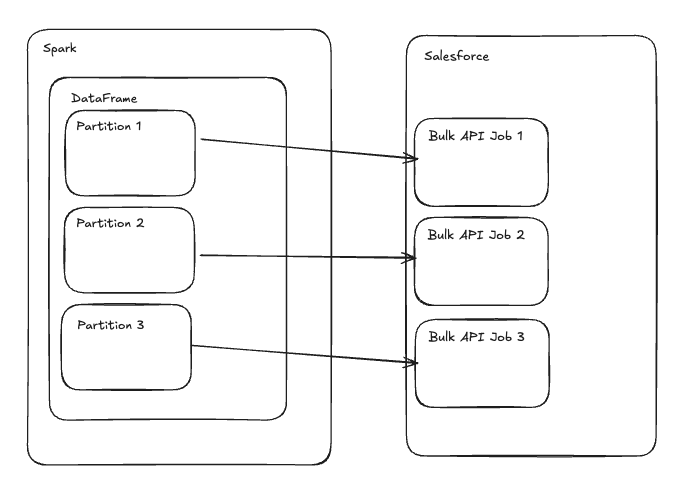
Spark to Salesforce Writer
Now that we understand a bit more about how Spark and the Salesforce Bulk API can interact, let’s dive into our custom writer implementation.
def write(self, rows: Iterator[Row]) -> SalesforceCommitMessage:
        “”“
        Write rows to Salesforce using Bulk API.

        Args:
            rows: Iterator of PySpark Row objects to write

        Returns:
            SalesforceCommitMessage with write statistics
        “”“
        # Import inside method to meet serialization requirements on executors
        from simple_salesforce import Salesforce, SalesforceAuthenticationFailed

        ctx = TaskContext.get()
        partition_id = ctx.partitionId()

        username = self.options.get(”username”)
        password = self.options.get(”password”)
        security_token = self.options.get(”security_token”)
        sobject = self.options.get(”sobject”)
        instance_url = (self.options.get(”instance_url”) or “”).strip()
        domain = (self.options.get(”domain”) or “login”).strip()
        api_version = self.options.get(”api_version”, “1”)  # “1” (Bulk V1) or “2” (Bulk V2)

        if not all([username, password, security_token, sobject]):
            raise ValueError(”Missing required Salesforce options: ‘username’, ‘password’, ‘security_token’, ‘sobject’”)

        # Collect iterator to a list of dicts for bulk insert
        data_to_upload: List[Dict[str, Any]] = [row.asDict() for row in rows]

        if not data_to_upload:
            print(f”Partition {partition_id}: No rows to write.”)
            return SalesforceCommitMessage(partition_id=partition_id, records_written=0, errors=0)

        try:
            if instance_url:
                sf = Salesforce(
                    username=username,
                    password=password,
                    security_token=security_token,
                    instance_url=instance_url,
                )
            else:
                sf = Salesforce(
                    username=username,
                    password=password,
                    security_token=security_token,
                    domain=domain,
                )
The data_to_upload is an important array variable in this writer. To understand what it is doing, recall that write() is pickled and sent as a task for each partition in your DataFrame. This means that the rows: Iterator[Row] argument that data_to_upload is iterating over is the set of rows for one partition. This is turning each row into a key/value dict for compatibility with the Salesforce API and storing them in a Python List. It’s extremely important to recognize that creating this List of Dict objects is materializing the entire partition in the memory of your executor. This must be done, as the Salesforce API requires the full payload to be constructed before sending. If this is done on a partition that is too large, you will face Out of Memory (OOM) issues. If this is the case, logic could be added to chunk your partition, but that would mean additional Bulk API jobs and additional API calls in Salesforce.
The next step is to actually perform the bulk insert of these records and track the status of the job returned by the API.
if api_version == “2”:
                job_summaries = self._bulk2_insert(sf, sobject, data_to_upload, batch_size)

                for summary in job_summaries:
                    num_processed = int(summary.get(”numberRecordsProcessed”, 0))
                    num_failed = int(summary.get(”numberRecordsFailed”, 0))
                    success += max(0, num_processed - num_failed)
                    errors += max(0, num_failed)

                    print(f”Partition {partition_id} job {summary.get(’job_id’)} summary: “
                        f”processed={num_processed}, failed={num_failed}, total={summary.get(’numberRecordsTotal’)}”)

                    if num_failed > 0 and summary.get(”job_id”):
                        try:
                            failed_csv = sf.bulk2.__getattr__(sobject).get_failed_records(summary[”job_id”])
                            if isinstance(failed_csv, str):
                                preview = failed_csv[:2048]
                                print(f”Partition {partition_id} job {summary[’job_id’]} failed records (preview):\n”
                                    f”{preview}”)

                                # Store the first error preview to bubble up to the driver
                                if not failed_records_preview:
                                    failed_records_preview = preview
                        except Exception as e:
                            print(f”Partition {partition_id}: Could not retrieve failed records: {e}”)
job_summaries performs the insert via the _bulk2_call method, and will contain job_status information for the submitted job once it completes. _bulk2_call is an internal method that uses the simple-salesforce insert method and attempts to upload the data in the v2 syntax “insert(records=records)” or if that fails attempts the v1 syntax “insert(data=records)”. It also contains logic to allow for performing upserts instead of inserts.
def _bulk2_call(
        self,
        sf,
        sobject: str,
        operation: str,
        records: List[Dict[str, Any]],
        batch_size: int,
        upsert_key: Optional[str] = None,
    ):
        “”“Execute a Bulk API 2.0 job for the given operation and records.

        Uses the modern signature if available and falls back to legacy signatures.

        Args:
            sf: An authenticated simple_salesforce Salesforce client instance.
            sobject: The target Salesforce object API name (e.g., “Contact”).
            operation: The CRUD operation (”insert”, “update”, “upsert”, “delete”).
            records: The list of prepared record dicts to send.
            batch_size: Preferred batch size hint for the Bulk API 2.0 client.
            upsert_key: External ID field name for upsert operations (required for upsert).

        Returns:
            Any: The result object or list of result objects from the Bulk API call.

        Raises:
            ValueError: If upsert_key is missing for an upsert operation.
        “”“
        api = sf.bulk2.__getattr__(sobject)
        fn = getattr(api, operation)

        try:
            # Prefer modern signature
            if operation == “upsert”:
                if not upsert_key:
                    raise ValueError(”Option ‘upsertField’ is required for upsert.”)
                return fn(records=records, external_id_field=upsert_key, batch_size=batch_size)
            return fn(records=records, batch_size=batch_size)
        except TypeError:
            # Fallback for older versions
            if operation == “upsert”:
                if not upsert_key:
                    raise ValueError(”Option ‘upsertField’ is required for upsert.”)
                return fn(data=records, external_id_field=upsert_key, batch_size=batch_size)
            return fn(data=records, batch_size=batch_size)
Usage
The idea of a reusable and configurable Salesforce writer is great, but how easy is it to use? To use the example I’ve written, simply copy the SalesforceBatchDataSource class anywhere that makes sense for your project. Import the class and register the DataSource with:
spark.dataSource.register(SalesforceBatchDataSource)Now you’re ready to use the writer!
If running on Databricks, I recommend using dbutils secrets for secret management of your Salesforce credentials. The following code is an example of how to retrieve those and configure your Salesforce connection. instance_host should be your company’s salesforce URI without the https prefix, e.g. mycompany.my.salesforce.com. domain should be “test” for sandbox development, or any other string value for production.
try:
    SF_USERNAME = dbutils.secrets.get(scope=”neil-salesforce”, key=”username”)
    SF_PASSWORD = dbutils.secrets.get(scope=”neil-salesforce”, key=”password”)
    SF_TOKEN = dbutils.secrets.get(scope=”neil-salesforce”, key=”token”)
    SF_DOMAIN = dbutils.secrets.get(scope=”neil-salesforce”, key=”domain”)

    try:
        SF_INSTANCE_HOST = dbutils.secrets.get(scope=”salesforce”, key=”instance_host”)
        SF_INSTANCE_URL = f”https://{SF_INSTANCE_HOST}”
    except Exception:
        SF_INSTANCE_URL = “https://test.salesforce.com” if SF_DOMAIN == “test” else “https://login.salesforce.com”

    sf_creds = {
        “username”: SF_USERNAME,
        “password”: SF_PASSWORD,
        “security_token”: SF_TOKEN,
        “instance_url”: SF_INSTANCE_URL,
    }
    run_job = True
    print(”Loaded Salesforce credentials from Databricks secrets.”)
    print(f”Using instance_url for auth: {SF_INSTANCE_URL}”)
except Exception as e:
    print(f”Warning: Could not load Databricks secrets. {e}”)
    print(”Provide credentials manually or configure secrets; skipping write.”)
Next, the write can be called on our DataFrame. The SF_SOBJECT will be the name of the Salesforce object you are writing to. In my example, I am using a custom “big” object for testing writes larger than the Salesforce developer limit for traditional objects. Another more realistic example of an SF_SOBJECT might be “Contact” or “Account”. Note that the schema of the DataFrame you attempt to write must match the schema that the Salesforce Bulk API V2 expects for that object.
NUM_PARTITIONS = 32
API_VERSION = “2”
SF_SOBJECT = “spark_perf_test__b”

df_perf = df_to_write.repartition(NUM_PARTITIONS)

print(f”DataFrame repartitioned into {NUM_PARTITIONS} partition(s).”)
print(”Schema being sent to Salesforce:”)
df_perf.printSchema()

 # --- 4. Run the Write Job ---
print(f”Starting write of {TOTAL_RECORDS:,} records to {SF_SOBJECT} via Bulk API v{API_VERSION}...”)

try:
    (
        df_perf.write
        .format(”salesforce-batch”)
        .mode(”append”)
        .options(**sf_creds)
        .option(”sobject”, SF_SOBJECT)
        .option(”api_version”, API_VERSION)
        .save()
        )
Parent/Child Relationships
A must-have for Salesforce integration is the ability to handle objects with parent/child relationships. For example, when uploading a Contact, the Contact should be tied to an Account. This is possible in our example code by performing an upsert, and submitting the Parent ID with the child record.
df_ready = contacts_df.select(
         “FirstName”,
         “LastName”,
         “Email”,  # Contact upsert key in this example
         col(”AccountExtId”).alias(”Account.Oracle_Id__c”)  # Link Contact -> Account by Account external ID
     )

(df_ready.write
     .format(”salesforce-batch”)
     .mode(”append”)
     .options(**sf_creds)
     .option(”sobject”, “Contact”)
     .option(”api_version”, “2”)
     .option(”operation”, “upsert”)
     .option(”upsertField”, “Email”)   # child field to upsert on. unique key
     # Optional tuning:
     # .option(”ignoreNullValues”, “true”)  # omit nulls instead of clearing
     # .option(”batchSize”, “10000”)
     .save()
    )
Null Values
Above we see the option “ignoreNullValues”. This option determines what we do when not all fields are submitted for an object. If ignoreNullValues is set to True, those empty fields in the payload will not be touched within Salesforce. If ignoreNullValues is set to false, those fields will be overwritten with Null values within Salesforce.
Performance
In the snippet above we set NUM_PARTITIONS equal to 32 and repartition the DataFrame with this value. It’s crucial to consider what this value should be set to. As we discussed above, Spark will create a task for each partition, which means creating a Salesforce Bulk API job per partition. This increases throughput, but also multiplies how many Salesforce API calls you make per pipeline run. Each job submitted will use more than one Salesforce API call as it processes, so pay careful attention to your organization’s Salesforce API limits when developing this solution.
With this in mind, for large uploads to Salesforce this solution does outperform submitting all records as one Salesforce Bulk API job. When submitting 300,000 records in one batch, uploading took 372 seconds. When running after repartitioning to 32 partitions (one for each core in my cluster), the time dropped to 31 seconds.
In my performance testing, 32 partitions was chosen to match the 32 cores in my provisioned cluster. For a production use case I recommend finding a balance between the number of partitions you choose to maximize throughput, and the number of Salesforce API calls you are comfortable making per run.
Conclusion
This was an in-depth explanation of how this batch writer has been implemented, and the thought behind it. The final takeaway should be that if you consider some crucial information from this post, writing multiple objects to Salesforce should be as easy as:
# Write the DataFrame `df_accounts` to the standard Account object (recommended: upsert via External ID)
(
    df_accounts.write
    .format(”salesforce-batch”)
    .mode(”append”)
    .options(**sf_creds)
    .option(”sobject”, “Account”)
    .option(”api_version”, “2”)
    .option(”operation”, “upsert”)
    .option(”upsertField”, ACCOUNT_EXT_ID_FIELD)  # e.g., “Oracle_Id__c” or “AccountNumber”
    .save()
)

# Link the DataFrame `df_contacts` to Accounts by flattening the relationship column
# Assumes df_contacts has: FirstName, LastName, Email, AccountExtId (values like “ORA-1001”)
from pyspark.sql.functions import col

df_contacts_ready = df_contacts.select(
    “FirstName”,
    “LastName”,
    “Email”,  # Upsert key on Contact
    col(”AccountExtId”).alias(f”Account.{ACCOUNT_EXT_ID_FIELD}”)  # e.g., “Account.Oracle_Id__c”
)

# Write the linked Contacts (recommended: upsert via Email)
(
    df_contacts_ready.write
    .format(”salesforce-batch”)
    .mode(”append”)
    .options(**sf_creds)
    .option(”sobject”, “Contact”)
    .option(”api_version”, “2”)
    .option(”operation”, “upsert”)
    .option(”upsertField”, “Email”)  # must be non-null/non-empty; ideally External ID/Unique
    .save()
)