

TL;DR: Updating Streaming Tables Without Data Loss
The Problem: A “Full Refresh” on Kafka-fed pipelines can cause permanent data loss if older records have aged out of the topic (TTL).
The Strategy: Use a “Backup-and-Rebase” workflow: archive existing data, identify the last processed offsets, and point the new pipeline to that exact starting position.
The Execution: This guide demonstrates how to manually configure
startingOffsetsin Spark to bridge the gap between historical backups and new Kafka data.The Result: Seamless streaming table updates with zero data loss or record duplication.
The Constraint: Kafka TTL & Streaming Table Immutability
In Spark Declarative Pipelines (SDP), situations may arise when you need to alter a bronze Streaming Table that is being fed by Apache Kafka. This can pose a challenge as you cannot manually alter Streaming Tables via Alter Table commands.
This is further complicated by the fact that Kafka topics are configured with a finite retention period (Time-to-live or TTL), meaning older records eventually age out. Since a pipeline Full Refresh clears the target Delta Table, you cannot simply update your pipeline definition and full refresh from the source, as older records will be missing. The diagram below illustrates this situation. The Kafka cluster contains user-4 who has already been ingested, and users 5 and 6 who still need to be ingested into our Lakehouse. The older user records (1, 2, and 3) have aged out of the topic’s TTL.
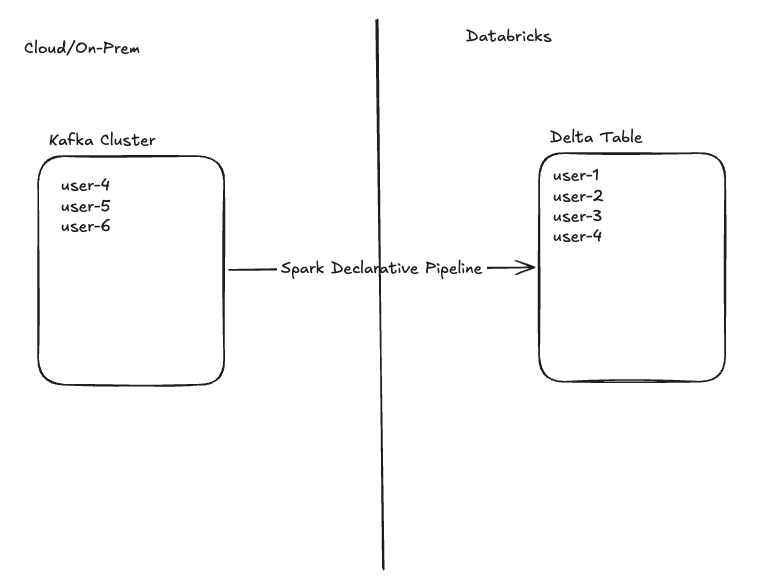
As new records are constantly being appended to this topic, how can I update my pipeline and alter my result table without missing new records (users 5, 6, etc), dropping old records (users 1, 2, and 3), or duplicating records (user-4)? The following example has been fabricated to show the solution. The actual reason for implementing this will vary by use-case.
Example: Ingesting JSON via Kafka
Imagine a pipeline is ingesting JSON data from Kafka. This JSON data contains three high-level fields: name, country, and email. It also contains two nested fields “event” and “device” which contain information about what actions users are taking from which devices.
{”user”:”user-2”,”email”:”user-2@example.com”,
“country”:”CA”,
“device”:{”os”:”android”,”model”:”Pixel 7”,”geo”:{”lat”:39.98,”lon”:-82.98}},
“event”:{”name”:”demo”,”seq”:2,”ts”:”2026-02-17T14:40:26.189Z”}}
This data is being written to a json_bronze table, and is storing the user, email, and country fields as String and the nested fields as Struct types. It also adds Kafka metadata fields.
import dlt
from pyspark.sql.functions import current_timestamp, col, from_json, expr

SERVERS = "REDACTED"
TOPIC = “neil_struct_topic”

# Explicit JSON schema for predictable demos (no schemaLocationKey)
SCHEMA_DDL = “”“
  user STRING,
  email STRING,
  country STRING,
  device STRUCT<os: STRING, model: STRING, geo: STRUCT<lat: DOUBLE, lon: DOUBLE>>,
  event STRUCT<name: STRING, seq: BIGINT, ts: STRING>
“”“

@dlt.table(
    name=”json_bronze”,
    comment=”Raw Kafka payload with explicit JSON schema and rescued data”,
    table_properties={”quality”: “bronze”}
)
def json_bronze():
    df = (
        spark.readStream
            .format(”kafka”)
            .option(”kafka.bootstrap.servers”, SERVERS)
            .option(”kafka.security.protocol”, “SSL”)
            .option(”subscribe”, TOPIC)
            .option(”startingOffsets”, “earliest”)
            .load()
    )

    parsed = (
        df.selectExpr(”CAST(value AS STRING) AS json_str”, “topic”, “partition”, “offset”, “timestamp”)
          .select(
              from_json(
                  col(”json_str”),
                  SCHEMA_DDL,
                  options={”rescuedDataColumn”: “_rescued_data”}  # capture type mismatches/new fields
              ).alias(”data”),
              “topic”, “partition”, “offset”, “timestamp”
          )
          # data.* includes _rescued_data already; do not reselect it to avoid duplicate column error
          .selectExpr(”data.*”, “topic”, “partition”, “offset”, “timestamp AS kafka_timestamp”)
          .withColumn(”ingestion_ts”, current_timestamp())
    )

    return parsed
Below is the current state of our target table. This matches the state of the diagram above. Users 1 through 4 have been ingested into the target Delta table.
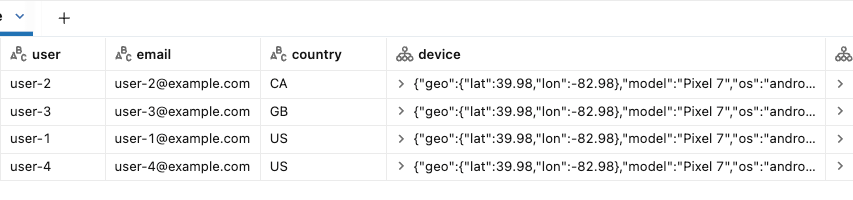
Now let’s imagine the nature of our topic changes and the device and event fields need to become flexible, allowing for new nested fields to be added anytime and reflected in our target. In the current implementation, these new fields would not appear automatically in our Struct columns.
One way to allow for flexibility of these nested columns is to update the Struct columns to Variant type. As mentioned above, however, Alter Table is unavailable on a streaming table to update column types. Here’s how to accomplish a streaming table update while ensuring there is no data-loss or duplication.
Step 1: Pause your pipeline
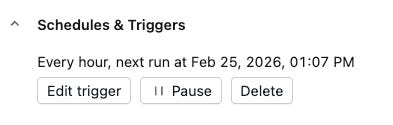
Whether your pipeline is continuous or scheduled to run periodically, you don’t want to be ingesting data while performing these actions.
Under the scheduled Job:
Step 2: Backup Bronze Table
This retains all data we’ve already ingested (users 1-4), including data that no longer exists in our Kafka topic (users 1-3). We’ve now ensured we won’t lose records that have aged out of the source.
CREATE TABLE neil_test_catalog.streaming.json_bronze_backup
SELECT * FROM neil_test_catalog.streaming.json_bronze;
Step 3: Determine Max Offset per Partition
At this point, Kafka has continued to receive new records behind the scenes (user-5 and user-6). We want to ensure that when we Full Refresh our pipeline, we read only these new messages without reprocessing data (user-4). This is achieved by making use of Spark’s readStream startingOffsets parameter.
This parameter allows you to specify which offsets Spark should begin reading data from, the first time a pipeline runs. Keep in mind that in Kafka, offsets are integers that uniquely identify messages per partition, so you’ll have to specify a starting offset for each partition in your topic. SDP uses these offsets to ensure that upon initial startup, the pipeline begins exactly where you intend. From that point forward, Spark continuously records these offsets in its internal checkpoints to track progress over time and guarantee exactly-once processing. It’s also a good idea to store this Kafka metadata in the Delta table itself.
Here’s the same snapshot of our source topic and target Delta table, with offset information included:
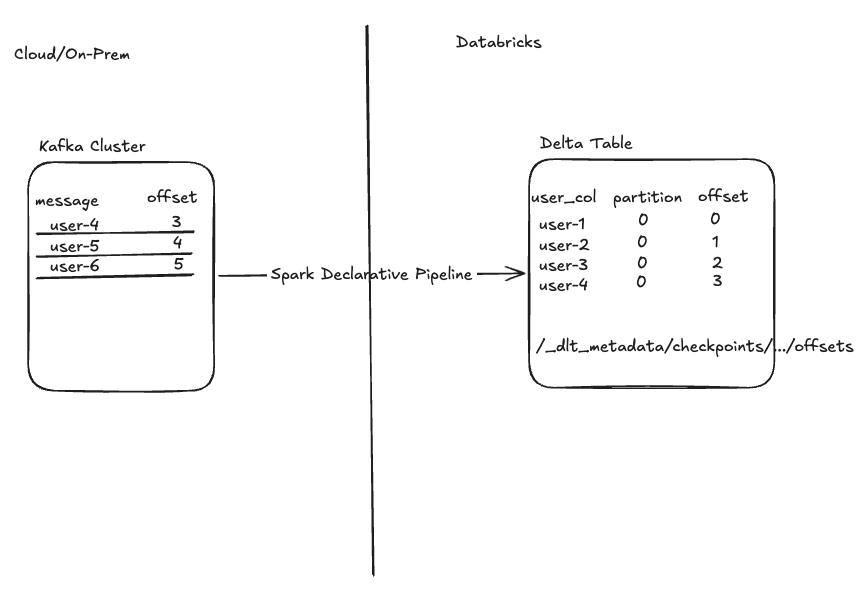
Notice that to begin processing at user-5 we will need to specify our pipeline start at offset 4. The startingOffsets parameter expects this information in the following format:
.option(”startingOffsets”, ‘{”neil_struct_topic”:{”0”:4}}’)If our topic contained multiple partitions, starting offsets must be set for each partition and would look like this for two partitions:
.option(”startingOffsets”, ‘{”neil_struct_topic”:{”0”:4, “1”:6}}’)
But how can we find this information?
Finding via Metadata Columns (If Defined in Pipeline and Tracked in Delta Table)
If you’ve added Kafka metadata to your bronze table, you can retrieve your max offset per partition there. Remember that for this simple example we only have one Kafka partition. If using this method it’s important to note that these results show the most recent offset ingested, and +1 must be added to specify where Spark should start reading.
SELECT partition, MAX(offset)
FROM neil_test_catalog.streaming.json_bronze
GROUP BY partition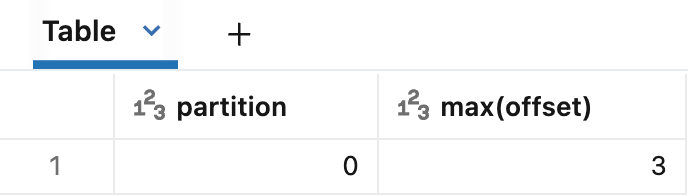
Finding via Spark Declarative Pipelines Checkpoints
Another way to retrieve your offset information is to query SDP’s /checkpoints/ folder that your pipeline uses to track state and progress. For more detailed information on checkpoints and how Spark Structured Streaming achieves exactly-once processing, check out this blog: Inside Delta Lake’s Idempotency Magic: The Secret to Exactly-Once Spark.
First, find your streaming table’s storage location via DESCRIBE DETAIL.
Note: If your table is Unity Catalog-managed, this method requires direct read access to the table’s managed storage location.
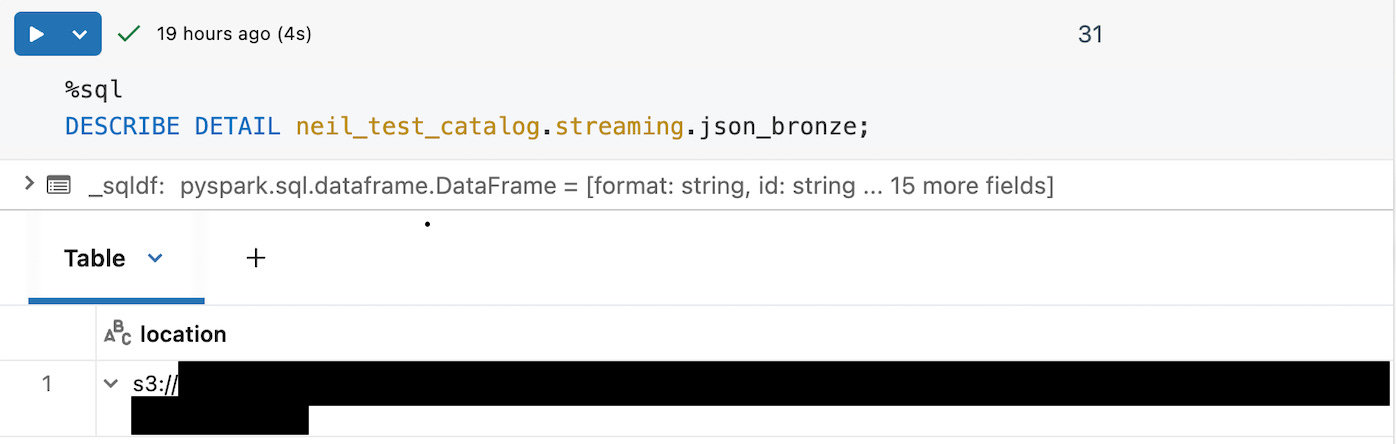
Using the location, you can append “/_dlt_metadata/checkpoints/your_table_name/” to find the most recent streaming query context (the greatest number). For this streaming table the max result is 8 as shown below.
path = “s3://....”
metadata_path = path + “/_dlt_metadata/checkpoints/neil_test_catalog.streaming.json_bronze/”
display(dbutils.fs.ls(metadata_path))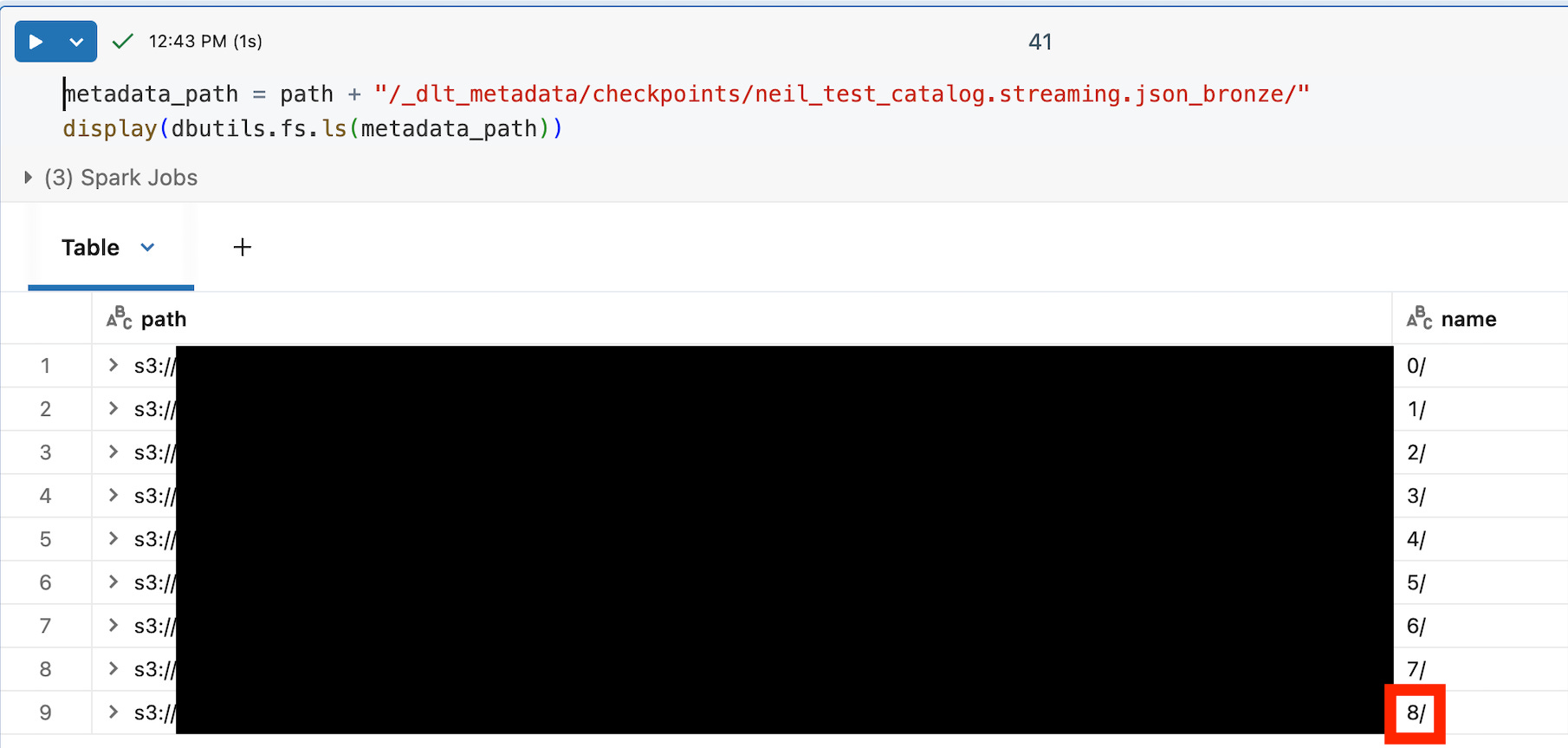
Within the numbered subfolder under your table name, you will see /offsets/ and /commits/ folders, each also containing numbered folders 0/, 1/, 2/ and so on. These folders represent streaming batches in SDP.
offsets/Nis a write‑ahead log entry written before processing batch N. It stores the end offsets (high‑water mark) for that batch — i.e., “read up to here” for each topic/partition.commits/Nis only written after batch N has finished successfully.
Because an offsets/N entry can exist even if its corresponding commits/N is missing (a batch started but never committed), you should follow these steps to determine where to retrieve your startingOffsets.
List the batch IDs in both folders:
offsets_path = path + "/_dlt_metadata/checkpoints/your_table_name/8/offsets/"
commits_path = path + "/_dlt_metadata/checkpoints/your_table_name/8/commits/"
display(dbutils.fs.ls(offsets_path))
display(dbutils.fs.ls(commits_path))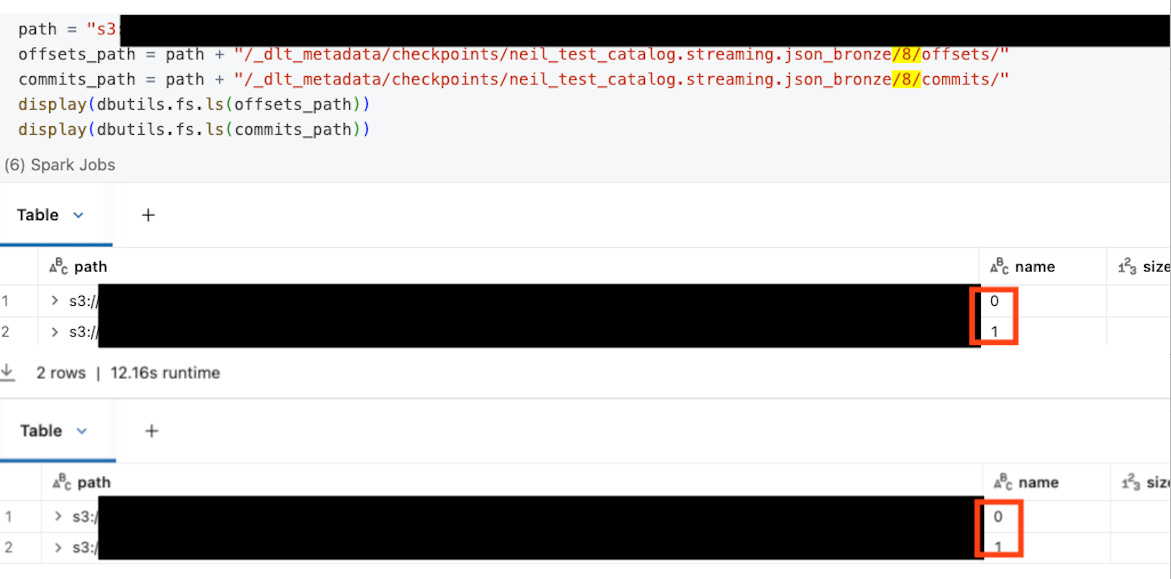
Let:
commit_batches= all numeric batch IDs undercommits/max_commit_batch= largest value incommit_batches
Use max_commit_batch as the last fully committed batch, and read the matching offsets file:
Always read offsets/max_commit_batch to get the correct startingOffsets JSON.
Ignore any higher batch ID that appears only under offsets/ but not commits/. That batch started but never finished, so if you treat its offsets as your starting position, Spark will behave as if that data has already been read and will skip it rather than processing it.
In my example, both the /offsets/ and /commits/ folders contain only batches 0 and 1, so using max_commit_batch, we read startingOffsets from /offsets/1.
metadata_path = path + “/_dlt_metadata/checkpoints/neil_test_catalog.streaming.json_bronze/8/offsets/1/”
display(dbutils.fs.head(metadata_path))
{”batchWatermarkMs”:0,”batchTimestampMs”:1771439553201,”conf”:{...}}
{”neil_struct_topic”:{”0”:4}}Notice the final line is our starting partition:offset information in the exact format we created manually above. Spark tracks the next offset to read, so you do not need to increment +1 via this method. Again, if our topic had multiple partitions it might look like:
{”neil_struct_topic”:{”0”:4, “1”:6}}Step 4: Update pipeline definition
Now it’s time to apply the actual logic changes that prompted this process. For my example, I add variant support to table properties:
table_properties={”quality”: “bronze”, “delta.feature.variantType-preview”: “supported”}And cast the Struct columns to Variant:
return (
        parsed
            .withColumn(”event”, expr(”parse_json(to_json(event))”))
            .withColumn(”device”, expr(”parse_json(to_json(device))”))
        )
Step 5: Full Refresh Table
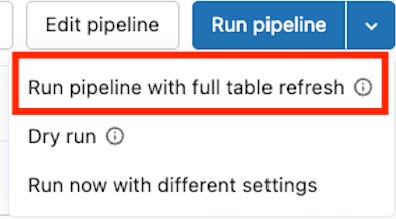
With pipeline logic updated, it’s time to run with Full refresh to wipe the target table and ingest the new Kafka records starting at our specified offsets. The resulting table will contain only the records we did not back up via Step 2.
To do this, we run our pipeline with full refresh after adding our startingOffsets (line 28). Here is the final pipeline definition.
.option(”startingOffsets”, ‘{”neil_struct_topic”:{”0”:4}}’)import dlt
from pyspark.sql.functions import current_timestamp, col, from_json, expr
SERVERS = “REDACTED”
TOPIC = “neil_struct_topic”
# Explicit JSON schema for predictable demos (no schemaLocationKey)
SCHEMA_DDL = “”“
user STRING,
email STRING,
country STRING,
device STRUCT<os: STRING, model: STRING, geo: STRUCT<lat: DOUBLE, lon: DOUBLE>>,
event STRUCT<name: STRING, seq: BIGINT, ts: STRING>
“”“
@dlt.table(
name=”json_bronze”,
comment=”Raw Kafka payload with explicit JSON schema and rescued data”,
table_properties={”quality”: “bronze”, “delta.feature.variantType-preview”: “supported”}
)
def json_bronze():
df = (
spark.readStream
.format(”kafka”)
.option(”kafka.bootstrap.servers”, SERVERS)
.option(”kafka.security.protocol”, “SSL”)
.option(”subscribe”, TOPIC)
.option(”startingOffsets”, ‘{”neil_struct_topic”:{”0”:4}}’)
.load()
)
parsed = (
df.selectExpr(”CAST(value AS STRING) AS json_str”, “topic”, “partition”, “offset”, “timestamp”)
.select(
from_json(
col(”json_str”),
SCHEMA_DDL,
options={”rescuedDataColumn”: “_rescued_data”} # capture type mismatches/new fields
).alias(”data”),
“topic”, “partition”, “offset”, “timestamp”
)
# data.* includes _rescued_data already; do not reselect it to avoid duplicate column error
.selectExpr(”data.*”, “topic”, “partition”, “offset”, “timestamp AS kafka_timestamp”)
.withColumn(”ingestion_ts”, current_timestamp())
)
return (
parsed
.withColumn(”event”, expr(”parse_json(to_json(event))”))
.withColumn(”device”, expr(”parse_json(to_json(device))”))
)On the pipeline page:
Here’s the result: user-5 and user-6 as expected:

Step 6: Insert Historical Records
To complete our intended result table, insert historical data from the backup table, ensuring the data matches the new table format (cast columns, etc.):
INSERT INTO neil_test_catalog.streaming.json_bronze
SELECT user, email, country, to_variant_object(device), to_variant_object(event), _rescued_data, topic, partition, offset, kafka_timestamp, ingestion_ts
FROM neil_test_catalog.streaming.json_bronze_backup
Our final result. Your pipeline may be resumed.
user:string
email:string
country:string
device:variant
event:variant
_rescued_data:string
topic:string
partition:integer
offset:long
kafka_timestamp:timestamp
ingestion_ts:timestamp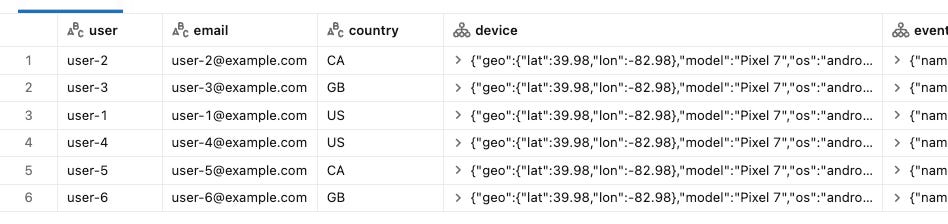
Step 7: Revert startingOffsets
To avoid pipeline failures in the case of a future Full Refresh, revert startingOffsets to its prior value.
.option(”startingOffsets”, “earliest”)Frequently Asked Questions
Q: Why can’t I just run a standard Full Refresh on the pipeline?
A: A Full Refresh clears the target table and re-reads the source from the beginning. If your Kafka topic has a retention policy (TTL), data that has "aged out" of the topic will be permanently lost because it no longer exists in the source to be re-read.
Q: Why is startingOffsets necessary if I have a backup?
A: While the backup saves your history, startingOffsets ensures your pipeline resumes reading exactly where the backup stopped. Without this explicit instruction, the pipeline might default to "earliest" (reading only what remains in Kafka, creating a gap) or "latest" (skipping data that arrived during the maintenance window).
Q: Is this process required for "Append-Only" tables?
A: Generally, yes, if you need to restructure the existing table. If you are only adding new columns that are nullable, you might rely on schema evolution, but fundamental type changes usually require the table to be rewritten.